

CPU vs GPU – Expert PC Gaming Setup 💻, Bottleneck Fix
CPU vs GPU: A very common question that comes to our minds that do we need a high end CPU or GPU to set up my PC for gaming. Mostly when you pair a midrange CPU with a high end GPU that is tailored properly, you can create a well balanced system for good gaming experience. But it also depends on what type of games you play on your system.
Modern games have your graphics card sweating to produce lifelike visuals. So gamers prioritize a high-end GPU to handle the intense graphics. That said, this doesn’t mean the CPU is unimportant. Still, a compatible CPU is a much-needed candidate to manage game logic and for stable performance.
If we blindly pair a powerful GPU with low end CPU you may experience CPU bottleneck that will cause disturbance and waste your precious gaming hours. For certain games like Open world, Strategy or some multiplayer games, you should team up a normal CPU with a high end GPU for smooth gaming experience. But if you are still confused why your game lag, or get no clue about how to pick parts for your PC Build keep reading below:
In the last part of FAQs, we have tried to address the common questions and provide all the information you need to make informed decisions.
Why the High-End GPU Matters Most for Gaming
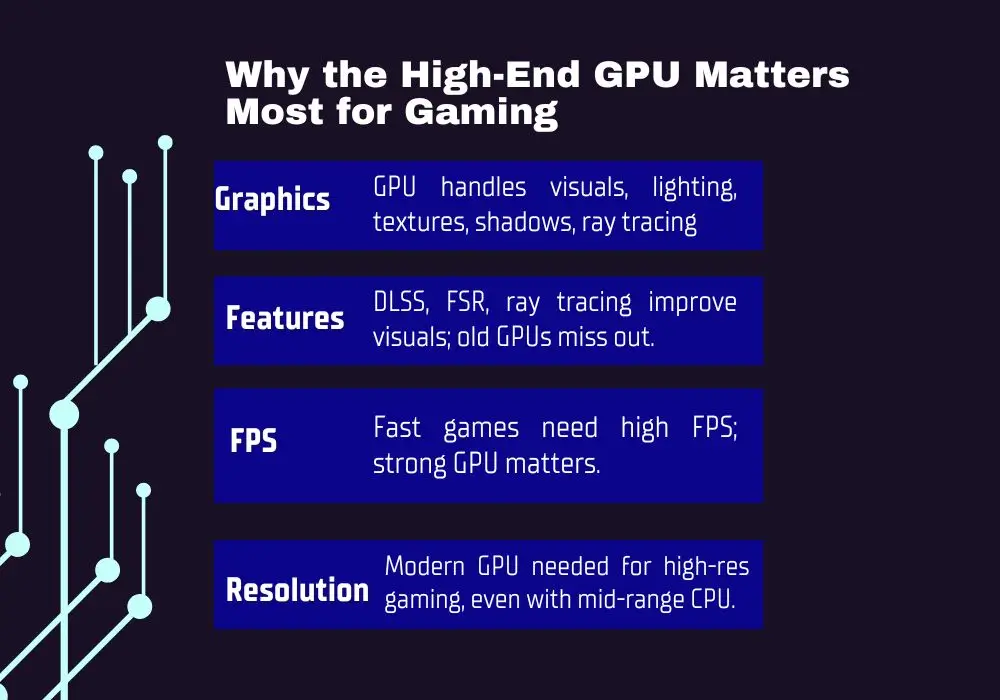
The GPU is the heart of your gaming rig. This part is responsible for producing lifelike visuals and running your game like butter. Modern games lean hard on the GPU to handle all graphics-heavy tasks. Here’s why the GPU usually steals the spotlight.
Graphics Rendering
Graphics rendering covers all the basic tasks that your system’s GPU handles. This includes building up the images, lighting, textures, shadows, and those crazy effects like ray tracing. For crazy resolution settings, say 1440p or 4K, that most of us want to play our games at, it’s the GPU that actually works overtime to pump out the lifelike visuals that make your screen look insane.
Frame Rates
Who wants to play a fast-action game at unplayable 30 FPS? Not me. Everyone wants that high-frame gameplay with an FPS, like 100 or more. That’s what modern games are built for. You can’t increase those frames without a solid GPU. Let’s say if you have an NVIDIA RTX 3060, then it can’t run heavy hitters like Cyberpunk 2077 as chill as an RTX 4080 does.
Advanced Features
In modern games, DLSS, FSR, and ray tracing are the real deal to look them fire. DLSS and FSR use AI tricks to refine the visuals for magical gameplay. Ray tracing refines it even more with crazy-real lighting, reflections, and shadows. These advanced features make you feel your gaming world alive. But you need a modern GPU to flex these features. If your rig’s running an older card, you will miss out on all that next-level eye candy.
Resolution Support
To play at high resolution without lowering the graphics, a powerful graphics card is a must. With a modern card, you can play solo or GPU-hungry games even with a mid-range CPU.
“But don’t ignore the CPU. It still pulls weight. But when? Let’s check.”
When the High-End CPU Matters More
The GPU might be the king of visuals, but who’s the one who prepares the to-do list for the GPU? That’s the CPU. From game logic to AI, physics, and all the behind-the-scenes tasks, the CPU runs the show and tells the GPU what to render. Basically, it’s the brain that makes sure that everything is in order before the GPU brings it to your screen. In some cases, you can’t help except upgrade your CPU first. Let’s check out when that actually matters.
Low-Resolution, High-FPS Gaming
At 1080p with high refresh rates, like 144Hz or above, your CPU can start to choke things up. Games like Valorant or CS: GO love fast CPUs with solid single-thread performance and high core clock. At this setting, a resolution bottleneck is less of an issue, but the CPU can become the limiting factor.
CPU-Intensive Games
Some games go hard on physics and player interactions. These are called CPU-intensive games because the CPU has to struggle hard to handle all the complex calculations. The examples are Civilization VI, a strategy game, Cities: Skylines, a simulation game, or GTA V, an open-world game.
Gaming with Multitasking
If you don’t just play games alone and instead multitask, which is usually streaming in most cases, then you need a strong CPU with more threads and cores, like AMD Ryzen 7 7700 or Intel Core i7-13700, to handle the load well.
So above are the cases in which you can’t enjoy your game without upgrading your CPU first. If you try to play such titles with your low-end CPU, no matter you’ve upgraded your GPU to the best one, the GPU can’t utilize its power because your low-end CPU will not provide the GPU with the required data quickly. This is called CPU bottlenecking the GPU.
CPU vs GPU- How to Balance Both to Avoid CPU Bottlenecking the GPU
How to Avoid CPU Bottlenecking GPU
A truly balanced gaming system pairs a low-end new CPU or a high-end old CPU with a high-end GPU to avoid a CPU bottleneck.
So far, we have come to the point of understanding the deciding factors when choosing between a CPU and a GPU. These include:
1. Your gaming resolution,
2. Target frame rates,
3. Game type (like strategy or simulation), and
4. Any additional tasks you do while gaming.
To find out what is bottlenecking my PC, the first area to address is to check the CPU and GPU balance. Here’s a breakdown of how you can balance both CPU vs GPU in different situations.
1080p Esports Gaming (High FPS, 144Hz+)
- Priority
A high-clock CPU should be your priority, and pair it with a good mid-to-high tier GPU. Be aware that when playing with overclocking, CPU throttling can hit your system any time.
- Example Build
Ryzen 5/7, or an Intel i5/ i7, along with a GeForce RTX 4060 or 4070, or something similar.
- Why
At 1080p, the GPU pumps out frames nonstop. So the CPU must be powerful enough to keep feeding data to the GPU for competitive games like Fortnite or Overwatch 2.
1440p Gaming (Balanced Visuals and Performance)
- Priority
Both components should be compatible with each other. If you want more detailed visuals, then you can select a bit more powerful GPU than CPU.
- Example Build
You can match a Ryzen 5 7600X or an Intel Core i5-13600K with a graphics card like the NVIDIA RTX 4070 or AMD RX 7900 XT for a solid all-around setup.
- Why
1440p gaming stresses both components, but the GPU takes a bit more workload to render detailed visuals.
4K Gaming (Max Visual Fidelity)
- Priority
High-end GPU.
- Example Build
AMD Ryzen 5 5600X or Intel Core i5-12400 with an NVIDIA RTX 4080 or AMD RX 7900 XTX.
- Why
4K gaming drains the GPU for rendering high-resolution textures and effects. To avoid bottlenecks, go with a mid-range CPU in your setup.
Streaming and Content Creation
- Priority
Strong CPU with more cores/threads and a high-end GPU.
- Example Build
AMD Ryzen 7 7700 or Intel Core i7-13700 with an NVIDIA RTX 4070 Ti or AMD RX 7900 XT.
- Why
Streaming chews through CPU power for encoding, but if your GPU has NVIDIA’s NVENC, your GPU can take over the load to keep the gameplay slick.
Budget Builds
- Priority
Choose the best GPU within budget and pair it with a new mid-range CPU.
- Example Build
AMD Ryzen 5 5500 or Intel Core i3-12100F with an NVIDIA RTX 3060 or AMD RX 6700 XT.
- Why
A strong GPU makes your games pop with a visual treat. A mid-range CPU keeps the system from tripping over itself.
CPU vs GPU– Practical Tips for Choosing Components
Prioritize the GPU for Visuals
When your money is tight, then prioritize upgrading your GPU or buying a more powerful GPU than the CPU. For example, a high-end GPU with a mid-range CPU will be ok. A high-end GPU can handle demanding games for years.
Can’t decide between Nvidia vs AMD? Relax, both are strong. Go with the one that suits your needs without much draining your cash. Choosing the right GPU becomes even more important if you are deciding between DLSS vs FSR.
Avoid Extreme Imbalances
It means spending all of your money on purchasing a beast component, say a high-end GPU, and pairing it with a 10-year-old CPU; a total waste of your money. The wiser thing is that both components should be compatible; if one is high-end, then the other should be at least mid-range.
Match Generations
Go with the latest gears. Don’t mix old and new parts; use new-generation hardware like modern CPUs and GPUs because they stay compatible with new technologies for future games. For example, if you are comparing Ryzen 7 vs i5 then I recommend to choose newer generation to better fir your needs.
Use Bottleneck Calculator
You can use our PC bottleneck calculator to see how much work your current CPU and GPU are handling in your games. You can also find the optimal components for your setup by using the “Find Component” feature in our calculator.
Note: Note: If you’re wondering, are bottleneck calculators accurate? Check out How our PC Bottleneck Calculator Works and see how reliably it can give you results.
FAQs Related to CPU vs GPU
What is CPU bottlenecking the GPU?
We often hear this term from gamers when they complain about their system’s bad performance. This mostly happen if you use some incompatible CPU with some advanced graphic card, then the GPU will not be able to perform to its full capacity. Because when you play games that are graphic intensive, you need a powerful GPU. Most gamers upgrade their GPU, but a balanced CPU is also essential to give your powerful GPU good company and to provide it with a list of instructions continuously. Actually what happens is that the GPUs acts faster than the CPUs, so that is the reason that you face stuttering and poor performance.
If I overclock my old CPU will it prevent CPU bottlenecking the GPU?
If you overclock your old CPU, it may give you better speed as it do faster data rendering to GPU but still it cannot make a good solution of outdated CPU with advanced graphic card. Also you may observe system heating issues.
Which powerful component do I need at 4K??
The hard-working component for running games at 4K resolution is the GPU, so you need a powerful GPU that you can pair with a mid-range CPU for 4K gaming.
Can a low-end CPU make your games stutter?
Yes, your game may stutter if you have a low-end CPU, especially if you try to play CPU-intensive games or run other heavy applications in Chrome while gaming. Upgrading to a modern mid-range CPU can be a fix.
What is worth upgrading first, CPU or GPU?
If your CPU is years old, swap it out first. Don’t forget to upgrade the motherboard and RAM, too, to avoid nasty bottlenecks. Otherwise, throwing cash at a GPU is enough for the biggest jump in gaming performance.
Why is the GPU important in VR gaming?
In VR gaming, the GPU has to render two separate visuals, meaning two images, one for each eye. That means the GPU has to do the double job. Therefore, in such gaming, we need a powerful GPU.
Can software cause CPU bottlenecking?
Yes, badly optimized games or heavy background stuff like antivirus or browsers overload your CPU and hold back your GPU. Just tweak your settings or close unnecessary apps to lighten the load.
Final Words
So the conclusion is, while deciding CPU vs GPU, most gamers opt to upgrade or buy the most powerful GPU as they love to play with high-quality visuals, higher frame rates, and other advanced gaming effects. However, a balanced CPU is also essential to keep things running continuously without tripping your system. Chasing a powerful GPU alone while ignoring the CPU can backfire. A year-old CPU, paired with an old motherboard and RAM, will stop your GPU from going all out.


