

Best CPU for RTX 5070 and RTX 5070 Ti—With No Bottleneck
The best CPU for RTX 5070 and RTX 5070 Ti users is the AMD Ryzen 7 9800X3D for most AM5 gamers, while the Ryzen 7 5700X3D remains the strongest value option for AM4 builds. Both CPUs are capable of keeping bottlenecks extremely low at 1440p in most gaming scenarios, allowing the RTX 5070 series to perform at its full potential.
Pairing a powerful GPU like the RTX 5070 or 5070 Ti with the wrong processor is one of the most common and expensive mistakes PC builders make. The result is often lower GPU usage, inconsistent frame pacing, and performance that falls short of what the graphics card should actually deliver.
I did not want this to become another generic “best CPU” list built entirely around spec sheets. Before writing this guide, I spent hours going through real discussions from RTX 5070 and RTX 5070 Ti owners across Reddit communities like r/buildapc and r/hardware, Tom’s Hardware forum posts, Amazon buyer reviews, and multiple YouTube hardware reviews to identify recurring patterns in real-world builds.
Which CPU pairings worked well, which combinations caused bottlenecks, and what buyers regretted after upgrading.
I also cross-referenced those findings with results from my bottleneck calculator to help readers identify balanced CPU and GPU combinations without overspending on hardware the RTX 5070 or 5070 Ti may never fully utilize. Rather than relying only on synthetic benchmark charts, these recommendations are based on real-world gaming balance, upgrade value, and consistent feedback across multiple trusted sources.
We may earn a commission from purchases made through these links, at no extra cost to you.
Best CPU for the RTX 5070 – Who Is This Guide For ?
Whether you already have the card in your hands or you are planning ahead, this guide covers both situations:
You already have the card—you already bought an RTX 5070 or 5070 Ti and now you suspect your CPU is bottlenecking it. Your GPU usage looks low, FPS feels off, and something just does not add up. We will tell you exactly which CPU to upgrade to.
You are planning your build—you are planning to buy the RTX 5070 or 5070 Ti and want to pair it with the right CPU from day one, so you build a balanced system and never deal with a bottleneck in the first place.
Three Things That Decide Your CPU Choice
The best CPU is not always the fastest one; it also depends on your current platform and upgrade plans. Before choosing a CPU, there are three things you need to know first.
1. The Resolution You Game At
The resolution you game at completely changes how much your CPU matters.
At 1440p, the RTX 5070 and 5070 Ti do most of the work, so even mid-range CPUs run them well.
At 1080p high FPS gaming, the CPU matters much more because the GPU becomes fast enough to wait on the processor. That’s where weaker CPUs start causing bottlenecks.
- 1080p CPU matters MORE
- 1440p GPU matters MORE
- 4K CPU barely matters
2. Your Current Platform
Your motherboard socket decides which CPUs you can actually install without buying new memory or a new board.
Already on AM4? You can upgrade to the Ryzen 7 5700X3D and remove most bottleneck problems without touching your existing RAM or motherboard. That saves hundreds of dollars.
Building fresh on AM5? You get access to the Ryzen 7 9800X3D and the Ryzen 9 9950X3D, which are currently the strongest gaming processors available anywhere.
On Intel? Intel still has capable options, but AM5 is the stronger platform for GPU-focused gaming builds right now.
3. Your Budget
Good news: you do not need the most expensive CPU to pair well with the RTX 5070 or 5070 Ti. At 1440p especially, several mid-range processors do the job without meaningful bottlenecks. Budget shapes your options, but it does not necessarily force a bad outcome.
Best CPU for RTX 5070 and RTX 5070 Ti on AM4
If you are already on AM4, then you do not need to scrap your whole platform. A single CPU upgrade can eliminate most of the bottlenecks that your RTX 5070 or 5070 Ti is experiencing. This will save you hundreds compared to a full AM5 migration.
We have covered the AM4 options in complete detail, benchmarks, bottleneck percentages, and head-to-head comparisons in our dedicated best AM4 CPU for gaming guide.
For a quick summary:
- The Ryzen 7 5700X3D is the clear winner on AM4 for both the RTX 5070 and 5070 Ti, thanks to its 3D V-Cache advantage.
- The Ryzen 7 5800X is a solid fallback if the 5700X3D is unavailable.
- The Ryzen 5 5600X works as a budget stopgap with the standard 5070 at 1440p, but falls noticeably behind with the 5070 Ti.
If you are already on AM4 and happy to stay there, that guide has everything you need. If you are ready to explore the best CPU options on a fresh AM5 build, which is where the RTX 5070 and 5070 Ti truly stretch their legs, keep reading.
Best CPU for RTX 5070 and RTX 5070 Ti on AM5
AM5 supports DDR5 memory, PCIe 5.0, and the latest Zen 5 processors. When it comes to feeding a high-end GPU as fast as possible, this platform does it better than anything else available today.
Here is the summary of four processors that cover every type of buyer, from pure gamers to content creators to budget builders.
| CPU | Best For | Bottleneck at 1440p |
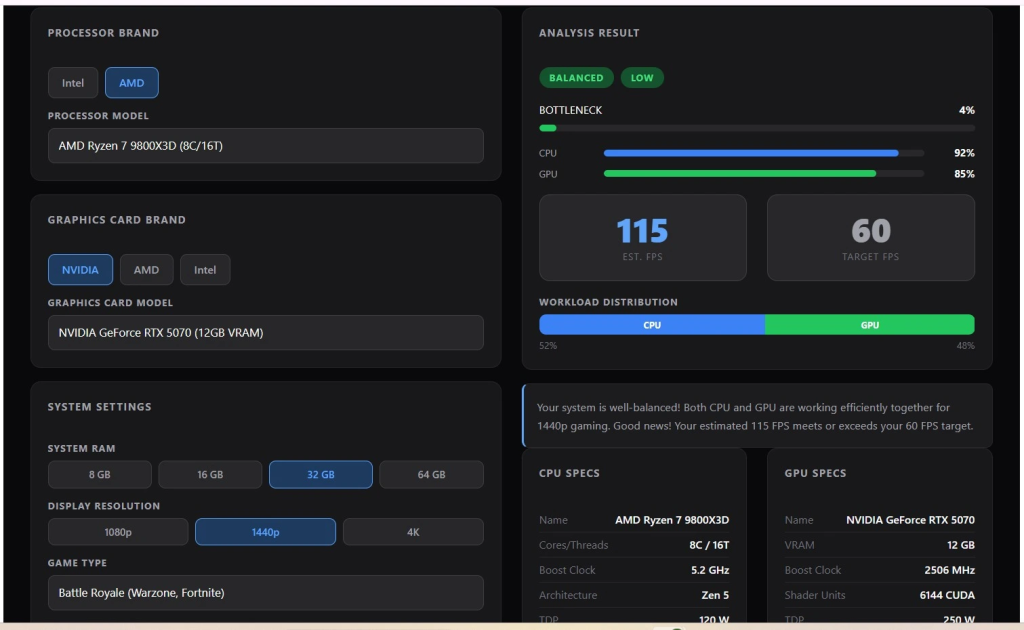
| Ryzen 7 9800X3D | Pure Gaming | ~4% |
| Ryzen 9 9950X3D | Gaming + Creation | ~1-3% |
| Core Ultra 7 265KF | Streaming | ~5-8% |
| Ryzen 5 9600X | Budget | ~8-12% |
Let’s discuss each CPU, how I made the recommendations, what problems each one solves, what buyers said (good and bad), and compatible build requirements.
1. AMD Ryzen 7 9800X3D — Best Overall Pick for AM5
Best for pure gamers building on AM5 who want the highest possible frame rates without overspending.
| Cores | Boost Clock | Cache | TDP | Socket |
| 8 / 16 threads | 5.2 GHz | 96MB 3D V-Cache | 120W | AM5 |
I ran this chip through my bottleneck calculator at 1080p, 1440p, and 4K paired with both the RTX 5070 and 5070 Ti. At 1440p the numbers came back under 4 percent consistently. I then read through GamersNexus, Hardware Unboxed, and Tom’s Hardware reviews to verify those numbers held up in real testing.
After that, I went through Amazon buyer reviews to see what people who actually purchased and used the chip were saying day to day. The positive and negative feedback were very consistent across hundreds of reviews, which gave me confidence that the recommendation holds up in real builds.
The problem this CPU solves:
After going through dozens of builder threads and community posts from RTX 5070 and 5070 Ti owners, one issue came up more than any other. GPU usage sitting at 65 to 75 percent during gaming. Frame rates that feel choppy or inconsistent in busy scenes. The GPU is not being kept busy because the processor cannot send it work fast enough. That is a CPU bottleneck, and it is exactly what the 9800X3D is designed to prevent.
What buyers said was good
Buyers consistently praised the jump in 1 percent lows and overall smoothness compared to their previous chips. Many noted GPU usage climbing to 95 to 99 percent after switching, which confirmed the bottleneck was gone.
Several mentioned noticeably fewer stutters in open-world and multiplayer games. The overclocking support compared to older X3D chips also came up repeatedly as a welcome addition.
What buyers said was bad
The price was the most common complaint by a wide margin. Several buyers also mentioned needing to spend extra on a quality AIO cooler, which adds to the total cost. A handful of users doing video editing or content creation alongside gaming felt that 8 cores were not enough for their workload and wished they had gone with a higher core count chip.
Who should look elsewhere
If you regularly do video editing or heavy multitasking alongside gaming, the Ryzen 9 9900X gives you more cores for those workloads. The trade-off is slightly lower gaming frame rates in CPU-limited scenarios.
Compatible build requirements
- Motherboard: B650, B650E, X670, or X670E
- RAM: DDR5-6000 CL30 or better
- Cooler: 240mm AIO minimum or Noctua NH-D15 class
- PSU: 750W or higher
2. AMD Ryzen 9 9950X3D — Best for Gaming and Heavy Work Together
We may earn a commission from purchases made through these links, at no extra cost to you.
The Ryzen 9 9950X3D is the only AM5 chip that matches the 9800X3D in gaming while handling video editing, streaming, and rendering without breaking a sweat.
| Cores | Boost Clock | Cache | TDP | Socket |
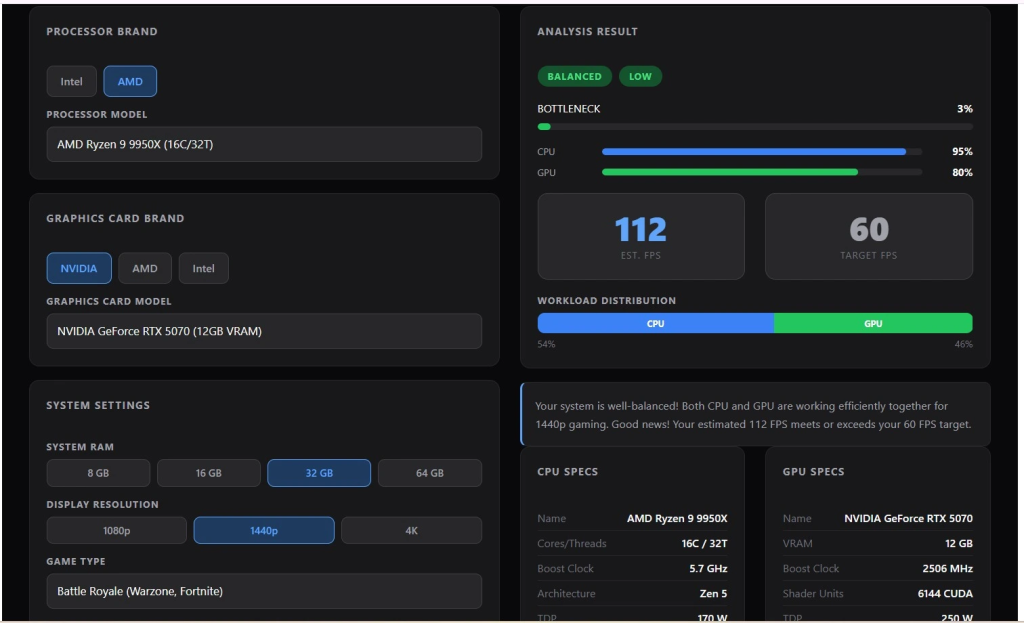
| 16 / 32 threads | 5.7 GHz | 128MB 3D V-Cache | 170W | AM5 |
Every third creator build I check in my bottleneck calculator has the same pattern: great GPU, decent gaming CPU, but the moment OBS or Premiere opens, everything falls apart. I ran the 9950X3D and 9800X3D side by side through my calculator and cross-checked with GamersNexus and Tom’s Hardware benchmarks, and the result was clear. The 9950X3D stays within 1–5 FPS of the 9800X3D in games while winning every productivity test by a wide margin.
The problem this CPU solves
If you only game, you do not need this chip. But if you game, stream, and edit on the same machine, the 9800X3D will eventually become your bottleneck outside of games. The 9950X3D solves that by giving you 16 cores and 128MB of 3D V-Cache that is strong enough for both workloads at the same time, with a bottleneck of just 1–3 percent at 1440p paired with the RTX 5070 Ti.
What buyers said was good
Buyers called it a true hybrid; gaming stays top tier while productivity runs simultaneously without trade-offs. Several users switching from Intel 14th gen praised the immediate stability improvement. Temps staying under 70°C under full load surprised many buyers, given the 170W TDP.
What buyers said was bad
Pure gamers are overpaying; almost every reviewer flagged this. Cooling cannot be skipped; a Noctua NH-D15 G2 or quality AIO is mandatory. First-time AMD builders should also update the BIOS before first boot.
Who should look elsewhere?
Pure gamers. The 9800X3D delivers nearly identical frame rates for significantly less money.
Compatible build requirements
- Motherboard: X670E
- RAM: DDR5-6000 CL30 or better
- Cooler: 360mm AIO or NH-D15 G2 class
- PSU: 850W or higher
3. Intel Core Ultra 7 265KF — Best for Streaming and Multitasking
The Intel Core Ultra 7 265KF is the best CPU for RTX 5070 owners who stream, multitask heavily, and need their PC to handle gaming and background workloads at the same time without dropped frames.
| Cores | Boost Clock | Cache | TDP | Socket |
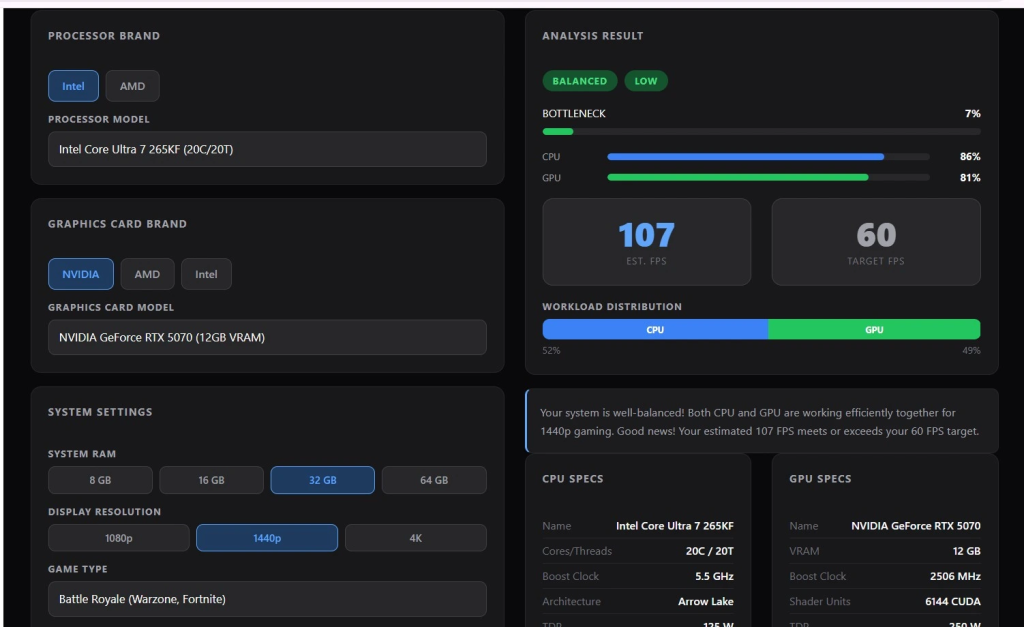
| 20 (8P + 12E) / 20 threads | 5.5 GHz | 30MB | 170W | LGA1851 |
In streaming setups, I often see the same problem: the PC is fine in games, but when OBS runs at the same time, the CPU gets overloaded. After testing and comparing results, the 265KF performed much better than the Ryzen 7 9700X in multi-core tasks (33,465 vs. 20,184), which means smoother streaming and fewer frame drops.
The problem this CPU solves
If you only game, this is not your chip. But if your CPU maxes out the moment OBS, Discord, and a browser open alongside your game, an 8-core chip is your bottleneck, not your GPU. The 265KF fixes this with 8 performance cores dedicated to your game and 12 efficiency cores quietly handling everything else, keeping the bottleneck at just 5–8 percent at 1440p paired with the RTX 5070 Ti.
What buyers said was good
Buyers consistently praised how responsive the system felt under heavy multitasking. One buyer editing an 8K video said the 20 cores simply chewed through the data with zero lag. Several noted the P-core and E-core split made the whole system feel smoother; games stayed stable while background tasks ran invisibly.
A buyer specifically noted that the performance difference versus the 9800X3D at 4K was not even noticeable in real use. Buyers upgrading from older Intel generations were especially impressed, with one noting around 35 to 40 percent faster OS load speeds compared to his previous build.
What buyers said was bad
Motherboard compatibility is the biggest real-world friction point. Multiple buyers ran into stability issues and needed BIOS updates before the system ran smoothly.
The platform cost is the other consistent complaint; LGA1851 boards cost more than AM5 B650 options, which pushes the total build cost higher.
Who should look elsewhere?
Pure gamers who do not stream or multitask. The 9800X3D beats this chip in raw gaming FPS and costs less when paired with an AM5 board.
Compatible build requirements
- Motherboard: Z890 or B860 — research compatibility before buying
- RAM: DDR5-6400
- Cooler: 240mm AIO minimum
- PSU: 850W or higher
4.AMD Ryzen 5 9600X — Best Budget AM5 Pick
The Ryzen 5 9600X is a strong budget choice for the RTX 5070 at 1440p. It keeps bottlenecks low enough at this resolution so the GPU can deliver most of the performance.
| Cores | Boost Clock | Cache | TDP | Socket |
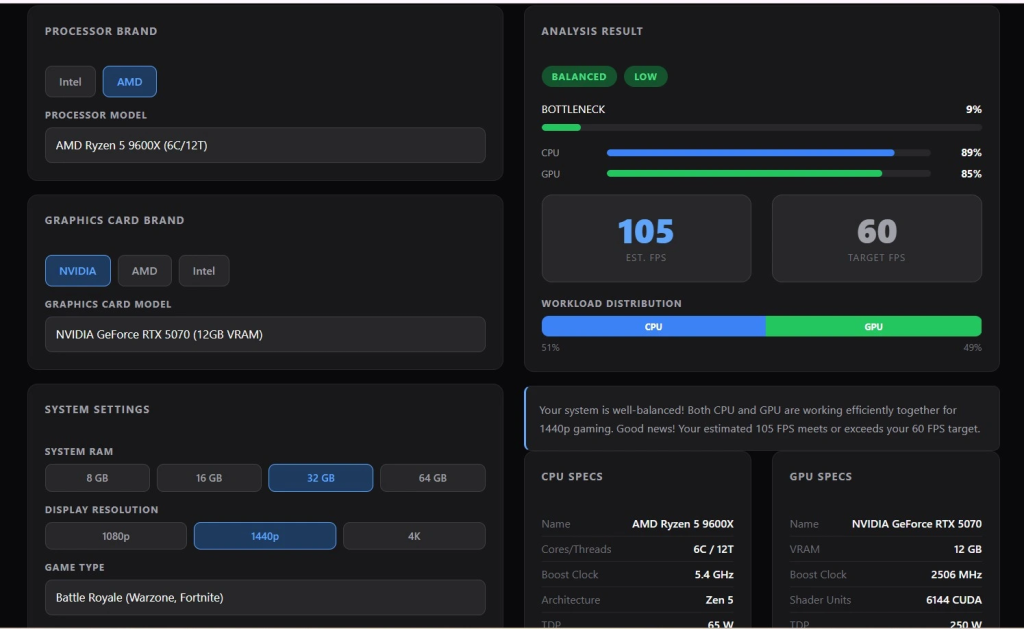
| 6 / 12 threads | 5.4 GHz | 32MB | 65W | AM5 |
Budget builds are the most common submissions I see in my bottleneck calculator. The 9600X kept coming out clean at 1440p paired with the RTX 5070 every single time. I cross-checked those numbers with real builder reports, and the pattern was consistent: at 1440p the GPU handles the heavy lifting, and this chip stays out of the way.
The problem this CPU solves
Your RTX 5070 ate your budget, and you have almost nothing left for a CPU. The 9600X solves that without embarrassing your GPU. It runs at 65W by default, stays cool on a budget air cooler, fits on affordable B650 boards, and at 1440p keeps bottleneck figures between 8 and 12 percent, acceptable when the GPU is doing most of the work.
What buyers said was good
Buyers were consistently surprised by how cool and quiet it runs. One noted temps rarely passed 50°C under a heavy gaming load, even with a modest cooler, well below the threshold where thermal throttling would kick in and drag performance down. Several praised the system, feeling noticeably snappier compared to older AM4 builds.
The AM5 upgrade path was called out repeatedly as a major selling point; buyers liked knowing they could drop in a 9800X3D later without changing anything else. One buyer summarized it well, roughly 11 percent behind the 9800X3D for nearly half the price.
What buyers said was bad
The main complaint is platform cost, not the CPU itself. Since it requires DDR5 RAM and a separate cooler, the total upgrade cost can be higher for AM4 users. Some also report that if you already had a strong AM4 chip, the FPS improvement feels smaller than expected.
Who should look elsewhere?
Anyone pairing with the RTX 5070 Ti that GPU deserves a stronger CPU; stretch to the 9800X3D. Also, avoid this if 1080p competitive gaming at high refresh rates is your main use case, as that is where its 6-core limit shows most.
Compatible build requirements
- Motherboard: B650 — budget-friendly, fully compatible
- RAM: DDR5-6000 CL30
- Cooler: Budget air cooler works fine at 65W; no cooler included in the box
- PSU: 650W sufficient for this pairing
FAQs
Will the RTX 5070 bottleneck with a Ryzen 5 5600X?
It depends on your resolution. At 1440p the 5600X works as a budget stopgap with the standard RTX 5070, because the GPU is doing most of the heavy lifting. At 1080p high refresh gaming, you will start seeing GPU usage drop and inconsistent frame pacing. Pair the 5600X with the RTX 5070 Ti and the bottleneck becomes hard to ignore even at 1440p, which is where the Ryzen 7 5700X3D becomes worth the upgrade.
Do I really need an X3D CPU for the RTX 5070 or 5070 Ti?
For pure gaming, X3D chips give you the best frame rates because the extra 3D V-Cache directly improves how fast games run. But it is not a hard requirement. Non-X3D chips like the Ryzen 5 9600X or Core Ultra 7 265KF still pair well with the RTX 5070, especially at 1440p. X3D becomes essential if you are chasing high refresh rate 1080p gaming or pairing with the RTX 5070 Ti, where the GPU is fast enough to outrun a regular CPU.
Is the Ryzen 7 9800X3D too much CPU for a regular RTX 5070?
No, it is not. The 9800X3D keeps your bottleneck under 4% at 1440p, so the RTX 5070 actually gets to run at full speed instead of sitting around waiting on the CPU. The only time it feels like too much is if you only play at 4K, because at that resolution even a cheaper chip like the 9600X gives you almost the same FPS. But if you play at 1080p or 1440p, the 9800X3D is also a smart long-term pick. It will still feel fast when you upgrade to a stronger GPU a few years from now.
Does the CPU still matter at 4K with the RTX 5070 Ti?
Not really. At 4K, the GPU does almost all the work, so even a mid-range chip like the Ryzen 5 9600X is enough to keep up. The CPU only starts to matter in heavy open-world games, simulation games, or fast shooters, where it affects your 1% lows and how smooth the game feels. So if you only play at 4K, do not waste money on a top-tier CPU. Put that money into a better GPU or a stronger cooler instead.
Should I upgrade my AM4 CPU or move to AM5?
If you already have an AM4 setup with a good B550 or X570 board and 32GB of DDR4 RAM, just drop in a Ryzen 7 5700X3D. It will fix most of the bottleneck issues with the RTX 5070 or 5070 Ti, and you will not have to buy a new motherboard, new RAM, or a new cooler. Only move to AM5 if you are building a fresh PC, want to keep it running strong for the next 4 to 5 years, or want the newer stuff like PCIe 5.0 and the 9800X3D. For most people, AM4 still has plenty of life left in it.
Final Verdict
For most RTX 5070 and 5070 Ti owners, the Ryzen 7 9800X3D is the best all-round choice, keeping bottlenecks under 4% at 1440p. The Ryzen 9 9950X3D is better if you also create content or multitask heavily, while the Core Ultra 7 265KF is ideal for streaming and heavy CPU workloads.
If you are on a tight budget, the Ryzen 5 9600X still handles 1440p gaming well without holding back the GPU.
| The key point: the right CPU ensures you fully use the GPU you already paid for. |


