Best 750W PSU in 2026-Top 5 PSUs Compared & Ranked
Looking for the Best 750W PSU for your gaming PC? This guide keeps things simple. A 750W power supply fits many mid-range and high-end builds, such as an RTX 5070 Ti or an RX 9070 XT. Below you will find the top picks, who each one is for, and clear answers to the questions most buyers ask.
Not sure 750W is right for your parts? Run your build through our PSU calculator first. Not sure which PSU is already in your PC? Read how to check what PSU you have. Want a wider view of all wattages? See our best PSU for gaming PC guide.
Table of Contents
Quick answer
Quick Answer
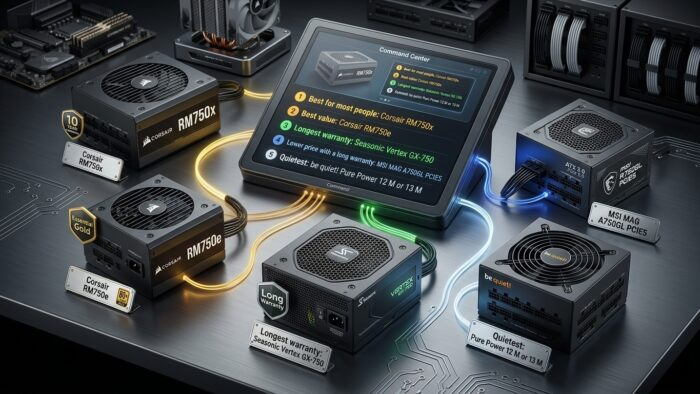
Best for most people: Corsair RM750x
Best value: Corsair RM750e
Longest warranty: Seasonic Vertex GX-750
Lower price with a long warranty: MSI MAG A750GL PCIE5
Quietest: be quiet! Pure Power 12 M or 13 M
All of these come from well-known brands and have independent reviews. Always check the exact version at checkout.
🏆 Top Picks at a Glance
We may earn a commission from purchases made through these links, at no extra cost to you.
How we picked these PSUs: We have not tested these units ourselves. These picks come from desk research, manufacturer specifications, professional reviews from trusted hardware sites, and real buyer reviews on retailers and forums. Prices and availability change, so always check the current listing before buying.
Is a 750W PSU enough for your graphics card?
These 750W PSUs are a perfect match for the RTX 5070 and RTX 5070 Ti. If you already own one of these cards, you’re all set. But if you’re buying a new RTX 5070 or 5070 Ti, check your CPU too — a weak processor will hold your new card back, and you won’t get its full benefit. Read our full guide to the best CPU for RTX 5070 and RTX 5070 Ti before you buy.
For many popular cards, yes. The table below shows what the card makers advise for the whole PC.
| Graphics card | Maker’s PSU advice | Is 750W enough? |
|---|---|---|
| RTX 5070 | 650W | Yes |
| RTX 5070 Ti | 750W | Yes |
| RX 9070 XT | 750W (AMD, reference card) | Yes, but read your card’s page |
| RTX 5080 | 850W | No. Choose 850W |
| RTX 5090 | 1000W | No. Choose 1000W |
These numbers are for the whole PC, not just the card. Some partner cards ask for more power than the reference card. Always read the product page of your exact model. Corsair’s RTX 50-series PSU guide lists the advised wattage for each NVIDIA card.
Building with an RTX 5080? Read our [best 850W PSU list](LINK: best 850W PSU). Building with an RTX 5090? Read our [best 1000W PSU list](LINK: best 1000W PSU).
How much power does your PC really use?
A simple way to estimate: add the power of your graphics card and your CPU, then add about 100W for the rest of the parts. The 100W is a rough guess for the motherboard, memory, drives and fans.
Here is an example. An RTX 5070 Ti is listed at about 300W. A Ryzen 7 9800X3D is listed at about 162W, according to Club386’s PSU guide. Add about 100W for the rest. The total is around 560W at a heavy load. A 750W PSU leaves room for short power spikes.
Two more facts that help:
- A 750W PSU does not use 750W all the time. It only gives your PC what the PC asks for.
- Your PC will not run at full power all day. Games, work and idle time all use different amounts.
For a more exact number for your own parts, use the PSU calculator.
What to check before you buy a 750W PSU
Size. Most PC cases take a standard ATX power supply. Small cases may need a smaller SFX unit. Check your case page first. If you have a small case, see our [best SFX PSU list](LINK: best SFX PSU).
ATX 3.1. This is the newest PSU standard. It is made to handle quick power spikes from modern graphics cards. For a new build, pick ATX 3.1 when the price is close.
12V-2×6 cable. This is the newer 16-pin power plug used by many graphics cards. If your card uses it, a cable that comes with the PSU is better than an adapter. Push the plug in all the way.
Efficiency. A more efficient PSU wastes less power as heat. 80 PLUS Gold is a good level for most builds.
Modular cables. A fully modular PSU lets you connect only the cables you need. This keeps the case tidy. Learn more in our guide on modular vs non-modular PSU.
Warranty. A longer warranty is a good sign. The picks below have 7 to 12 years.
Independent reviews. Choose models that trusted sites have tested, such as Club386. A spec sheet cannot show how steady the power is. For ranked results from independent lab tests, see our PSU tier list.
Right cables for your card. Count the 8-pin or 16-pin plugs your graphics card needs. Make sure the PSU has them.
Best 750W PSU Picks for 2026
These picks come from well-known brands. Each one has a native 12V-2×6 cable or the right plugs for modern cards. Prices change often, so compare them on the day you buy.
Best 750W PSU Overall: Corsair RM750x
This is the easy choice for most people. It follows ATX 3.1 and PCIe 5.1. It is fully modular and has a native 12V-2×6 cable. It has a Cybenetics Gold efficiency rating and a 10-year warranty. The fan stays off at low load, so it is quiet when you browse or do light work.
Good for: most RTX 5070 Ti, RTX 5070 and RX 9070 XT builds. Think about: it costs more than the RM750e.
Best Value: Corsair RM750e
This is the cheaper model in the same family. It keeps ATX 3.1, the native 12V-2×6 cable, Cybenetics Gold efficiency and the zero-RPM fan mode. The warranty is shorter at 7 years. Corsair itself names it as a good 750W match for the RX 9070 XT.
Good for: a mid-range build with a tight budget.
Longest Warranty: Seasonic Vertex GX-750
Seasonic builds its Vertex line to last. It comes with a 12-year warranty. It usually costs more than the Corsair models.
Good for: people who want to buy once and not think about it again.
Lower Price, Long Warranty: MSI MAG A750GL PCIE5
This unit is fully modular and 80 PLUS Gold. It follows ATX 3.1 and PCIe 5.1, has a native 12V-2×6 cable and a 10-year warranty. Many people buy it, so there is a lot of real-world feedback. The design is plain, but the main specs are right.
Good for: a first build or a lower budget.
Quietest: be quiet! Pure Power 12 M or 13 M
be quiet! is known for low noise. The Pure Power 12 M is 80 PLUS Gold, fully modular and has a 10-year warranty. The newer Pure Power 13 M follows ATX 3.1. Stores may sell either version, so check which one you are buying.
Good for: a desk setup where noise matters.
Quick comparison
| PSU | Standard | Efficiency | Warranty | Best for |
|---|---|---|---|---|
| Corsair RM750x | ATX 3.1 | Gold | 10 years | Most people |
| Corsair RM750e | ATX 3.1 | Gold | 7 years | Value |
| Seasonic Vertex GX-750 | ATX 3.1 | Gold | 12 years | Long use |
| MSI MAG A750GL PCIE5 | ATX 3.1 | Gold | 10 years | Lower price |
| be quiet! Pure Power 12 M / 13 M | Check version | Gold | 10 years | Quiet builds |
Which 750W PSU should you choose?
- Want one safe choice? Pick the Corsair RM750x.
- Want to spend less and still get ATX 3.1? Pick the Corsair RM750e or the MSI MAG A750GL.
- Want the longest warranty? Pick the Seasonic Vertex GX-750.
- Want a quiet PC? Pick the be quiet! Pure Power.
- Have a small case? Look at SFX units instead.
Gold or Platinum: which is better for a 750W PSU?
Gold is enough for most people. Platinum wastes a little less power, so it can run cooler and save a small amount on your power bill. The gain is small at this wattage. Pay more for Platinum only if the price gap is small or you want the quietest build.
Do you need ATX 3.1?
It is not a must, but it is a good idea for a new build. ATX 3.1 is the newer standard and is made for modern graphics cards. Older ATX 3.0 units can still work well. If both cost about the same, pick ATX 3.1.
FAQs
750W or 850W: which should you buy?
Pick 750W for an RTX 5070, RTX 5070 Ti or RX 9070 XT with a normal gaming CPU. Pick 850W if you have an RTX 5080, if you plan to overclock a lot, or if you want more room for later. The 850W units cost a bit more, but the gap is often small. See our [best 850W PSU list](LINK: best 850W PSU).
Can a 750W PSU run a strong gaming CPU?
Yes, in most cases. A gaming CPU such as the Ryzen 7 9800X3D is listed at about 162W. With an RTX 5070 Ti, the whole PC is still well below 750W at a heavy load. Very high-power CPUs and heavy overclocking use more. Check your parts in the PSU calculator.
Will 750W be enough if you upgrade your GPU later?
It depends on the new card. A move from an RTX 5070 to an RTX 5070 Ti is fine. A move to an RTX 5080 needs 850W by NVIDIA’s advice. A move to an RTX 5090 needs 1000W. If you plan to upgrade within a year or two, buy the bigger PSU now and save the cost of buying twice.
Is a cheap 750W PSU safe?
It can be risky. A weak PSU can give unsteady power, shut down your PC, and in bad cases damage other parts. Do not buy a no-name unit just because it is cheap. Pick a model with independent reviews and a real warranty. See our [best budget PSU list](LINK: best budget PSU) for safer low-price options.
How can you check what PSU you have now?
Open your case and look at the sticker on the side of the PSU. It shows the wattage and the model name. You can also read our guide on how to check what PSU you have.
What are the signs of a failing PSU?
Watch for random shutdowns, restarts when you play games, black screens under load, a burning smell, or strange fan noise. Other parts can cause these problems too, so test them as well. Read our PSU failing symptoms guide for a full list. Hot or melted cables are serious, so stop using the PC.
How long does a 750W PSU last?
There is no fixed number. A good PSU often lasts for many years, and the warranty is a fair guide. The picks above have 7 to 12 years. A warranty is a promise from the maker, not a guarantee that the unit will last that long. Replace a PSU if it shows signs of failing or if your next GPU needs more power.
Final checklist before you buy
- Check the power advice for your exact graphics card.
- Add up your parts, or use the PSU calculator.
- Make sure the PSU fits your case size.
- Choose ATX 3.1 and a native 12V-2×6 cable if your card needs one.
- Pick a model with independent reviews and a warranty of at least 7 years.
- Compare prices on the day you buy.