
PSU Calculator: What Wattage Power Supply Do You Need?
PSU Calculator
Pick your GPU and CPU to see the PSU wattage to buy
Power data last verified: October 2026. GPU and CPU wattages come from NVIDIA, AMD and Intel spec pages.
Power data last verified: October 2026. GPU and CPU wattages come from the official NVIDIA, AMD and Intel spec pages.
Updated October 2026
It is the final round. Your squad is down to two, the last enemy is one shot away, and then your screen goes black. The fans spin down, the lights fade, and a few seconds later the PC boots back up on its own as if nothing happened. Nothing is broken. Your new graphics card simply asked for a burst of power that your power supply could not deliver.
This happens to a lot of gamers right after a GPU upgrade, and it is completely avoidable. This free PSU calculator tells you exactly what wattage power supply to buy for your PC. Pick your graphics card and processor, and it adds their rated power, a fixed allowance for the rest of the system, and safe headroom on top. Every step of the math is shown, so you can check the result yourself instead of trusting a black box.
⚡ Quick answer
Most gaming PCs need a 650W to 850W power supply.
- 550W to 650W: budget builds with an RTX 5060 or RX 9060 XT
- 650W to 750W: mid-range builds with an RTX 5070 or RX 9070
- 750W to 850W: high-end cards like the RTX 5080 or RX 9070 XT
- 1000W or more: flagship RTX 5090 builds
Use the PSU calculator below for the exact number for your parts.
How the PSU calculator works
The PSU calculator uses a simple, open formula. There are no hidden adjustments, so you can repeat the math on paper.
- GPU board power from the NVIDIA or AMD spec page for your card.
- CPU TDP from the AMD spec page, or Intel’s processor base power from Intel’s spec page.
- 100W system allowance for the motherboard, RAM, storage, fans and cooling. This is a plain allowance, not a measured figure.
- x 1.4 headroom for short power spikes and future upgrades, then rounded up to the next standard PSU size: 450, 550, 650, 750, 850, 1000, 1200 or 1600W.
- Overclocking adds 10 percent more, as a rough estimate.
The PSU calculator formula
(GPU + CPU + 100W) x 1.4
Round up to the next standard PSU size. Add 10 percent if you overclock.
The result is the PSU capacity to buy, not your PC’s actual power draw. If NVIDIA or AMD lists a higher minimum PSU for your graphics card, the PSU calculator tells you to use that number instead. Only GPUs and CPUs with power figures on a manufacturer spec page are in the lists, and new cards are added as soon as their specs are published. You can check the source figures yourself on the NVIDIA GeForce RTX 50 series page and the AMD Radeon graphics page.
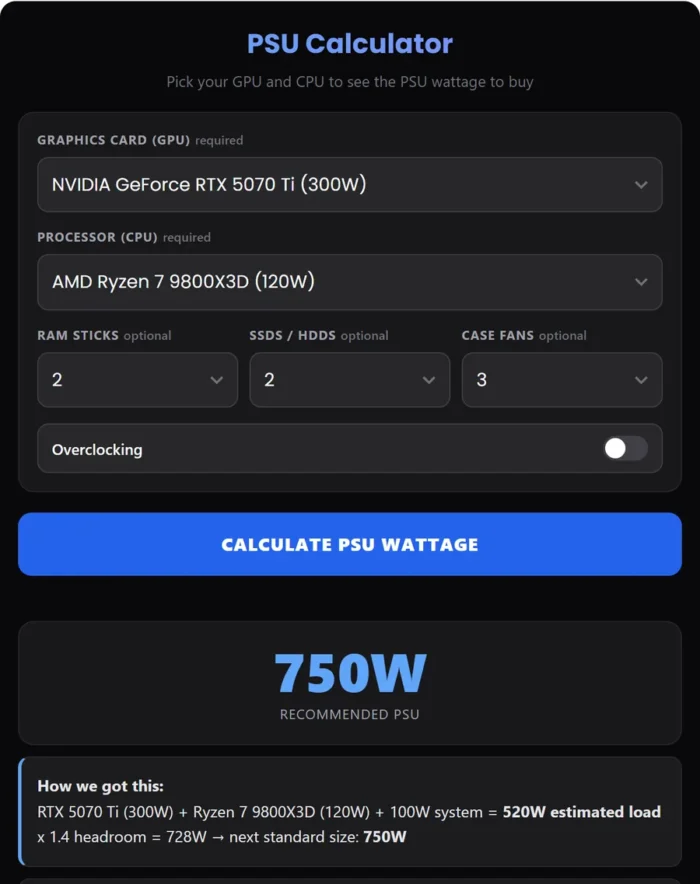
Worked example: RTX 5070 Ti with a Ryzen 7 9800X3D
Here is the same math the PSU calculator runs, done by hand for a popular 1440p gaming build.
- GPU board power: NVIDIA lists the RTX 5070 Ti at 300W.
- CPU TDP: AMD lists the Ryzen 7 9800X3D at 120W.
- System allowance: add 100W for the motherboard, RAM, storage, fans and cooler.
- Subtotal: 300 + 120 + 100 = 520W.
- Headroom: 520 x 1.4 = 728W.
- Round up: the next standard PSU size above 728W is 750W.
NVIDIA’s own minimum for the RTX 5070 Ti is also 750W, so the two numbers agree. If you plan to overclock, the extra 10 percent takes 728W to about 801W, and the recommendation moves up to 850W.
💡 Good to know
This PC will not actually pull 728W from the wall while gaming. That figure is the capacity to buy, so the PSU never runs near its limit, handles short power spikes, and leaves room for a future upgrade.
Recommended PSU wattage by graphics card
The graphics card is the biggest power user in almost every gaming PC, so it decides most of your PSU size. The table shows the board power and the manufacturer’s minimum PSU for current cards, plus what our PSU calculator gives with a typical CPU pairing.
| Graphics card | Board power | Maker’s minimum PSU | Typical CPU pairing | PSU calculator result |
|---|---|---|---|---|
| RTX 5090 | 575W | 1000W | Ryzen 7 9800X3D | 1200W |
| RTX 5080 | 360W | 850W | Ryzen 7 9800X3D | 850W |
| RTX 5070 Ti | 300W | 750W | Ryzen 7 9800X3D | 750W |
| RTX 5070 | 250W | 650W | Ryzen 5 9600X | 650W |
| RTX 5060 Ti | 180W | 600W | Ryzen 5 9600X | 550W (use 600W+) |
| RTX 5060 | 145W | 550W | Ryzen 5 9600X | 450W (use 550W+) |
| RX 9070 XT | 304W | 750W | Ryzen 7 9800X3D | 750W |
| RX 9070 | 220W | 650W | Ryzen 5 7600X | 650W |
| RX 9060 XT 16GB | 160W | 450W | Ryzen 5 9600X | 550W |
Two things stand out. First, for the RTX 5060 and 5060 Ti, NVIDIA’s minimum is higher than our formula, because NVIDIA bases its minimum on a PC with a Ryzen 9 9950X processor. In that case, go with NVIDIA’s number. Second, for the RTX 5090 our formula lands above NVIDIA’s 1000W. That is the 1.4 headroom at work on a 575W card. A quality 1000W unit runs a stock 5090 build, but 1200W gives more margin for spikes and a hungrier CPU.
Always check the product page of your exact card model too. Brands like ASUS, MSI and Sapphire sometimes raise power limits on premium models and list a bigger PSU to match.
🆕 What about the RTX 50 Super cards?
As of October 2026, NVIDIA has not announced them, and reports point to an early 2027 launch. Leaks suggest they will draw more power than the current models, so if you plan to buy one, leave an extra size of headroom. We will add them to the PSU calculator as soon as NVIDIA publishes official specs.
PSU wattage by build type
If you have not picked parts yet, these ranges are a good starting point. Come back to the PSU calculator once you know your exact GPU and CPU.
- Office or home PC with integrated graphics: 450W to 550W. Without a graphics card, even a fast CPU rarely needs more.
- Budget 1080p gaming (RTX 5060, RX 9060 XT class): 550W to 650W. Pick a unit with the 8-pin PCIe cables your card needs.
- Mid-range 1440p gaming (RTX 5070, RX 9070 class): 650W to 750W. A 750W unit leaves room for a later GPU upgrade.
- High-end 1440p and 4K (RTX 5070 Ti, RTX 5080, RX 9070 XT class): 750W to 850W. An ATX 3.1 unit with a native 16-pin cable is the clean choice for NVIDIA cards here.
- Flagship 4K and workstation (RTX 5090 class): 1000W to 1200W. Also check the power circuit at home, since these systems can pull a lot from a single wall socket.
Wattage is not everything: how to pick a good PSU
Two 750W power supplies can be very different products. Once the PSU calculator gives you a wattage, check these points before you buy.
Build quality and brand
The PSU feeds every other part in your PC, so a cheap no-name unit is a real risk. Buy from a known brand and look up a professional review of the exact model before buying. Many brands sell several product lines at the same wattage, and the budget line can use much cheaper parts than the premium one.
Efficiency rating
80 Plus Gold is the sweet spot for most gaming PCs. It wastes less power as heat than Bronze, so the fan spins slower and the unit runs quieter. Platinum and Titanium save a little more but cost noticeably more. You may also see a Cybenetics rating, which grades both efficiency and noise. It is a newer, stricter test and a useful second opinion next to the 80 Plus program.
ATX 3.1 and the right GPU cables
Count the power connectors on your graphics card before you buy. Most RTX 50 series cards from the 5070 up use a single 16-pin 12V-2×6 connector, while the RTX 5060, 5060 Ti and many Radeon cards use classic 8-pin PCIe plugs. An ATX 3.1 PSU with a native 16-pin cable avoids bulky adapters and is built to handle the short spikes of modern GPUs. Push the 16-pin plug in fully until it clicks, and avoid bending the cable sharply right at the connector.
Modular cables
A fully modular PSU lets you plug in only the cables you need, which makes building and cable management much easier. Semi-modular is a good middle ground.
⚠️ Never mix modular cables
Never reuse modular cables from a different PSU, even from the same brand. The pin layout on the PSU end is not standard, and the wrong cable can destroy your parts instantly.
Size and warranty
Standard ATX power supplies fit most cases. Small form factor cases need an SFX or SFX-L unit, so check your case manual. For warranty, 7 to 10 years on a quality unit is common, and a long warranty is a good sign the maker trusts its parts. A good PSU often outlives two or three graphics cards, so it is worth spending a little more here.
Power spikes: why the PSU calculator adds headroom
Modern graphics cards do not draw a steady amount of power. When a game scene changes suddenly, the card can jump well above its rated board power for a tiny fraction of a second. These are called transient spikes or power excursions. Most of the time a good PSU absorbs them without you noticing. An undersized or low quality PSU can see one of these spikes as an overload and trip its protection, which shuts the PC off instantly.
That is the main reason the PSU calculator multiplies by 1.4 instead of just adding up the parts. The headroom also keeps the PSU working in its most efficient range, which for most units is somewhere around half load, and it gives you room to drop in a stronger graphics card later without buying a new power supply.
A note on Intel processors
The PSU calculator uses Intel’s processor base power because that is the main figure on Intel’s spec page. Intel’s unlocked K series chips can draw a lot more than that under heavy all-core loads, up to the maximum turbo power Intel also lists. Gaming rarely pushes a CPU that hard, so for a gaming PC the estimate holds up well. If you also render video, compile code or run other all-core workloads on a K series Intel chip, move up one PSU size.
PSU calculator result vs real power draw
The PSU calculator tells you what to buy. If you want to see what your current PC actually uses, there are two easy ways.
- Software sensors: tools like HWiNFO64 show live GPU and CPU power while you game. Run a demanding game for 15 to 20 minutes and check the maximum values. Our HWiNFO64 guide shows where to find these readings.
- Wall power meter: a cheap plug-in watt meter shows the whole system draw from the socket. This number includes PSU losses, so it reads a bit higher than what the parts actually use.
Software readings cover only the GPU and CPU and update a few times per second, so they miss the very short spikes. Treat them as a sanity check, not a reason to buy a smaller PSU than the calculator suggests.
Upgrading your graphics card? Check your PSU first
A new GPU is the most common reason people outgrow their power supply. Before you order the card, run through this quick check:
- Find your current PSU’s wattage and model on the label on its side.
- Enter the new GPU and your CPU in the PSU calculator above and compare.
- Check that your PSU has the power cables the new card needs, either a native 16-pin cable or enough separate 8-pin PCIe cables.
- If your PSU is more than 7 or 8 years old or was a budget unit, consider replacing it with the GPU even if the wattage is enough.
- Check that your CPU can keep up with the new card using our PC bottleneck calculator.
Common PSU mistakes to avoid
- Adding up parts with no headroom. A PSU sized to the exact total runs at its limit, gets hot and loud, and can shut down on a power spike.
- Trusting the wattage on a no-name box. Cheap units often cannot deliver their label rating for long. A quality 650W beats a junk 850W.
- Using adapters instead of proper cables. Splitting one 8-pin cable into two, or chaining adapters for a 16-pin card, puts extra load on a single cable. Use separate cables from the PSU.
- Keeping an old PSU through every upgrade. A ten year old unit may have the wattage on paper but not the modern cables or the spike handling a new GPU needs.
- Buying far too big. A 1600W unit for a 500W system costs more and runs less efficiently at light load. One size up is plenty.
PSU calculator FAQ
How does the PSU calculator work out the wattage?
It adds the GPU board power and the CPU TDP from the NVIDIA, AMD and Intel spec pages, plus a fixed 100W allowance for the motherboard, RAM, storage, fans and cooling. That total is multiplied by 1.4 for headroom and rounded up to the next standard PSU size. If NVIDIA or AMD lists a higher minimum PSU for your GPU, the PSU calculator tells you to use that number instead.
Is the result my PC’s actual power draw?
No. It is the PSU capacity we suggest you buy, not a measurement of your PC. Real power draw changes from moment to moment and is usually below the rated figures. The extra headroom covers short power spikes and future upgrades.
Does overclocking change the recommendation?
Yes. Overclocking raises power use, so the overclocking switch adds a further 10 percent on top of the headroom. That 10 percent is a rough allowance, not a measured figure. A heavy overclock can need more.
Is 650W enough for an RTX 5070?
Yes, for most builds. NVIDIA lists 650W as the minimum for the RTX 5070, and with a mid-range CPU like the Ryzen 5 9600X the PSU calculator also lands at 650W. If you pair it with a high-end CPU or plan a bigger GPU later, 750W gives more room.
Is 750W enough for an RX 9070 XT?
Yes. AMD lists 750W as the minimum for the RX 9070 XT, and our formula gives 750W even with a Ryzen 7 9800X3D. Some factory overclocked partner cards list 850W on their own product page, so check your exact model.
Is 850W enough for an RTX 5080?
Yes. 850W is NVIDIA’s minimum for the RTX 5080 and matches our formula with a Ryzen 7 9800X3D. With a power hungry Intel K series CPU or an overclock, step up to 1000W.
What do 80 Plus ratings mean?
80 Plus is an efficiency certification. A more efficient PSU turns less power into heat. The levels run from standard 80 Plus through Bronze, Silver, Gold and Platinum to Titanium. The rating covers efficiency, not build quality, so also pick a known brand with a solid warranty.
Do I need an ATX 3.0 or ATX 3.1 power supply?
Not always. ATX 3.0 and ATX 3.1 power supplies are built for the short power spikes of newer graphics cards and come with a native 16-pin GPU cable (12VHPWR on ATX 3.0, the revised 12V-2×6 on ATX 3.1). If your GPU has a 16-pin connector, one of these is the cleaner choice. A GPU with 8-pin connectors works with an older ATX 2.x PSU that has enough wattage and the right cables.
What happens if my PSU is too weak?
A PSU that cannot keep up may shut the PC down or restart it under heavy load, often in the middle of a game. You can also see crashes and instability. A PSU that runs near its limit all the time also runs hotter and louder.
Can a PSU be too big?
It will not harm your PC. A PSU only delivers the power your parts ask for, so a 1000W unit in a 400W system is perfectly safe. The downsides are cost and slightly lower efficiency at very light loads. Buying one size up for future upgrades is sensible, buying three sizes up usually is not.
Does a better PSU increase FPS?
No. A PSU that is big enough and working properly gives the same frame rate as a more expensive one. What a good PSU gives you is stability, lower noise, protection for your other parts and a longer life. If your FPS is lower than expected, the cause is usually a CPU or GPU bottleneck, not the power supply.
How long does a power supply last?
A quality PSU usually lasts 7 to 10 years, often longer, and the warranty length is a good hint. Budget units can wear out sooner, especially in hot, dusty cases. Random shutdowns under load, coil whine that gets worse, or a burning smell are signs it is time to replace it.
Does the PSU calculator work for laptops?
No. Laptops use a fixed power adapter matched to that model by the maker. The PSU calculator is for desktop PCs where you choose the power supply yourself.
Final thoughts
For most gaming PCs, start from your graphics card: the manufacturer’s minimum PSU is the floor, and the PSU calculator adds sensible headroom on top. A quality 650W to 750W unit covers most mid-range builds, 850W suits high-end cards, and only flagship systems need 1000W or more. Spend on a known brand with a good warranty and the right GPU cables, and your power supply will likely outlast the rest of the build.
✅ Key takeaways
- Your graphics card decides most of your PSU size.
- Never go below the GPU maker’s minimum PSU.
- Buy about 40 percent more than your parts’ rated power for spikes and upgrades.
- 80 Plus Gold from a known brand is the sweet spot for gaming PCs.
- Match the cables to your card: native 16-pin or enough separate 8-pin cables.
- A bigger PSU is safe, but one size up is plenty.
Related guides: What is bottlenecking my PC, GPU temperature range, Best CPU for RTX 5070 and 5070 Ti, Best CPU for RTX 5080, Best GPU for Ryzen 7 9800X3D.
