

4060 Ti vs 5060 Ti- Benchmarks, VRAM, and CPU Pairing Data
If you are trying to decide on 4060 Ti vs 5060 Ti, you already know the marketing headlines all say the same thing: the new card is faster, has more bandwidth, and costs less at launch. That part is true. What most articles skip is what actually changes in real games, whether the 16GB versions are worth the jump over the 8GB models, and whether your CPU even matters in this comparison.
We pulled real benchmark data from independent reviewers, ran both cards through our own bottleneck calculator, and broke down exactly where the newer card earns its lead and where the older one still holds up fine.
Quick Verdict: 4060 Ti vs 5060 Ti
The 4060 Ti vs 5060 Ti matchup is not close once you factor in VRAM and memory bandwidth. Real testing puts the newer card roughly 15 to 25 percent ahead in raw gaming performance, with the GDDR7 memory upgrade doing most of the heavy lifting. If you already own a 4060 Ti 16GB and mostly play at 1080p, you can comfortably skip this generation. If you are buying new, are stuck with an 8GB card, or plan to keep the GPU for several years, the newer 16GB card is the smarter buy.
- Best overall: RTX 5060 Ti 16GB, faster core, GDDR7 memory, DLSS 4
- Still fine if you own it: RTX 4060 Ti 16GB at 1080p and light 1440p
- Avoid in 2026: Either card in the 8GB configuration
Table of Contents
This guide is based on desk research, not hands-on lab testing. We compare published manufacturer specifications, weigh real-world compatibility and value for each use case, track current prices and availability on Amazon, and reference publicly available benchmark data from established review outlets. We do not run our own hardware tests — any performance figures are estimates drawn from public sources and will vary with your system, drivers, and settings.
4060 Ti vs 5060 Ti: Specs Side by Side
Before the benchmarks, here is what actually changed under the hood between these two generations.
4060 Ti vs 5060 Ti: Real Gaming Benchmarks
A lot of comparisons fall apart in RTX 5060 Ti vs 4060 Ti gaming benchmark, because most sites either quote one review or lean on spec sheet math. Here is what independent testing actually shows for the 5060 Ti vs 4060 Ti across resolutions.
Tom’s Hardware measured the raw compute advantage at only about 8 percent based on core counts and clock speeds, but found the memory bandwidth gap was far larger at 56 percent thanks to the jump from GDDR6 to GDDR7. Their full RTX 5060 Ti 16GB vs RTX 4060 Ti 16GB testing concluded that real-world gaming gains typically land between 15 and 25 percent, depending on how memory-hungry a given title is.
GamersNexus ran a much larger test suite in their RTX 5060 Ti review and benchmark breakdown and landed on similar numbers. Their testing showed the RTX 5060 Ti pulling ahead by roughly 13 to 27 percent at 1440p and 11 to 24 percent at 1080p, with most games clustering around a 18 to 20 percent lead. That is a meaningful generational jump, but it is nowhere near the 40 to 50 percent claims you sometimes see floating around forums, which usually come from cherry picked ray tracing scenes with frame generation enabled on one card and not the other.
The pattern across every credible test is consistent. At 1080p, both cards can hit high frame rates in most titles, so the RTX 4060 Ti vs 5060 Ti gap is smaller and less noticeable. At 1440p, the extra memory bandwidth on the newer card starts to matter more, and the gap widens. At 4K, neither card is really built for the job, but the 5060 Ti holds up noticeably better because it is not choking on memory bandwidth the way the 4060 Ti does.
Bottom line: the RTX 4060 Ti vs RTX 5060 Ti gap is real and consistent, sitting around 18 to 22 percent on average, and it grows the higher you push resolution.
4060 Ti vs 5060 Ti 16GB: Why VRAM Is the Real Story
Raw frame rate gets all the attention, but the 4060 Ti vs 5060 Ti 16GB comparison is honestly the more important one for anyone planning to keep their card past this year. Both GPUs ship in 8GB and 16GB flavors, and the gap between those two configurations matters more than the generational gap between the cards themselves.
The 8GB versions of both cards are already showing their age. Open world titles with high resolution texture packs, like recent releases pushing past 2025 hardware targets, regularly exceed 8GB of VRAM usage at 1080p on max settings, let alone 1440p. When that happens, you do not just lose a few frames, you get stutter, texture pop in, and forced quality drops regardless of how fast the core GPU is.
If you are dealing with stutter or frame drops on your current setup and are not sure whether VRAM, CPU, or something else is the cause, our guide on why GPU usage runs low walks through how to tell the difference.
The 16GB versions solve this cleanly for both generations. If your budget only stretches to an 8GB card, you are better off buying used or waiting than locking yourself into that VRAM ceiling in 2026. This is one of the few places where we would tell you to skip the “faster” GPU spec sheet and prioritize memory capacity instead.
Ray Tracing and DLSS: The Other Half of the RTX 4060 Ti vs RTX 5060 Ti Story
Outside of raw rasterization, the NVIDIA RTX 5060 Ti has a real feature advantage. It supports DLSS 4 with Multi Frame Generation, while the RTX 4060 Ti is capped at DLSS 3 with single frame generation. In practice, this means the 5060 Ti can generate more intermediate frames per rendered frame, which shows up as a much bigger apparent FPS gain in supported titles, especially ones leaning on ray tracing or path tracing.
It is worth being honest about what frame generation actually does here. It smooths out the number on the chart, but it does not reduce input latency the same way a genuinely faster GPU does. If you play competitive or fast paced titles, treat the DLSS 4 numbers as a nice bonus, not the deciding factor.
If you play slower, cinematic, ray traced heavy games, the 5060 Ti’s DLSS 4 support is a legitimate reason to lean toward it. If AMD’s side of the market is also on your radar, our RX 9060 XT vs RTX 5060 Ti breakdown covers how the ray tracing and upscaling picture compares against Radeon’s competing card.
Does Your CPU Matter in the 4060 Ti vs 5060 Ti Comparison
Here is something almost nobody covers when comparing the RTX 4060 Ti vs RTX 5060 Ti. A GPU upgrade only pays off if your CPU can actually feed it. We ran both GPUs through our own bottleneck calculator paired with the same CPU, an AMD Ryzen 5 7600, at 1080p with 16GB of system RAM, so you can see how each card actually behaves on identical hardware rather than relying on spec sheet assumptions.
Results measured at 1080p with a 60 FPS target and 16GB system RAM using the mypcbottleneck.com bottleneck calculator. Numbers will shift at different resolutions, RAM amounts, or FPS targets, so run your own exact specs through the tool for an accurate read.
Notice something odd here. The RTX 5060 Ti actually shows a higher bottleneck percentage than the 4060 Ti on the exact same CPU, even though it delivers more frames. This is not a mistake, and it is exactly the kind of number that misleads people if you do not understand what the calculator is measuring.
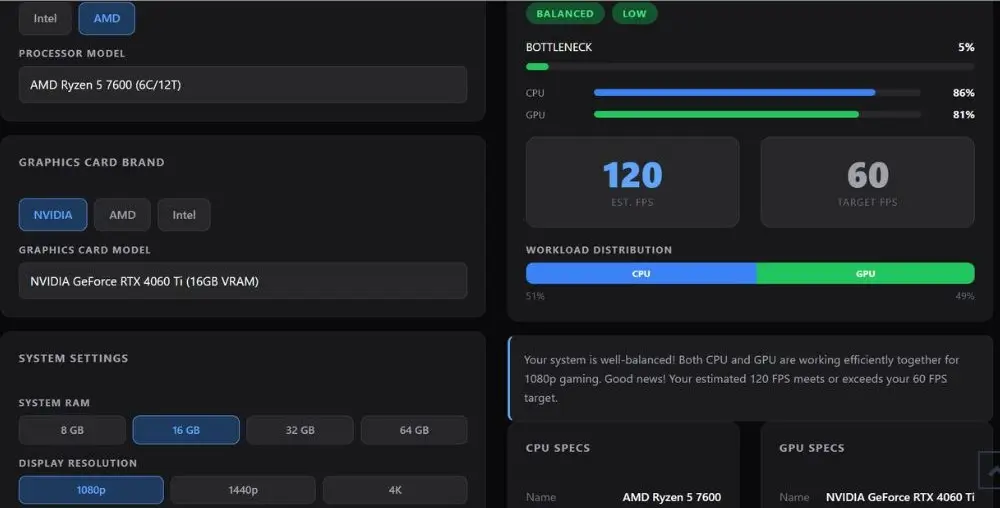
With a 60 FPS target at 1080p, the tool is measuring how much headroom each component has left relative to that target, not which GPU is faster. The 5060 Ti finishes its work quickly enough that the CPU’s share of the workload becomes proportionally larger in the ratio, even though the actual frame rate is higher. Neither card is meaningfully CPU bound here.
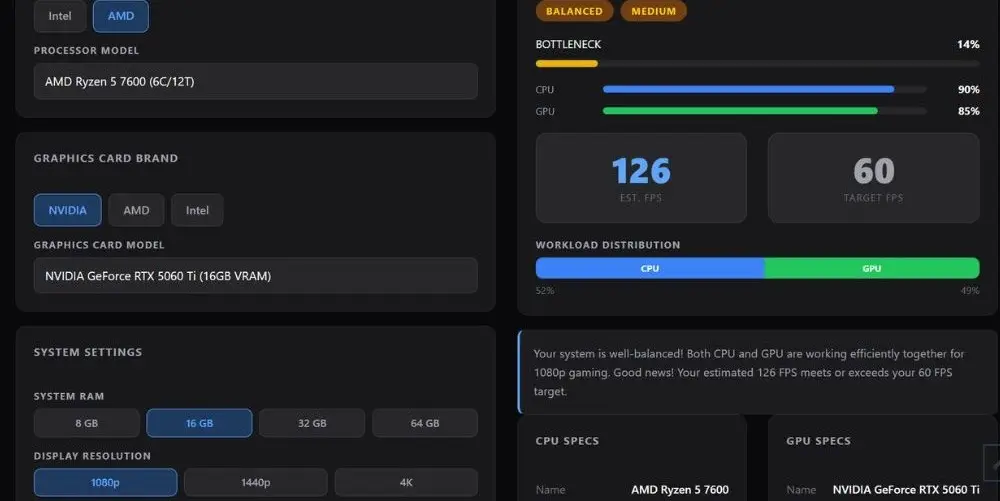
A 5 to 14 percent bottleneck at 1080p is well within a well balanced system, and both results confirm the Ryzen 5 7600 is not holding either GPU back in any way that matters. This same effect shows up in our best CPU for RTX 5060 Ti guide, where faster CPUs post higher percentages at low FPS targets for the same reason.
This is also why we do not lean on calculator percentages alone for GPU vs GPU verdicts. The real benchmark data above is what actually tells you which card is faster. The calculator’s job here is narrower and more useful in a different way, confirming whether your specific CPU is a smart pairing for whichever card you land on.
If you are still deciding on a processor for the base RTX 5060 rather than the Ti, our best CPU for RTX 5060 guide covers the same style of pairing data one tier down, and if you are weighing a jump to the RTX 5070 instead of either 60 Ti card, the RTX 5060 vs RTX 4070 comparison is worth reading before you spend more.
5060 Ti vs 4060 Ti: Who Should Actually Buy Which
- Buy the RTX 5060 Ti 16GB if: you are buying new, want DLSS 4 and Multi Frame Generation, plan to game at 1440p, or want a card that will not run into VRAM limits for the next few years.
- Keep your RTX 4060 Ti 16GB if: you already own one, mostly play at 1080p, and are not chasing the newest ray tracing heavy titles.
- Skip the 8GB version of either card in 2026, full stop. The VRAM ceiling will bite you regardless of how fast the core is.
- Pair either card with a mid-range CPU like the Ryzen 5 7600 or better. Neither GPU needs a flagship processor to perform well at 1080p or 1440p, and if you want to confirm your card is not overheating under the extra load, our GPU temperature range guide covers safe thermals for both NVIDIA generations.
Frequently Asked Questions
Is the RTX 5060 Ti a big enough upgrade over the RTX 4060 Ti to be worth it?
If you already own a 4060 Ti 16GB, most people on hardware forums agree it is not worth upgrading just for the 15 to 25 percent performance gain. It becomes worth it if you are also stuck on the 8GB variant, since you would be fixing the VRAM problem and gaining performance at the same time.
Should I buy the 8GB or 16GB version of either card?
Buy the 16GB version of whichever card you choose. This comes up constantly in PCPartPicker build threads, and the consensus is the same every time. 8GB is no longer safe for 1440p gaming in 2026, and it is starting to show cracks even at 1080p in newer titles.
Does the RTX 4060 Ti bottleneck with a budget CPU like the Ryzen 5 5600?
Not meaningfully at 1080p or 1440p. Both of these GPUs sit in a performance tier where the CPU rarely becomes the limiting factor on a modern mid-range chip.
Is the RTX 5060 Ti good for 1440p gaming?
Yes, the 16GB version handles 1440p comfortably in most titles, especially with DLSS 4 enabled. This is one of the most repeated conclusions across Tom’s Hardware Forum threads asking about 1440p budget builds.
Why does the RTX 5060 Ti show a higher bottleneck percentage than the RTX 4060 Ti on the same CPU?
This confuses a lot of people who run our calculator on both cards back to back. It happens because the calculator measures workload distribution relative to a target FPS, not raw GPU speed. A faster GPU finishing its work sooner shifts more of the ratio toward the CPU side, even though actual frame rates go up. It does not mean the CPU is a worse match for the faster card.
Is the RX 9060 XT a better option than either of these NVIDIA cards?
It depends on whether you value ray tracing and DLSS 4 more than raw rasterization value for the price. That tradeoff is worth reading through before you decide between brands.
Will my GPU usage look low if I pair either card with too weak a CPU?
Yes, and this is one of the most common questions we see in r/buildapc and PC Gamer forum threads. Low GPU usage next to high CPU usage is the classic sign of a CPU bottleneck, though it can also come from VSync, power settings, or background software rather than the CPU itself.
Final Words
We may earn a commission from purchases made through these links, at no extra cost to you.
The RTX 4060 Ti vs 5060 Ti comparison comes down to one thing: the 5060 Ti is faster, has better memory, and costs less at launch. If you already own a 4060 Ti 16GB, you don’t need to rush an upgrade. If you’re buying new, get the 5060 Ti, and get the 16GB version no matter which card you pick. Your CPU won’t hold either one back if you’re running anything mid-range or better.
