

Best CPU for RTX 5060 Ti- No Bottleneck Picks
If you just picked up an RTX 5060 Ti and now you’re wondering which CPU to pair it with, you’re in the right place. Picking the best CPU for RTX 5060 Ti is actually pretty straightforward once you know what to look for. The good news is you do not need a top-tier processor to get the most out of this GPU. The right mid-range chip will keep it fully fed without wasting money on cores you will never use.
We may earn a commission from purchases made through these links, at no extra cost to you.
Quick Verdict
- Best overall: AMD Ryzen 7 9800X3D, the fastest gaming CPU you can buy right now, zero bottleneck at any resolution
- Best value: AMD Ryzen 5 9600X, hits the sweet spot between gaming performance and cost for 1080p and 1440p builds
- Best budget pick: AMD Ryzen 5 7500F, lowest cost option that still pairs cleanly with the 5060 Ti at 1440p
- Best Intel pick: Intel Core Ultra 5 245K, solid 1440p performance and strong multi core output
- Best for productivity + gaming: AMD Ryzen 7 9700X, 8 cores, 65W TDP, excellent all around chip
| Category | CPU | Why It Works |
|---|---|---|
| Best Overall | AMD Ryzen 7 9800X3D | The fastest gaming CPU you can buy right now. Zero bottleneck at any resolution. |
| Best Value | AMD Ryzen 5 9600X | Hits the sweet spot between gaming performance and cost for 1080p and 1440p builds. |
| Best Budget Pick | AMD Ryzen 5 7500F | Lowest cost option that still pairs cleanly with the 5060 Ti at 1440p. |
| Best Intel Pick | Intel Core Ultra 5 245K | Solid 1440p performance and strong multi-core output. |
| Best for Productivity + Gaming | AMD Ryzen 7 9700X | 8 cores, 65W TDP, excellent all-around chip. |
Table of Contents
Bottleneck Calculator Results — RTX 5060 Ti at 1080p
We ran every CPU in this guide through our bottleneck calculator at 1080p with the RTX 5060 Ti 16GB and 16GB RAM, and here’s what the results showed:
Estimated Bottleneck with RTX 5060 Ti 16GB at 1080p
| CPU | Cores / Threads | Est. FPS | Bottleneck % | Rating |
|---|---|---|---|---|
| Ryzen 7 9700X | 8 / 16 | 147 | 3% | Low |
| Ryzen 5 9600X | 6 / 12 | 140 | 5% | Low |
| Core Ultra 5 245K | 14 / 14 | 138 | 6% | Low |
| Ryzen 7 9800X3D | 8 / 16 | 147 | 14% | Medium |
| Ryzen 5 7500F | 6 / 12 | 123 | 16% | Medium |
Results measured at 1080p with a 60 FPS target and 16GB system RAM using the mypcbottleneck.com bottleneck calculator. Numbers will shift at different resolutions, RAM amounts, or FPS targets, so run your own exact specs through the tool for an accurate read.
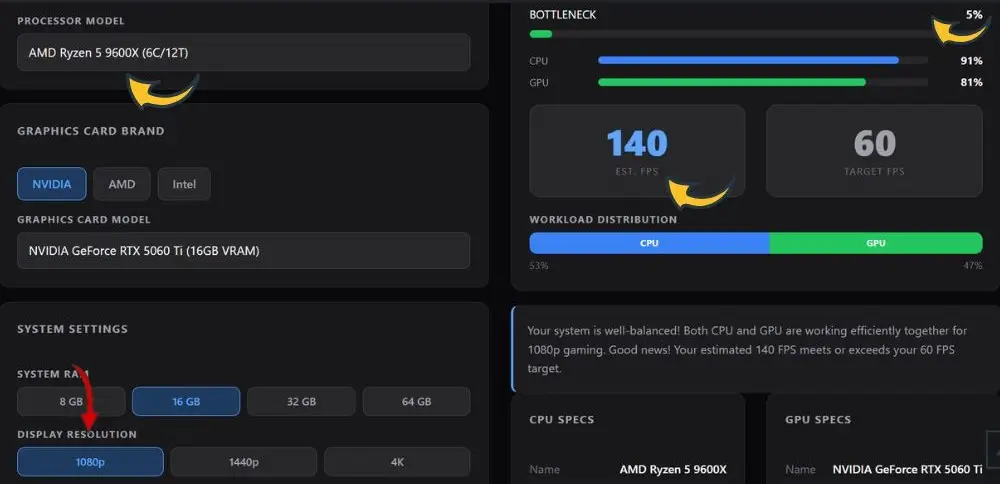
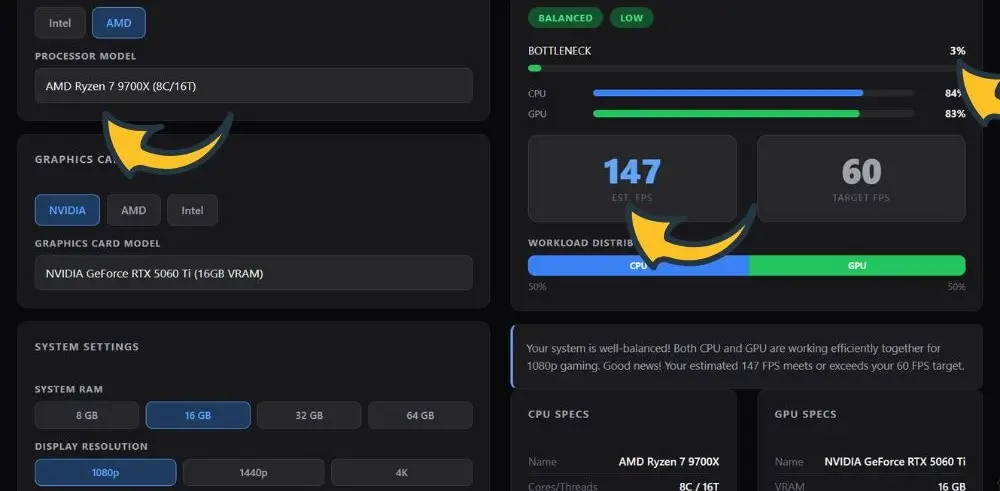
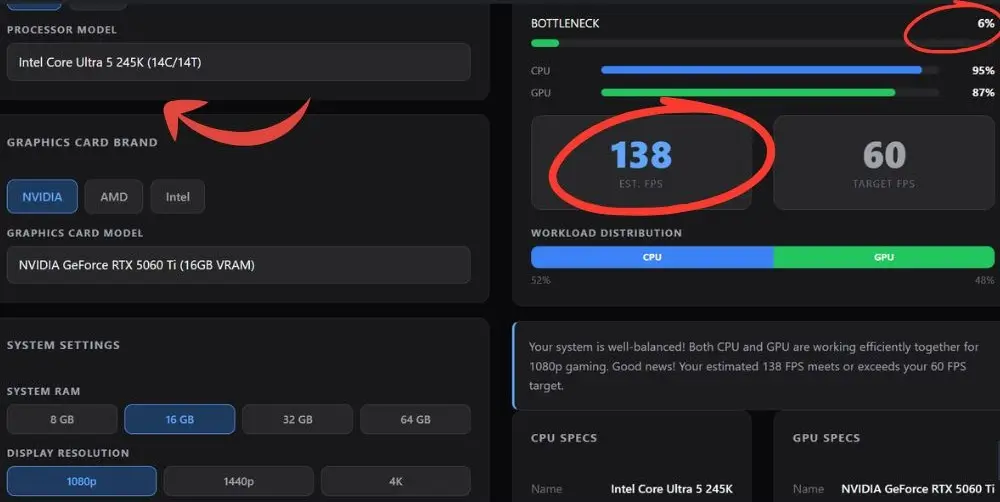
Why does the 9800X3D show a higher bottleneck % here than the 9600X? At 1080p with a modest 60 FPS target, the calculator is measuring how much headroom each component has relative to that target, not raw gaming horsepower. A faster CPU like the 9800X3D has so much extra capability that the workload split skews toward the CPU side of the ratio even though actual FPS output stays high.
At higher FPS targets or higher resolutions, the 9800X3D pulls back ahead as expected. Always check your own settings on the bottleneck calculator since target FPS and resolution both shift these numbers.
RTX 5060 Ti at a Glance: What Kind of CPU Does It Actually Need?
The RTX 5060 Ti is built on NVIDIA’s Blackwell architecture and packs 4,608 CUDA cores with either 8GB or 16GB of GDDR7 memory running across a 128-bit bus at 448GB/s of bandwidth. It has a 180W TDP which is easy to manage in most mid range builds. Think of it as a solid 1440p GPU that can do light 4K work when DLSS 4 is turned on.
Because it sits in the mid range tier, it does not demand an elite processor. A CPU that scores well in single threaded workloads matters most here since games are still largely single threaded. Something around a Ryzen 5 or Ryzen 7 class chip is more than enough. Going for something like a Ryzen 9 or Core i9 is overkill and you would be spending extra money that shows zero improvement in your actual frame rates.
What about the 16GB vs 8GB version? The difference is mostly about VRAM headroom. At 1080p both cards perform almost identically. At 1440p the 16GB model pulls ahead, especially in texture heavy games. At 4K the gap widens significantly. For CPU pairing purposes the same recommendations apply to both versions since the GPU cores are identical.
If you are still deciding between the two Nvidia cards, our RTX 5060 vs RTX 5060 Ti breakdown covers exactly where the Ti version justifies the upgrade and where it does not.
Best CPU for RTX 5060 Ti: Full Breakdown
1. AMD Ryzen 7 9800X3D-Best Overall
If you want absolutely zero CPU bottleneck with your RTX 5060 Ti, the Ryzen 7 9800X3D is the answer. It uses AMD’s 3D V-Cache technology which stacks extra L3 cache directly on top of the processor die. That extra cache dramatically reduces the latency between the CPU and game data, which translates to noticeably better 1% lows and smoother frame delivery. You are not just getting higher average FPS, the gameplay actually feels more consistent.
It has 8 cores, 16 threads, and a boost clock of 5.2GHz. The 96MB of L3 cache is the star of the show here. In CPU bound scenarios at 1080p it creates visible separation from everything else. At 1440p with the 5060 Ti the GPU becomes the limiting factor and the 9800X3D just stays completely out of the way and lets the GPU do its thing. It also runs at a comfortable 120W TDP which is reasonable for a chip this powerful.
If you’re trying to decide between this and its non-X3D sibling for a build that needs to do more than game, our 9800X3D vs 9700X comparison breaks down exactly where the extra cache pays off and where it doesn’t.
It is the most expensive pick in this list but if you are building a rig for the long haul and you want a processor that will not hold back any GPU you upgrade to for the next 3 to 4 years, this is worth stretching for.
Pros
- Best gaming CPU available right now
- 3D V-Cache eliminates CPU bottleneck
- Excellent 1% low frame times
- AM5 platform with upgrade path
- Strong multi threaded performance
Cons
- Most expensive chip in this list
- Overkill if you only game at 1440p+
- AM5 motherboard required
We may earn a commission from purchases made through these links, at no extra cost to you.
2. AMD Ryzen 5 9600X-Best Value
The AMD Ryzen 5 9600X is the sweet spot for most RTX 5060 Ti builds in 2026. It has 6 cores, 12 threads, and a boost clock that hits 5.4GHz. That high single threaded speed is what matters for gaming and the 9600X delivers it at a very reasonable cost compared to the 9800X3D. It handles 1080p and 1440p gaming with the 5060 Ti without any meaningful bottleneck.
AMD also bumped the TDP on this chip after launch to give it proper headroom, which paid off. It is efficient and does not run particularly hot under normal gaming loads. For builders who want a clean, no drama gaming build without spending a lot on the CPU, this is the one to grab. It also sits on AM5 so you can upgrade to a 9800X3D or whatever comes after it later without changing your motherboard.
Pros
- 5.4GHz boost clock, great for gaming
- Much lower cost than 9800X3D
- AM5 future proof platform
- Handles 1080p and 1440p cleanly
Cons
- Only 6 cores, not ideal for streaming
- Slight bottleneck in CPU-heavy 1080p titles
3. AMD Ryzen 7 9700X- Best for Productivity + Gaming
The AMD Ryzen 7 9700X steps things up to 8 cores and 16 threads while still running at a very manageable 65W TDP. That power efficiency is what makes it stand out in this tier. It is a strong all around processor that handles heavy multitasking, content creation, and gaming without breaking a sweat. When it comes to pairing with the RTX 5060 Ti it offers more than enough headroom across all resolutions.
Compared to the 5600X from the previous generation it is a clear upgrade in both gaming and productivity metrics. If you do anything outside pure gaming like video editing, 3D work, streaming, or running background apps while you play, the extra cores here make a real difference day to day. And at 65W it runs cool and quiet in most mid range cases without needing a big cooler.
Pros
- 8 cores great for streaming and editing
- Impressive 65W TDP, runs cool
- Strong gaming and productivity balance
- AM5 socket for future upgrades
Cons
- More expensive than the 9600X
- Gaming gains over 9600X are small
4. Intel Core Ultra 5 245K-Best Intel CPU for RTX 5060 Ti
Intel’s Arrow Lake lineup took some heat for its gaming performance at launch compared to AMD, but it has improved with driver and BIOS updates since then. The Intel Core Ultra 5 245K and Core Ultra 7 265K are the two strongest choices if you want to go Intel with your RTX 5060 Ti build.
The Core Ultra 5 245K hits that mid range sweet spot at around $250 to $300 and pairs well with the 5060 Ti at 1440p. The Core Ultra 7 265K goes further and is a better pick if you want strong multi threaded output for workloads like video encoding, compilation, or running multiple apps in the background. Its gaming numbers at 1440p are very solid too but the gap versus AMD’s best gaming chips shows up more clearly at 1080p where the CPU matters more.
If you already own an LGA1851 motherboard or you are building around an Intel ecosystem, either of those two chips gets the job done without leaving much performance on the table with the RTX 5060 Ti.
Pairing Intel with a different GPU tier instead? Our RX 9060 XT vs RTX 5060 Ti benchmarks show how Arrow Lake handles both sides of that matchup.
Pros
- Strong multi core performance
- 14 cores for mixed workloads
- Works great at 1440p with 5060 Ti
- Good option for existing Intel builds
Cons
- Single threaded gaming lags behind AMD
- Arrow Lake platform costs more overall
- Requires a cooler (sold separately)
5. AMD Ryzen 5 7500F-Best Budget CPU for RTX 5060 Ti
The Ryzen 5 7500F is the no frills budget champion for RTX 5060 Ti builds. It has 6 cores, 12 threads, and runs on the AM5 platform which means you get DDR5 support and PCIe 5.0.
Quick Tip: Not sure what RAM speed or capacity actually makes sense for your build? Our best RAM for gaming guide covers the sweet spot for AM5 builds without overspending.
The biggest thing that keeps it affordable is the lack of integrated graphics, but that does not matter at all when you have a dedicated GPU like the 5060 Ti sitting in your rig.
Benchmarks put it at around a 10% bottleneck at 1440p with the RTX 5060 Ti, which in practice means you will not notice much difference versus spending two to three times more on a higher end chip at that resolution. At 1080p in CPU-heavy titles you might see a slight gap compared to faster chips, but for 1440p gaming it is a genuinely solid pairing that leaves more budget for the GPU or faster memory. This is the one to grab if you are building on a tight budget and do not want to compromise too much on the GPU side.
Pros
- Very affordable entry to AM5
- Only ~10% bottleneck at 1440p
- DDR5 and PCIe 5.0 support
- Good upgrade path on AM5
Cons
- No integrated graphics
- More noticeable bottleneck at 1080p
- Limited to 6 cores
Best Budget CPU for RTX 5060 Ti- Who Should Go Budget?
If your total build budget is tight and the RTX 5060 Ti is already taking up a big chunk of it, going with a budget CPU like the Ryzen 5 7500F or even the Ryzen 5 7600 makes a lot of sense. The GPU is the more important component for gaming performance. Spending less on the CPU and using those savings toward faster RAM, a better cooler, or a larger SSD is a completely valid strategy.
At 1440p, which is the resolution the RTX 5060 Ti is really designed for, the performance difference between a budget CPU and a mid range CPU is small in GPU-limited scenarios. The GPU becomes the bottleneck first at higher resolutions, so an overpowered CPU is just idle silicon sitting in your build. Save the money and put it somewhere useful.
Quick tip: Pairing the RTX 5060 Ti with DDR5 RAM running at 6000 MHz CL30 on an AM5 board gives you noticeably better performance than slow DDR5. The memory speed matters more on AM5 than people expect.
CPU Pairing by Resolution: What Changes at 1080p vs 1440p
Resolution changes how important your CPU is quite a lot. Here is how it breaks down:
At 1080p the CPU carries more load because the GPU finishes rendering frames faster and now has to wait for the CPU to feed it the next frame. This is where a faster chip like the 9800X3D or 9600X shows a more noticeable edge over budget chips. If you are gaming at 1080p and targeting very high frame rates for competitive play, do not cut corners on the CPU.
At 1440p something interesting happens. We ran every CPU in this list through the bottleneck calculator at 1440p with the RTX 5060 Ti 16GB, and every single one landed on the exact same 88 FPS. The Ryzen 7 9800X3D, the Ryzen 5 7500F, the Core Ultra 5 245K, all of them.
At this resolution the RTX 5060 Ti hits its own ceiling first and becomes the hard limit on frame rate, so CPU choice stops mattering in any measurable way. If 1440p is your main resolution, this is the clearest argument yet for not overspending on the processor. Put that money into the GPU or your monitor instead.
At 4K the GPU is absolutely maxed out and the CPU barely matters for FPS. With the 5060 Ti 16GB you can push 4K with DLSS 4 enabled and the CPU choice has almost zero impact on your frame rates. Any chip in this list works fine at 4K.
Do You Need a High End CPU for the RTX 5060 Ti?
Short answer: no. The RTX 5060 Ti is a mid range GPU. It is designed to hit great performance numbers at 1440p, not 4K native at ultra settings with no upscaling. A top tier processor like a Ryzen 9 9950X or Core i9-14900K is completely unnecessary here and the extra money spent on those chips buys you nothing in gaming performance when the GPU is the bottleneck anyway.
Where you do need a decent CPU is at 1080p in CPU-heavy games or competitive titles with high refresh rate targets. Think CS2, Valorant, Apex Legends, and similar games where the GPU can push 300+ FPS and your CPU needs to keep up. In those cases the 9800X3D or at least a 9600X gives you a real advantage over older or slower chips.
If competitive 1% lows matter more to you than average FPS, our CPU bottleneck guide explains why that distinction changes which chip you should actually buy.
For everything else: mid range CPU, mid range GPU, spend the rest on fast RAM and a good NVMe drive. That is the formula that gives you the best all around gaming experience without wasted budget.
Bottleneck check: Not sure if your current CPU is holding back the RTX 5060 Ti? Run a quick check on the bottleneck calculator to see your exact pairing result. It only takes about 30 seconds and tells you the bottleneck percentage at different resolutions.
Frequently Asked Questions
Here are the questions people are actually typing into forums and search engines for this keyword (pulled from real bottleneck-checker queries, buyer’s guides, and build threads)
What is the best CPU for RTX 5060 Ti in 2026?
The Ryzen 7 9800X3D is the best overall CPU to pair with the RTX 5060 Ti right now. Its 3D V-Cache technology gives it the best gaming performance of any chip available and it creates virtually no bottleneck at any resolution. For most builders, the Ryzen 5 9600X is the better value pick and still performs excellently at 1080p and 1440p.
Is the RTX 5060 Ti CPU-bound or GPU-bound?
At 1440p and above it’s GPU-bound for almost any modern chip. The card carries a gaming score of roughly 72/100, which is low enough that a mid-range CPU pairs with it just fine without needing the most expensive chip on the market. This is the question a lot of people are actually trying to answer before they overspend on a CPU.
What is the cheapest CPU that won’t bottleneck the RTX 5060 Ti?
The Ryzen 5 7500F is the cheapest well-balanced match, priced around $126 with only a 10% bottleneck at 1440p. Since the GPU is doing most of the work at that resolution, spending more on a flagship CPU buys you very little extra real-world performance with this card.
Will an older CPU bottleneck the RTX 5060 Ti?
It depends on resolution and chip generation. A Ryzen 5 5500 paired with the RTX 5060 Ti shows only around a 7% bottleneck at 1080p, 1440p, and 4K, which most builders would consider a well-balanced pairing.
Chips older than that (think early Ryzen 1000-series or Intel 7th/8th-gen) start to show more noticeable CPU-limited frame drops, especially at 1080p where the GPU has less work to do per frame and the CPU becomes the limiting factor.
Should I go Intel or AMD for an RTX 5060 Ti build?
A modern 6-core or 8-core processor from either Intel’s Core i5/i7 lineup or AMD’s Ryzen 5/7 series will serve as an ideal match, with enough multi-threaded performance for streaming or light content creation on top of gaming.
As EveZone explains, AMD’s AM5 platform tends to get recommended more often for new builds since it has a longer upgrade runway, but Intel options like the Core Ultra 5/7 series perform competitively if you’re already invested in that ecosystem.
Does the RTX 5060 Ti need a specific CPU socket or motherboard?
No. The main thing to double-check is motherboard compatibility, since AMD’s current CPUs use the AM5 socket while Intel uses LGA 1700 (with newer sockets arriving)
Pick your CPU and platform first, then make sure the board supports it. It’s also worth confirming Resizable BAR is enabled in BIOS, since that’s a free performance gain many people miss.
Does the CPU matter for RTX 5060 Ti at 1440p?
Less than people assume, but it’s not zero. CPU bottlenecks become more noticeable at 1440p in modern AAA titles than at lower resolutions, which is part of why the Ryzen 5 7600X is positioned as a top-tier match rather than overkill. Practically: any current 6-core+ chip will keep up, but a genuinely outdated CPU can still hold back frame rates even though the GPU is the heavier lifter at this resolution.
If you are also weighing AMD’s alternative before making a final call, our RX 9060 XT vs RTX 5060 Ti comparison shows how the two cards perform side by side at 1080p and 1440p.
Final Words
The RTX 5060 Ti is a capable mid-range GPU that deserves a CPU that can keep up with it. At 1080p the Ryzen 7 9800X3D is the only processor that keeps the GPU fully fed in every title without exception. At 1440p the playing field levels out and even the Ryzen 5 9600X delivers the same real-world frame rates as chips that cost twice as much, because the GPU becomes the bottleneck first. Match your CPU choice to your target resolution and you will not go wrong.
Do not overcomplicate this decision. Run your planned pairing through our bottleneck calculator before buying anything, see the result for yourself, and build with confidence. The RTX 5060 Ti paired with any of the CPUs in this guide gives you a clean, balanced system with no wasted performance on either side. That is exactly what a good build looks like.
Already have a CPU in mind and shopping GPUs instead? Our RX 9070 vs RTX 5070 comparison covers the tier just above the 5060 Ti if you’re weighing a bigger jump.
If you are considering the base model instead, we have a separate guide covering the best CPU for RTX 5060 with the same bottleneck calculator testing approach.
If you’re shopping a tier down, our best CPU for RTX 4060 guide covers why flagship CPUs are wasted on that card too.


