

Best GPU for Ryzen 7 9800X3D in 2026-5 GPUs Worth Buying
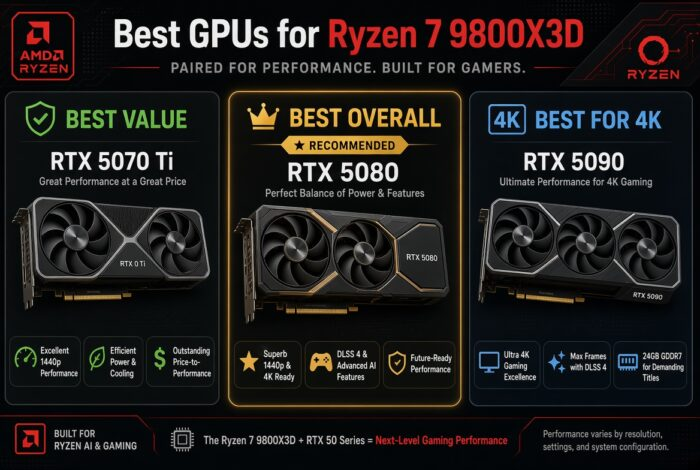
The best GPU for Ryzen 7 9800X3D is the RTX 5080. It is the top pick for most people. Do you play at 4K and want the very best? Get the RTX 5090. Want to spend less? The RTX 5070 Ti is great.
The Ryzen 7 9800X3D is the fastest gaming CPU you can buy. It has 8 cores and a big 3D cache. It will not slow down any graphics card. So your choice is simple. Pick the card that fits your screen and your budget.
We may earn a commission from purchases made through these links, at no extra cost to you.
For a Ryzen 7 9800X3D, buy the RTX 5080. It is the best all-round card for high-end 1440p and 4K. Want the very best 4K? Get the RTX 5090. Want to pay less? Get the RTX 5070 Ti. Like AMD? The RX 9070 XT is great value. The 9800X3D is fast enough for every one of them.
This guide is based on desk research, not hands-on lab testing. We compare published manufacturer specifications, weigh real-world compatibility and value for each use case, track current prices and availability on Amazon, and reference publicly available benchmark data from established review outlets. We do not run our own hardware tests — any performance figures are estimates drawn from public sources and will vary with your system, drivers, and settings.
Best GPU for Ryzen 7 9800X3D: Full Comparison
Every card here works great with the 9800X3D. The main question is simple. How much do you want to spend? And do you want top 4K or ray tracing? Our full graphics card rankings cover every card, from cheap to top-end.
Best GPU for Ryzen 7 9800X3D- Top 5 Picks in Detail
RTX 5080: Best Overall
The RTX 5080 is my top pick for a 9800X3D. It is strong at 4K. It is very fast at 1440p. It has 16GB of memory. It also has all of NVIDIA’s DLSS and frame tools. With the fastest gaming CPU behind it, it feels almost like a flagship for less money. See how the pair performs in our Ryzen 7 9800X3D + RTX 5080 guide.
RTX 5070 Ti: Best Value
Want to get the best budget GPU for Ryzen 7 9800x3d? Get the RTX 5070 Ti. It is built for fast 1440p. It can play 4K too, with DLSS. It has 16GB of memory. The 9800X3D keeps it fed with room to spare. It is the smart-money pick.
RTX 5090: Best for 4K
Want the very best? The RTX 5090 is the top card. It maxes out 4K with ray tracing. It has 32GB of memory. It costs a lot and uses a lot of power. Most gamers do not need it. But if you have a 4K high-refresh screen, this is the card the 9800X3D was made to feed.
RX 9070 XT: Best AMD Card
The RX 9070 XT gives the most speed for your money. In raw frame rate, it keeps up with pricier NVIDIA cards. It has 16GB of memory. You give up some ray tracing power. You also miss DLSS. But if you just want high FPS, it is a smart buy.
RTX 5070: Sensible Budget
Need to keep the GPU cost down? The RTX 5070 is the floor for a 9800X3D. It plays 1440p games very well. It uses DLSS for the hardest games. It has 12GB of memory. That is fine for 1440p. Think of it as a card you may upgrade past later.
See how the pair performs in our Ryzen 7 9800X3D + RTX 5070 guide.
RTX 5080 vs RTX 5070 Ti
Both cards handle the 9800X3D with room to spare. The real question is how much you want to spend.
The RTX 5080 is about 15-20% faster across most games. At 1440p that gap barely matters; both hit high frame rates. At 4K, the 5080 pulls ahead more, especially in ray-traced games.
The RTX 5070 Ti is the smarter buy if you’re mainly on 1440p. You get nearly the same experience for less money, and the same 16GB of memory.
Pick the RTX 5080 if: you game at 4K or want extra headroom for future games.
Pick the RTX 5070 Ti if: you’re on 1440p and want to save some cash for other parts.
📊 Want the full breakdown? Benchmarks, bottleneck percentages at 1440p/4K, and which card to actually buy — read our RTX 5070 Ti vs RTX 5080 detailed comparison.
RTX 5080 vs RX 9070 XT
This is NVIDIA vs AMD, and it comes down to what you value.
The RX 9070 XT often matches or beats the RTX 5080 in raw rasterized frame rate, and usually costs less. If you play games without heavy ray tracing, it’s the better value.
The RTX 5080 wins on ray tracing performance and has DLSS 4 frame generation, which AMD’s FSR still trails in image quality. If you stream, or play games that lean on ray tracing (Cyberpunk 2077, Alan Wake 2), the 5080 feels smoother.
Pick the RTX 5080 if: ray tracing and DLSS matter to you.
Pick the RX 9070 XT if: you want the most FPS per dollar and don’t care about ray tracing.
📊 Want the full breakdown? Raster vs ray tracing benchmarks, VRAM and upscaling compared — read our RTX 5080 vs RX 9070 XT detailed comparison.
RTX 5090: Is the Extra Cost Worth It?
The RTX 5090 costs a lot more than the RTX 5080. So is it worth it?
For most people, no. The 5090 gives you maybe 20-30% more frames than the 5080 in most games. That’s a real gap, but not one most people will notice mid-game.
It’s worth it if any of these are true for you:
- You have a 4K monitor running at 144Hz or higher
- You play with every ray tracing setting maxed out
- You do heavy video editing or 3D rendering alongside gaming
- Money genuinely isn’t a factor and you want the best, full stop
If none of those apply, put the difference toward a better monitor or SSD instead. The RTX 5080 will not hold you back.
Match the GPU to Your Monitor
Your screen is the best guide. Do not buy a 4K card for a 1080p screen. And do not buy a 1440p card for a 4K screen. Here is a simple match.
1440p, high refresh
This is where the 9800X3D shines most. The RTX 5070 Ti or RTX 5080 runs almost everything past 144Hz. The big 3D cache keeps your low FPS smooth in busy scenes. That is what fast-refresh gamers feel.
4K gaming
For a 4K screen, start with the RTX 5080. Want the very best? Step up to the RTX 5090. The RX 9070 XT can do 4K in many games too, if you care more about raw speed than ray tracing.
Gaming Benchmarks (1440p)
The 9800X3D takes the CPU out of the way. So these numbers follow the GPU. Esports games run very fast. Big ray-traced games show the real gaps.
| Game (1440p, high) | RTX 5070 Ti | RTX 5080 | RTX 5090 |
|---|---|---|---|
| Counter-Strike 2 | 440+ FPS | 470+ FPS | 520+ FPS |
| Fortnite (Performance) | 240+ FPS | 260+ FPS | 290+ FPS |
| Call of Duty: Warzone | 165-200 FPS | 190-230 FPS | 230+ FPS |
| Cyberpunk 2077 (RT + DLSS) | 95-115 FPS | 120-140 FPS | 160+ FPS |
| Starfield | 110-130 FPS | 130-150 FPS | 150+ FPS |
| Black Myth: Wukong (DLSS) | 80-95 FPS | 100-115 FPS | 130+ FPS |
Bottleneck Analysis
A bottleneck is the slow part. It is the part that runs out of power first. With most CPUs, a top GPU can be held back. The 9800X3D fixes that. It is the fastest gaming CPU. At 1440p and 4K, the GPU is always the slow part. That is exactly what you want.
The CPU only stretches its legs at 1080p and in CPU-heavy games. Think flight sims, racing sims, and big online maps. There the 9800X3D pulls ahead of every other chip. That is why it is worth a strong GPU, not a cheap one. Want your exact numbers? Try our bottleneck calculator.
Power Supply and Platform
The 9800X3D is efficient, so the GPU sets your needs. A good 850W 80+ Gold unit runs it with an RTX 5080. Use 1000W for an RTX 5090. A 750W unit is fine up to an RTX 5070 Ti or RX 9070 XT. The 9800X3D uses the AM5 socket. So you have room to grow. You keep the same board, the kind we cover in our best motherboard for the 9800X3D guide.
Complete 9800X3D Build Recommendations
Picking the GPU is the hard part. Here’s how to round out the rest of the build so nothing else holds it back.
Motherboard: Any B650 or X670 AM5 board works well. See our full best motherboard for Ryzen 7 9800X3D picks.
RAM: 32GB of DDR5 at 6000MHz is the sweet spot for gaming. Check our best RAM for gaming guide for exact kits.
Storage: A fast NVMe SSD keeps load times down and won’t bottleneck your GPU. See our best NVMe SSD for gaming picks.
Cooling: The 9800X3D runs cool for its performance. A good air cooler is enough for most builds. See our best CPU cooler for Ryzen 7 9800X3D guide if you want to go liquid.
Case: Pick a case with good airflow, not just looks. Our best PC cases 2026 guide has picks for every budget.
Quick build summary:
| Part | Recommendation |
|---|---|
| CPU | Ryzen 7 9800X3D |
| GPU | RTX 5080 (or pick above) |
| RAM | 32GB DDR5-6000 |
| Motherboard | B650 or X670 AM5 |
| Storage | 1-2TB NVMe SSD |
| PSU | 850W 80+ Gold (1000W for RTX 5090) |
| Cooler | Air cooler or 240mm AIO |
Every part here works together with zero bottleneck. Run your exact combo through our bottleneck calculator to double-check before you buy.
Upgrade Recommendations
On an RTX 30-series or RX 6000 card? The RTX 5070 Ti or RX 9070 XT is a big jump. On a 40-series card like a 4080? Only the 5090 is a big enough step up. Building new? Buy the card that fits your screen. The 9800X3D will not hold it back, now or for years.
Value for Money
Here is the best value with a 9800X3D. The RTX 5070 Ti is the smart-money pick. The RTX 5080 is the one to buy if you want a card you will not think about for years. The RX 9070 XT wins on raw speed if you skip ray tracing. The RTX 5090 is a want, not a need. It is only worth it for maxed-out 4K.
Alternative Recommendations
On a tighter budget, an RX 9070 or RTX 5060 Ti 16GB will still game well at 1440p with the 9800X3D. Want top ray tracing below the 5090? The 5080 is the pick. Building around the non-X3D chip instead? See our best GPU for the Ryzen 7 9700X guide. Shopping the other way? Our best CPU for the RTX 5080 guide covers the CPU side. You can also see the best CPU for RTX 5070 and 5070 Ti.
Frequently Asked Questions
Does the Ryzen 7 9800X3D bottleneck the RTX 5090?
No. At 1440p and 4K the RTX 5090 is the slow part, not the CPU. The 9800X3D is the fastest gaming CPU you can buy. It feeds even the RTX 5090 with ease.
What is the best GPU for 9800X3D?
The RTX 5080 for most people. It is strong at 4K and very fast at 1440p. If you want the very best 4K, get the RTX 5090. For value, the RTX 5070 Ti is great.
Is the 9800X3D worth it over the 9700X for gaming?
Yes, if you want the top frame rates. The 9800X3D has a big 3D cache. It pulls ahead at 1080p and in CPU-heavy games. At 4K the gap shrinks. But it is the best gaming CPU right now.
RTX 5080 or RX 9070 XT for the 9800X3D?
The RTX 5080 is faster at ray tracing and has DLSS frame generation. The RX 9070 XT gives more raw speed per dollar. Pick NVIDIA for ray tracing and streaming. Pick AMD for the most FPS for your money.
Do I need the RTX 5090 for 4K on a 9800X3D?
Only if you want maxed-out 4K with ray tracing above 120 FPS. Most 4K gamers are happy with the RTX 5080. The 5090 is for people who want zero compromise.
How much VRAM do I need at 4K?
16GB is the safe target for 4K and new games. 12GB (like the RTX 5070) is fine for 1440p. It is tight for 4K with heavy textures.
What power supply do I need for a 9800X3D build?
A good 850W 80+ Gold unit covers the 9800X3D with an RTX 5080. Use 1000W for an RTX 5090. A 750W unit is fine up to an RTX 5070 Ti or RX 9070 XT.
Will a mid-range GPU waste the 9800X3D?
You will not break anything. But a cheap card leaves a lot of CPU power unused. If your budget forces that, plan a GPU upgrade later. The AM5 platform makes that easy.
Final Verdict
Our pick for the best GPU for Ryzen 7 9800X3D is the RTX 5080. It fits most builds. The 9800X3D is the fastest gaming CPU, so it never holds you back. Buy the RTX 5080 for the best all-round build. Buy the RTX 5090 for the very best 4K. Buy the RTX 5070 Ti to save money. Pick the RX 9070 XT if you want raw speed over ray tracing. Whatever you pick, run it through our bottleneck calculator first. It shows your exact numbers.
Related RTX 5080 Guides
Run the 9800X3D with any of these GPUs through our free Bottleneck Calculator. See your estimated FPS and bottleneck percent at your resolution.
Open the Bottleneck Calculator →


