

Ryzen 5 7600 + RTX 4070- Bottleneck or Perfect Match?
Is the Ryzen 5 7600 + RTX 4070 a good match, or will the CPU hold your graphics card back? For 1440p gaming, it is a good match. In real game tests, the RTX 4070 was the busiest part in most heavy games, and the processor still had room to spare.
But we won’t just give you one number. We ran this pair through our bottleneck calculator and compared it with real 1440p game results from 8 games. In some places they agree, and in others they don’t. We show you both, so you can make the right decision before you spend money on an upgrade.
Quick Answer– Ryzen 5 7600 + RTX 4070 Combination
Quick Answer
What is a bottleneck?
A bottleneck means one part slows down another part.
- The graphics card (GPU) draws the picture.
- The processor (CPU) tells the GPU what to draw.
If the CPU is too slow, the GPU waits. If the GPU is too slow, the CPU waits.
In games, you want the GPU to be the busiest part. That means you are using the card you paid for. So “the GPU is the limit” is often a good sign, not a problem.
You can test your own parts with our free PC bottleneck calculator.
About the Ryzen 5 7600 and RTX 4070
| Part | Key facts |
|---|---|
| Ryzen 5 7600 | 6 cores, 12 threads, boosts up to 5.1 GHz, AM5 socket |
| RTX 4070 | 12GB video memory, made mainly for 1440p gaming |
TechSpot tested a close cousin, the Ryzen 5 7600X. It found about 28 percent better single-core speed than the Ryzen 5 5600X, according to the TechSpot Ryzen 5 7600X review. The 7600 is a little slower than the 7600X, so use this as a rough guide only.
What Our Calculator Says About Ryzen 5 7600 + RTX 4070 at 1440p
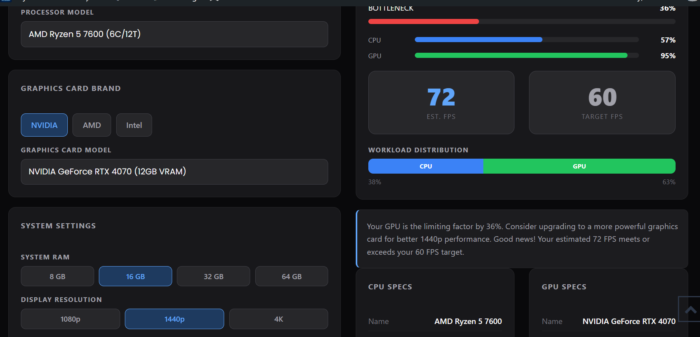
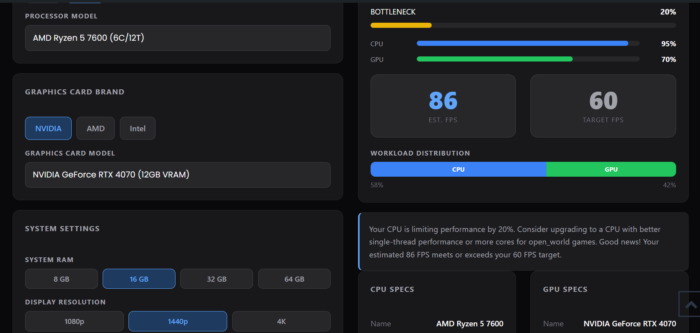
We checked two game types for Ryzen 5 7600 RTX 4070 1440p.
Esports games
Open world games
| Result | Esports games | Open world games |
|---|---|---|
| Bottleneck | 36% | 20% |
| CPU use | 57% | 95% |
| GPU use | 95% | 70% |
| Estimated FPS | 72 | 86 |
| Target FPS | 60 | 60 |
| Calculator says | GPU is the limit | CPU is the limit |
About Ryzen 5 7600 + RTX 4070 What Real Game Tests Show at 1440p
A YouTuber named ShadowSeven tested the Ryzen 5 7600 in 18 games at 1440p. You can watch it here for Ryzen 5 7600 RTX 4070 gaming performanceRyzen 5 7600 RTX 4070 gaming performance: RTX 4070 Super + Ryzen 5 7600: Test in 18 Games. We looked at 8 of those games. The numbers below come from his on-screen overlay. We did not run these tests ourselves.
Two important things:
- He used the RTX 4070 Super, which is a little faster than the normal RTX 4070. A normal 4070 will give slightly lower FPS.
- Each number is one moment in his video. Numbers go up and down while you play.
| Game | Type | Settings | Average FPS | 1% low FPS | GPU use | CPU use |
|---|---|---|---|---|---|---|
| Counter-Strike 2 | Esports | Very High | 223 | 107 | 94% | 45% |
| Valorant | Esports | High, MSAA x2 | 599 | 94 | 79% | 32% |
| Fortnite | Esports | Epic | 143 | 56 | 93% | 61% |
| Cyberpunk 2077 | Heavy game | Ultra | 84 | 66 | 98% | 49% |
| Alan Wake 2 | Heavy game | Ultra | 48 | 41 | 98% | 18% |
| Red Dead Redemption 2 | Open world | Ultra | 102 | 49 | 99% | 36% |
| Hogwarts Legacy | Open world | Ultra | 98 | 83 | 98% | 29% |
| Starfield | Open world | Ultra | 89 | 66 | 98% | 32% |
1% low means the FPS in your slowest moments. A low number means small stutters.
Where the calculator and real tests agree
| Point | Calculator | Real tests | Verdict |
|---|---|---|---|
| GPU is very busy in esports | 95% GPU use | 93 to 94% in CS2 and Fortnite | Agree |
| FPS in open world games | 86 FPS | 89 to 102 FPS (with a faster card) | Close |
| 1440p is playable and smooth | Above 60 FPS target | Above 60 FPS in most games | Agree |
Where they do not agree
| Point | Calculator | Real tests | Verdict |
|---|---|---|---|
| Esports FPS | 72 FPS | 143 to 599 FPS | Calculator is far too low |
| Who limits open world games | CPU (95% CPU, 70% GPU) | GPU (98 to 99% GPU, about 30% CPU) | Opposite result |
| Upgrade advice for esports | “Upgrade your graphics card” | GPU at 95% is healthy | We disagree with this advice |
Why might they be different?
Our calculator is an estimate. It uses average scores for each part. It cannot see the exact game, the exact scene, the settings, or tools like DLSS. The real test PC also used a faster card and more RAM (up to about 21GB in Hogwarts Legacy), while we set our calculator to 16GB. These small things can change the result.
Which one should you trust?
To check Ryzen 5 7600 RTX 4070 bottleneck, use the calculator for a quick first check. Use real game tests for the details. If they disagree, trust the real game results. Best of all, check your own PC while you play.
How to check your own PC
Open a free tool like MSI Afterburner or HWiNFO64 while you play a game.
| What you see | What it means |
|---|---|
| GPU use at 95 to 100% | Your graphics card is the limit. This is normal and healthy |
| GPU use low, one CPU core at the top | Your processor is the limit |
| Both are low | Something else, like a frame cap or slow storage |
Other things we noticed
- Dips matter. Fortnite averaged 143 FPS, but its 1% low was 56. Red Dead Redemption 2 averaged 102, but its 1% low was 49. The average can hide short dips.
- Video memory is getting full. Alan Wake 2 and Hogwarts Legacy used close to 10GB of the 12GB at Ultra. That is fine today, but heavy games are getting close to the limit.
- Alan Wake 2 is very demanding. It averaged 48 FPS at Ultra. Lower the settings or use DLSS for smoother play.
Which Resolution is Best for Ryzen 5 7600 + RTX 4070 Pair?
| Resolution | What to expect |
|---|---|
| 1080p | You may not use all of the RTX 4070’s power, mostly in esports games |
| 1440p | Best match for this pair |
| 4K | Many heavy games need DLSS or lower settings |
Should you upgrade?
| Your situation | What we suggest |
|---|---|
| You already own both parts | Keep them. Upgrade only if your own tests show a problem |
| You want more FPS in esports games | A faster gaming CPU like the Ryzen 7 7800X3D may help. See our 7800X3D vs 9800X3D guide |
| You want a much stronger graphics card later | Test it with our calculator first. Faster cards show CPU limits sooner |
| You are building a new PC | AM5 lets you swap in a faster CPU later. Use good DDR5 and a power supply of around 650W, the usual advice for this card |
| You are coming from a Ryzen 5 5600 | Read our Ryzen 5 5600 + RTX 4070 Super article |
| You want to compare with a stronger graphics card | See Ryzen 5 7600X + RTX 5090 |
| You want more parts ideas | Browse our best PC parts page |
FAQs
Will a Ryzen 5 7600 bottleneck an RTX 4070 at 1440p?
In the real games we looked at, no. The graphics card was the busiest part in most of them. Our calculator showed a CPU limit in open world games, but the real tests did not.
Is 6 cores enough for an RTX 4070?
For most games today, yes. CPU use in the heavy games was between 18% and 49%.
Is a bottleneck always bad?
No. Some part is always the limit. A GPU limit in games is usually what you want.
Should I upgrade to a 7800X3D?
Only if you play fast esports games and want higher FPS, mainly at 1080p. At 1440p in heavy games, you will likely see small gains.
Does the RTX 4070 Super change the answer?
No. The Super is faster. If the 7600 keeps it busy, a normal 4070 is even less likely to be held back by the CPU.
Final Verdict
The Ryzen 5 7600 + RTX 4070 is a good match for 1440p gaming. Our calculator and the real game tests agreed on most things, but not on esports FPS or on which part limits open world games. Trust real game results over one calculator number, and check your own PC before you spend money. Try the bottleneck calculator with your own parts.
Test source: ShadowSeven on YouTube, 1440p, RTX 4070 Super and Ryzen 5 7600. We did not run these tests ourselves.
