

7800X3D vs 9800X3D- Real Bottlenecks and Right Pick
The 7800X3D vs 9800X3D is the most important CPU comparison for PC gamers in 2026. Both chips share the same AM5 platform, the same 96MB of 3D V-Cache, and the same gaming-first design philosophy. But the 9800X3D is a full generation newer, built on Zen 5, and runs at meaningfully higher clock speeds. So which one actually fits your build better, and how much does the gap matter at your resolution?
I ran both CPUs through our bottleneck calculator paired with the most popular GPUs right now, across 1080p, 1440p, and 4K. The bottleneck percentages tell a much more useful story than raw FPS benchmarks alone, because they show exactly how much CPU headroom you are leaving on the table depending on which chip you pick. Let me show you the numbers.
Quick Verdict
The AMD Ryzen 7 9800x3D is the faster chip across the board. It wins in gaming, productivity, and raw clock speed. But the AMD Ryzen 7 7800X3D is still an elite gaming CPU in 2026 and costs significantly less. The right pick depends on what GPU you are pairing it with and what resolution you game at..
Ryzen 9 9800X3D
AM5 · Zen 5 · 8-core
Choose this if →Ryzen 7 7800X3D
AM5 · Zen 4 · 8-core
Choose this if →This guide is based on desk research, not hands-on lab testing. We compare published manufacturer specifications, weigh real-world compatibility and value for each use case, track current prices and availability on Amazon, and reference publicly available benchmark data from established review outlets. We do not run our own hardware tests — any performance figures are estimates drawn from public sources and will vary with your system, drivers, and settings.
7800X3D vs 9800X3D: Specs Compared
Both chips have 8 cores, 16 threads, and the same 96MB of 3D V-Cache. The differences are in architecture, clock speeds, and manufacturing process.
| Spec | Ryzen 7 7800X3D | Ryzen 7 9800X3D |
|---|---|---|
| Architecture | Zen 4 (Raphael) | Zen 5 (Granite Ridge) |
| Process Node | 5nm TSMC | 4nm TSMC |
| Cores / Threads | 8C / 16T | 8C / 16T |
| Base Clock | 4.2 GHz | 4.7 GHz |
| Boost Clock | 5.0 GHz | 5.25 GHz |
| All-Core Clock (Gaming) | ~4.8 GHz | ~5.2 GHz |
| L3 Cache (Total) | 96MB (32MB + 64MB 3D V-Cache) | 96MB (32MB + 64MB 3D V-Cache) |
| TDP | 120W | 120W |
| Memory Support | DDR5 (sweet spot: 6000 CL30) | DDR5 (handles 6400+ better) |
| Socket | AM5 | AM5 |
| Overclocking | No (locked) | Yes (PBO + manual) |
In the 7 7800X3D vs 7 9800X3D specs comparison, the big things to notice: the 9800X3D runs at 400-500MHz higher clocks in real gaming load, has a 15% IPC improvement from Zen 5, and is the first X3D chip that supports manual overclocking. The 3D V-Cache amount is the same on both, but the 9800X3D moved the cache to a better position under the cores instead of on top, which is why it can run hotter and faster without thermal issues.
Bottleneck Comparison: 7800X3D vs 9800X3D With Popular GPUs
This is the part of our 7800X3D vs 9800X3D comparison that most other sites don’t cover. Raw FPS numbers are one thing. But what actually matters for your build is how much CPU bottleneck each chip creates when paired with your specific GPU. I ran both through our bottleneck calculator with the most popular GPU pairings right now.
Lower bottleneck percentage is better. Anything under 10% is effectively zero in real gaming.
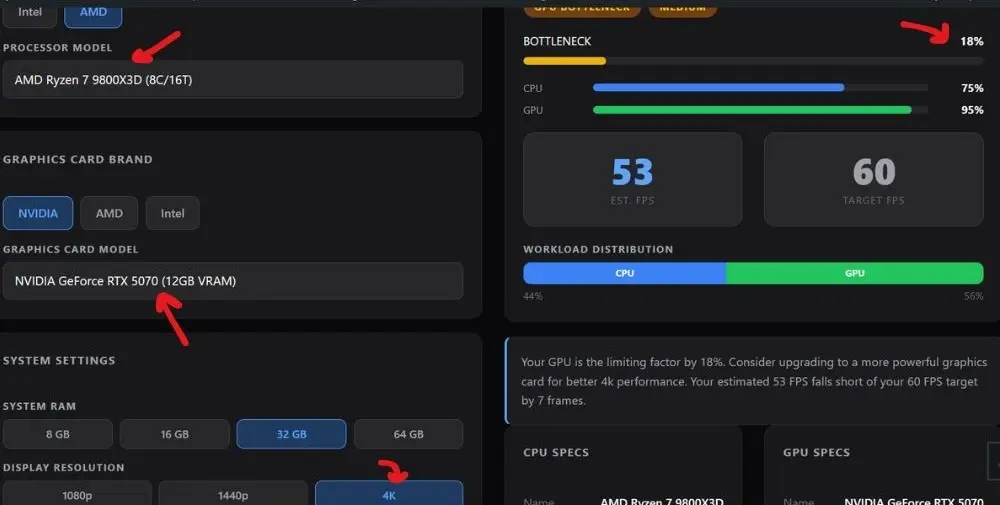
Bottleneck % — Paired with RTX 5070
Tested on Battle Royale settings, 32GB RAM
| CPU | Type | Bottleneck |
|---|---|---|
| 1080p | ||
| 7800X3D | CPU bottleneck | |
| 9800X3D | CPU bottleneck | |
| 1440p | ||
| 7800X3D | CPU bottleneck | |
| 9800X3D | CPU bottleneck | |
| 4K | ||
| 7800X3D | GPU bottleneck | |
| 9800X3D | GPU bottleneck | |
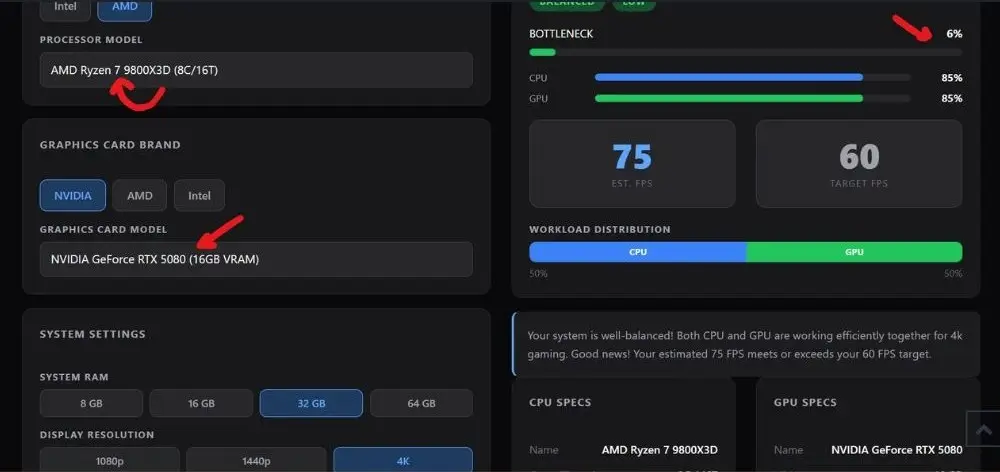
Bottleneck % — Paired with RTX 5080
Tested on Battle Royale settings, 32GB RAM
| CPU | Type | Bottleneck |
|---|---|---|
| 1080p | ||
| 7800X3D | CPU bottleneck | |
| 9800X3D | CPU bottleneck | |
| 1440p | ||
| 7800X3D | CPU bottleneck | |
| 9800X3D | CPU bottleneck | |
| 4K | ||
| 7800X3D | CPU bottleneck | |
| 9800X3D | CPU bottleneck | |
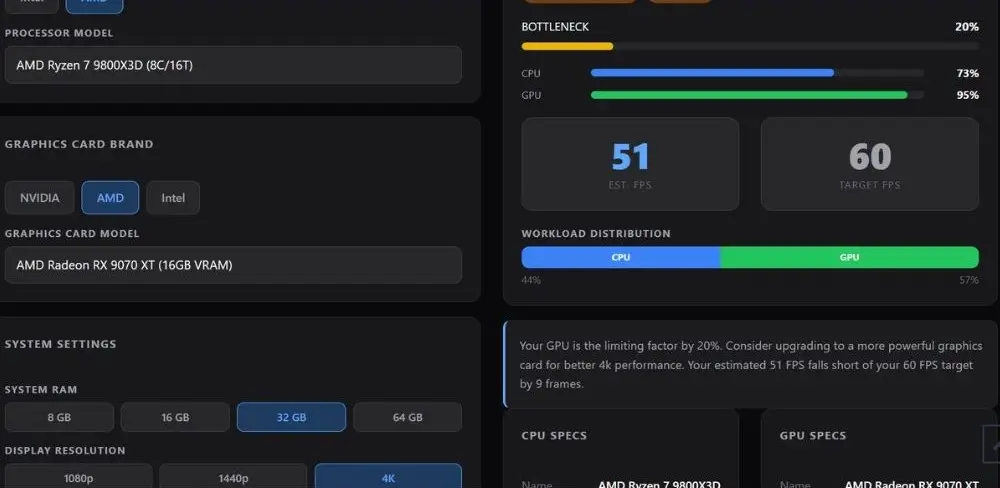
Bottleneck % — Paired with RX 9070 XT
Tested on Battle Royale settings, 32GB RAM
| CPU | Type | Bottleneck |
|---|---|---|
| 1080p | ||
| 7800X3D | CPU bottleneck | |
| 9800X3D | CPU bottleneck | |
| 1440p | ||
| 7800X3D | CPU bottleneck | |
| 9800X3D | CPU bottleneck | |
| 4K | ||
| 7800X3D | GPU bottleneck | |
| 9800X3D | GPU bottleneck | |
Here is what the data tells you in plain English. At 1080p, both CPUs show a mild CPU bottleneck with all three GPUs, with the 9800X3D coming in about 2-3% lower. That is a real but small advantage. At 1440p, both chips are effectively bottleneck-free, and the difference between them is within normal calculator variance. At 4K, the GPU becomes the limiting factor regardless of which CPU you pick, meaning both chips perform identically in actual gaming. The CPU choice simply does not matter at 4K.
Not sure what your specific combo looks like? Drop it into our bottleneck calculator and get your number in 30 seconds.
Gaming Performance: How Big Is the FPS Gap?
Based on a 45-game head-to-head tested at 1080p, the 9800X3D averages around 15% more FPS than the 7800X3D. But that average hides a wide range depending on the game.
| Game | 7800X3D (1080p avg FPS) | 9800X3D (1080p avg FPS) | Gap |
|---|---|---|---|
| The Last of Us Part 1 | ~195 | ~234 | +20% |
| Hogwarts Legacy | ~180 | ~218 | +21% |
| Starfield | 116 | 140 | +21% |
| Spider-Man Miles Morales | ~175 | ~201 | +15% |
| Assetto Corsa Competizione | 236 | 269 | +14% |
| Cyberpunk 2077 | ~158 | ~171 | +8% |
| Horizon Zero Dawn | ~192 | ~198 | +3% |
| Call of Duty: Black Ops 6 | ~310 | ~313 | +1% |
FPS data sourced from TechSpot 45-game benchmark (RTX 4090, 1080p). Approximate values used where exact figures were not published.
The pattern is clear. Games that lean hard on the CPU, things like Starfield, Hogwarts Legacy, and large open-world titles, show 20%+ gains. Competitive shooters like CoD and Fortnite show almost nothing because they are GPU-limited even at 1080p with how they handle frame delivery. The 9800X3D gains matter most in exactly the games that feel the roughest when your CPU is the bottleneck.
Also worth noting: the 1% lows improvement is often bigger than the average FPS jump. In The Last of Us Part 1, for example, the 9800X3D improved 1% lows by 33% even though average FPS was only up 20%. That means fewer hitches and stutters in the most demanding scenes, which is what actually makes a game feel smooth.
Does the Resolution You Play At Change Everything?
Yes, and this is probably the single most important thing in this whole comparison. The CPU gap between these two chips shrinks dramatically as you increase resolution.
1080p Gaming
Matters a lot
The CPU is doing real work here. 9800X3D can be 15-21% faster in CPU-heavy titles. If you game at 1080p 144Hz or higher, get the 9800X3D.
1440p Gaming
Depends on the game
In GPU-heavy AAA titles the gap shrinks to 5-8%. In CPU-heavy games it stays around 10-15%. The 7800X3D holds up well here for most people.
4K Gaming
Barely matters
The GPU is doing almost all the work at 4K. Both CPUs are within 2-3% of each other. The 7800X3D is the smarter buy if you only game at 4K.
This is why the resolution you play at should be the first thing you ask yourself before deciding. If you are on a 4K monitor and mostly play AAA titles, the 7800X3D saves you money and you will never feel the difference. If you are on a 1440p 165Hz or 1080p 240Hz monitor playing competitive games, the 9800X3D’s extra speed is real and worth it.
Ryzen 7 7800X3D vs Ryzen 7 9800X3D- Productivity and Creative Work
This is where the generational gap between Zen 4 and Zen 5 shows up the most in the Ryzen 7 7800X3D vs Ryzen 7 9800X3D comparison. The 9800X3D runs at 400-500MHz higher all-core clocks during sustained loads, on top of having better IPC from Zen 5. In productivity tasks, the gap is much bigger than in gaming.
Productivity Performance Gap (9800X3D vs 7800X3D)
Adobe Photoshop9800X3D ~25% faster
Video Render (Corona 10)9800X3D ~37% faster
Multi-thread compute9800X3D ~17% faster
Single-thread tasks9800X3D ~18% faster
Source: Club386 and PassMark benchmark data.
If you stream, edit video, or run anything demanding outside of games, the 9800X3D is a noticeably better chip. The 7800X3D was always a gaming-first CPU where the high clock was sacrificed a bit in favor of thermal headroom for the cache on top. The 9800X3D fixed that design with the cache underneath, and the result is a chip that is excellent at both.
Should You Upgrade From the 7800X3D to the 9800X3D?
This is the most-searched question in the 7 7800X3D vs 7 9800X3D comparison, and the honest answer is: it depends, but for most 7800X3D owners, the answer is no. Here is the breakdown by situation.
Upgrade: Yes
- You game at 1080p on a 165Hz or faster monitor
- You play CPU-heavy games and see the frame rate plateau
- You stream or do video work on the same machine
- You are pairing with an RTX 5080 or RTX 5090
- You want to overclock (the 9800X3D supports PBO and manual OC)
Upgrade: Skip it
- You game at 1440p or 4K and your GPU is your bottleneck
- You mostly play GPU-heavy AAA titles like Cyberpunk or Horizon
- Your current 7800X3D feels smooth and you have no complaints
- The savings would go toward a GPU upgrade, which helps more
- You play competitive shooters where the GPU is already maxed
The reality is that upgrading from a 7800x3D to an AMD Ryzen 7 9800x3D is a same-tier upgrade, one generation apart. Real forum discussions on HardForum and Reddit consistently land on the same conclusion: at 1440p and above, the 7800X3D is still holding nothing back in most games, and the money is better spent on a GPU upgrade or just saved. The upgrade makes the most sense if you are also getting a new GPU at the same time and want to make sure the CPU is not the limiting factor in your new build.
Motherboard Compatibility: Same Platform, No New Board Needed
Both chips use the AM5 socket, which is great news for anyone thinking about upgrading from a 7800X3D to a 9800X3D. You keep your motherboard and RAM. The only thing you might need is a BIOS update on older B650 or X670 boards to recognize the Ryzen 9000 series chip.
AM5 Chipset Compatibility for Both CPUs
X870 / X870E
Native support for both. Best for high-end builds with PCIe 5.0 and USB4.
B850 / B650E
Great mid-range option. May need BIOS update for 9800X3D on B650E boards.
B650
Works fine for both CPUs. BIOS update required for 9800X3D on boards made before late 2024.
For RAM, both chips love DDR5-6000 CL30 with EXPO enabled. That has been the sweet spot on AM5 for the AMD Ryzen 7 7800X3D. The 9800X3D handles faster speeds better and can scale up to DDR5-6400 with good results, but DDR5-6000 CL30 still gets you 95% of peak performance either way. If you are already on DDR5-6000, your RAM is fine for both chips. Check out our best RAM for gaming guide if you want to see the exact kits that work best on AM5.
Building fresh and need a board? Our best motherboard for Ryzen 7 9800X3D guide covers the top picks across every chipset tier.
Not sure which one fits your build?
Check Your Exact CPU and GPU Pairing
Our free bottleneck calculator shows you the exact bottleneck percentage for your specific CPU and GPU combo across all three resolutions. Takes 30 seconds.Use the Free Bottleneck Calculator
Frequently Asked Questions
These questions come from real threads on Reddit r/buildapc, Tom’s Hardware forums, and HardForum discussions about this exact comparison.
Is the AMD Ryzen 7 7800X3D still worth it in 2026?
Yes, absolutely. The 7800X3D has dropped in price and is still one of the best gaming CPUs you can buy. At 1440p and 4K it keeps up with the 9800X3D in most games because the GPU becomes the limiting factor first. The V-Cache design still delivers excellent 1% lows and frame consistency.u003cbru003eFor most gamers, especially at 1440p, the 7800X3D is the smarter buy because the savings can go toward a better GPU, which has a bigger impact on overall performance than the CPU upgrade would.
Is upgrading from the 7800X3D to the 9800X3D worth it?
For most people, no. If you game at 1440p or 4K and your GPU is already the bottleneck, you will not feel the difference. The upgrade makes the most sense if you play at 1080p high-refresh in CPU-bound games, if you also stream or do creative work on the same PC, or if you are adding a new high-end GPU at the same time.u003cbru003eOtherwise, the same money used to upgrade your GPU will give you a bigger real-world performance jump than swapping CPUs.
Do the 7800X3D and 9800X3D work on the same motherboard?
Yes, both use the AM5 socket. If you are upgrading from a 7800X3D to a 9800X3D, you keep your board and RAM. The only requirement is a BIOS update on older B650 and X670 boards to recognize the Ryzen 9000 series chip. Boards made after late 2024 typically support both out of the box. Check your motherboard manufacturer’s CPU support page before buying.
Does the 9800X3D run hotter than the 7800X3D?
Yes, slightly. The AMD Ryzen 9800X3D runs at higher clock speeds, and its Tjmax is the same 95 degrees C as other Ryzen 9000 chips, but it gets closer to that limit more often because it is actually using the extra thermal headroom to run faster. In gaming, the 9800X3D typically runs a bit warmer than the 7800X3D. Both chips run fine with a good 240mm AIO or a high-end air cooler. You do not need exotic cooling for either one.
Which is better for streaming: 7800X3D or 9800X3D?
In the Ryzen 7 7800x3D vs Ryzen 7 9800x3D comparison, the 9800X3D is meaningfully better for streaming. The 7800X3D was always a gaming-focused chip where AMD sacrificed some of the all-core clock speed to keep thermals in check with the cache sitting on top of the cores.u003cbru003eThe 9800X3D fixed that design, runs at higher sustained all-core frequencies, and benefits from better Zen 5 IPC. For anyone running OBS or other streaming software alongside gaming, the 9800X3D handles the extra workload much more comfortably, especially in demanding games where the 7800X3D was already near its CPU limit.
Does the 9800X3D have the same amount of 3D V-Cache as the 7800X3D?
Yes, both chips have 96MB of L3 cache total, with 64MB of that being 3D V-Cache stacked on top of the standard 32MB. The key difference is the physical location. The 7800X3D puts the cache on top of the cores (above the silicon), which limited how hot it could get and capped the clock speeds. The 9800X3D moves the cache to the bottom of the cores, which improves heat dissipation, allows higher boost clocks, and unlocks overclocking support that the 7800X3D never had.
Which CPU should I pair with the RTX 5080 or RTX 5090?
For those flagship GPUs, the 9800X3D is the better choice, especially at 1080p and 1440p. The RTX 5080 and 5090 have so much GPU headroom that a faster CPU makes a real difference in CPU-heavy games at lower resolutions.u003cbru003eThe 7800X3D still works well at 1440p and 4K with those GPUs, but it creates a small CPU-side bottleneck at 1080p that the 9800X3D mostly eliminates. Check out our u003ca href=u0022https://mypcbottleneck.com/best-gpu-for-ryzen-7-7800x3d/u0022u003ebest GPU for Ryzen 7 7800X3D guideu003c/au003e if you are working the other way around and trying to match a GPU to your existing chip.
Final Words
We may earn a commission from purchases made through these links, at no extra cost to you.
The Ryzen 7 7800X3D vs Ryzen 7 9800X3D is not a close call on paper, but it is a lot closer in real gaming than the spec sheet makes it look. The 9800X3D is the better chip, full stop. But the 7800X3D is still one of the best gaming CPUs ever made, and at its current price it is hard to argue against it for anyone gaming at 1440p or 4K.
The resolution you play at is everything here. At 1080p high refresh, get the 9800X3D. At 4K, save your money and put it toward your GPU instead.


