

Does the i5-12400F Bottleneck the RTX 4070?
Quick Verdict
The i5-12400F does not meaningfully bottleneck the RTX 4070 at 1440p. That is your sweet spot. At 1080p there is a 17% overall bottleneck but both components are being used well. At 4K the GPU becomes the limiting factor, not the CPU. This is a good pairing for 1440p gaming, and a genuinely budget-friendly one now that both parts sit a generation behind NVIDIA’s RTX 50-series and Intel’s newer Core chips.
If you already have an i5-12400F and you are looking at an RTX 4070, RTX 4070 Super, or RTX 4070 Ti, you want a straight answer before spending money. We ran all three combinations through our PC bottleneck calculator at 1080p, 1440p, and 4K so you do not have to guess.
The numbers below came directly from mypcbottleneck.com. No guessing, no copy-pasting from other sites. If you are new to the concept and want the basics first, our guide on what is bottlenecking my PC explains how CPU and GPU bottlenecks work before you dive into the numbers below.
Table of Contents
i5-12400F + RTX 4070 Bottleneck Results
1080p: Technically Bottlenecked, But Not in a Bad Way
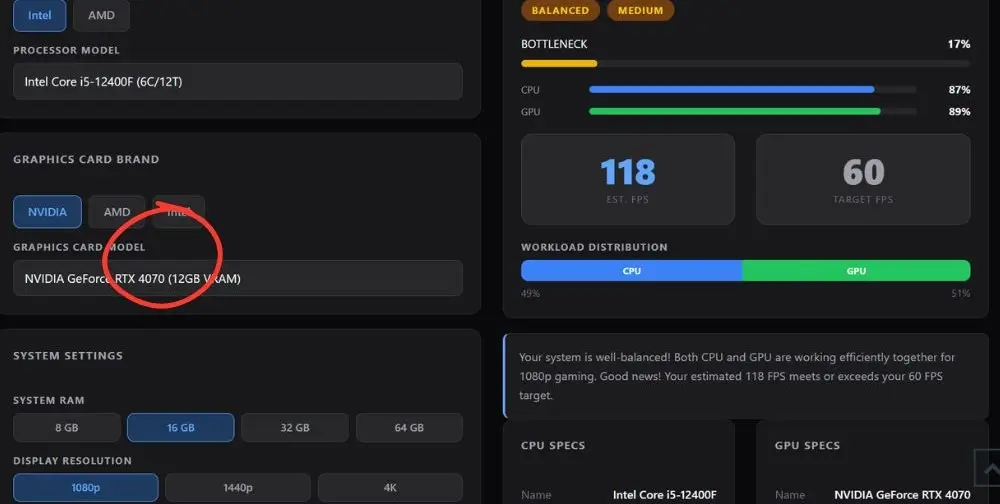
The calculator shows 17% at 1080p but labels it Balanced. That makes sense. Both the CPU (87%) and GPU (89%) are being used efficiently. The 17% figure means there is some imbalance, but you are still getting around 118 FPS which is well above the 60 FPS target. You will not feel this in most games.
The only time this becomes noticeable is in CPU-heavy titles like open-world games with lots of AI, or competitive shooters at 144Hz and above where the CPU needs to feed frames very fast. For regular 1080p gaming, this pairing is fine.
1440p: Almost Perfect
1% bottleneck at 1440p. That is about as balanced as it gets. The calculator calls it Balanced and that is exactly right. Around 89 FPS estimated, CPU and GPU both working well, and the GPU is doing most of the heavy lifting which is what you want.
If you are buying an RTX 4070 for a 1440p monitor, the i5-12400F will not hold it back in any meaningful way. This is the resolution this pairing was made for.
4K: The GPU Becomes the Bottleneck
At 4K you flip the situation. The GPU bottleneck jumps to 24% and the CPU drops down to 69% usage while the GPU sits at 95%. The RTX 4070 is working as hard as it can at 4K but it cannot push enough frames at that resolution. You are getting around 36 FPS estimated, which falls short of a smooth 60 FPS experience.
The good news is that this is not a CPU problem or an i5-12400F RTX 4070 bottleneck. The i5-12400F is not the issue here. The RTX 4070 is simply reaching its limit at 4K. Upgrading the CPU will not improve performance because the graphics card is already the limiting factor.
Does the i5-12400F Bottleneck the RTX 4070 Super?
The RTX 4070 Super is a stronger card than the standard 4070 and you can actually see the CPU start to feel more pressure as a result.
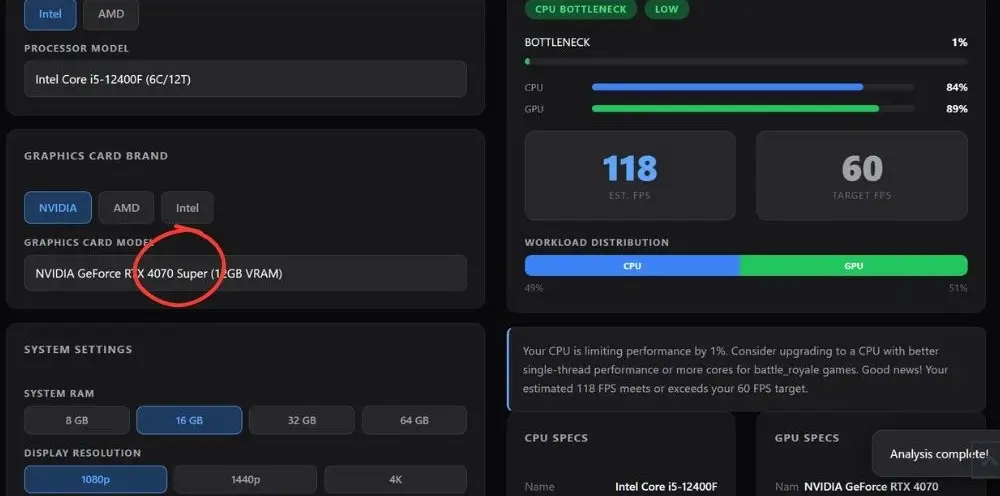
Does the i5-12400F Bottleneck the RTX 4070 Super? To get the honest answer, we ran the bottleneck test of i5-12400F with RTX 4070 Super at 1080p, 1440p, and 4K.
At 1080p, only 1% bottleneck. That is excellent. The Super is fast enough that at 1080p it is almost working in lockstep with the i5-12400F.
At 1440p, the bottleneck goes up slightly to 7% and now the CPU is running at 95%. The RTX 4070 Super is pushing harder and the i5-12400F is working harder to keep up. Still Balanced, still totally playable, still around 89 FPS estimated. You will not feel 7% in real games.
At 4K, same story as the regular 4070: the GPU hits its ceiling at 95% usage and you get around 39 FPS. Not great for 4K gaming but that is a GPU limitation, not a CPU one.
Bottom line on the 4070 Super: The i5-12400F handles it fine at 1080p and 1440p. If you are on a 1440p monitor this is a solid combination. If you want 4K, neither version of the 4070 is quite there at this resolution.
Does the i5-12400F Bottleneck the RTX 4070 Ti?
This is where things get interesting. The RTX 4070 Ti is a much more powerful card and the data shows the CPU starting to become a noticeable limit.
At 1080p, 6% CPU bottleneck. The CPU is at 89% while the GPU sits at 84%. The i5-12400F is actually working harder than the RTX 4070 Ti at 1080p. You still get around 118 FPS, which is fine, but you are leaving some GPU performance on the table.
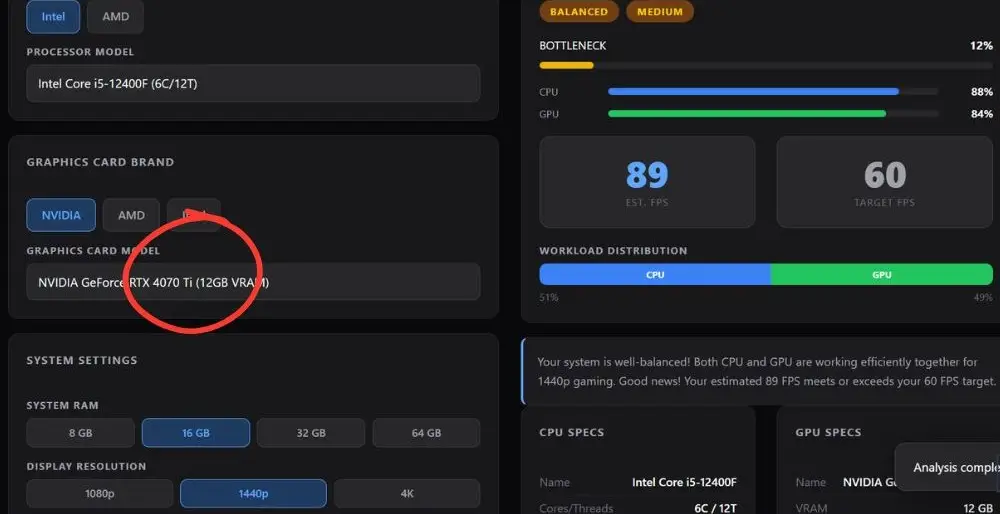
At 1440p, 12% bottleneck. Both components are pulling similar loads but the overall imbalance is more visible here. Still Balanced, still 89 FPS estimated, but if you have a 4070 Ti and want to squeeze every frame out of it at 1440p, the i5-12400F is starting to be the weaker link.
At 4K, the 4070 Ti performs noticeably better than the regular 4070 and Super. Only 8% bottleneck and 44 FPS estimated. Still under 60 FPS for demanding titles but much closer to playable for lighter games or with upscaling enabled.
Bottom line on the 4070 Ti: The pairing works but the 4070 Ti is slightly too powerful for the i5-12400F to fully unlock at 1080p. At 1440p it is still fine for most people. If you are buying a 4070 Ti specifically to max out 1440p performance, consider whether a newer CPU like the i5-13600K, i5-14600K, or a Ryzen 5 7600X would serve you better long term. And if you are eyeing something even higher-end down the line, our best CPU for RTX 5080 guide shows just how much CPU horsepower that tier actually demands.
Which RTX 4070 Version Should You Pair With the i5-12400F?
Here is the quick comparison across all three cards at 1440p (the most popular gaming resolution):
- RTX 4070: 1% RTX 4070 bottleneck. Near-perfect balance. Best pick for the i5-12400F.
- RTX 4070 Super: 7% bottleneck. Still great. Slightly more GPU power for not much more bottleneck.
- RTX 4070 Ti: 12% bottleneck. Works, but the CPU starts becoming a limit. You may not fully use what you paid for.
The regular RTX 4070 is the most balanced choice for an i5-12400F system. The Super is also a solid option if you can get a good deal. The Ti is a bit much for this CPU, especially if you care about getting the most out of every dollar spent on the GPU.
You can also run your exact build through our bottleneck calculator to see your specific RAM and resolution combo. The numbers above use 16GB RAM which is the most common configuration.
Worth noting heading into 2026: all three of these GPUs are now previous-generation cards, with NVIDIA’s RTX 5070 and RTX 5070 Ti sitting above them in the current lineup. That actually works in your favor here; last-gen RTX 4070-series cards are easier to find at discounted prices, and the i5-12400F remains a perfectly capable match for them at 1440p, which is exactly what the numbers above confirm.
Should You Upgrade the CPU or Stick With the i5-12400F?
For most people: stick with what you have. The i5-12400F is a capable 6-core, 12-thread processor that still holds up well in 2026. If you are gaming at 1440p with an RTX 4070 or 4070 Super, there is no urgent reason to upgrade the CPU. The bottleneck numbers back this up.
The cases where a CPU upgrade makes sense are narrow:
- You are playing at 1080p with a 144Hz or 240Hz monitor and you are actually CPU-limited in competitive titles
- You bought an RTX 4070 Ti and want to use all of it at 1440p
- You are already on an LGA1700 board and can drop in a better chip cheaply
If none of those apply, upgrade the GPU first. The bottleneck data shows the GPU is the performance ceiling at 1440p, not the CPU. To understand which component is actually holding your system back, check out our guide on how resolution affects CPU and GPU bottlenecks. And if your budget points toward something more modest than a 4070-class card, our best CPU for RTX 5060 guide breaks down pairings at the entry-level end of the current lineup.
Frequently Asked Questions
Is the i5-12400F still good for gaming in 2026?
Yes. It is a 6-core, 12-thread Alder Lake chip that still performs well for most gaming workloads, especially at 1440p paired with a mid-high range GPU like the RTX 4070. It starts to show its limits only in very CPU-heavy scenarios at 1080p high refresh rates.
Will the i5-12400F bottleneck the RTX 4070 at 1440p?
No. Our calculator shows only 1% bottleneck at 1440p with this pairing. Both components are well balanced and you get around 89 FPS estimated. This is one of the best resolution matches for this CPU and GPU combination.
Is the i5-12400F good for 1080p gaming?
Yes, with a note. At 1080p the 17% bottleneck figure looks high on paper but both the CPU and GPU are running at 87% and 89% respectively. You are getting about 118 FPS. Where you might notice a limit is in CPU-heavy games at very high frame rate targets like 165Hz or 240Hz competitive gaming.
What is the best CPU to pair with the RTX 4070?
For a zero-bottleneck 1440p build, look at options like the Ryzen 5 7600X or i5-13600K. For a closer look at how the i5-12400F stacks up against other budget and mid-range CPUs specifically for the RTX 4070, see our full best CPU for RTX 4070 roundup. If you are instead shopping for a current-generation GPU rather than the 4070, check our guide on the best CPU for RTX 5070 and 5070 Ti to see how we test pairings at different resolutions using the same calculator method.
Does the i5-12400F bottleneck the RTX 4070 Ti?
Slightly, yes. At 1080p there is a 6% CPU bottleneck, meaning the GPU is not being fully used. At 1440p it rises to 12%. Still playable and Balanced overall, but if you paid for a 4070 Ti you might want a newer CPU eventually to get every frame the card can deliver.
Can I run RTX 4070 games at 4K with an i5-12400F?
You can run games at 4K but the RTX 4070 becomes the bottleneck, not the CPU. With the standard 4070 you get around 36 FPS estimated at 4K, which is below 60 FPS. With DLSS enabled on supported titles you can boost that significantly and 4K becomes much more viable.
Final Words
The verdict across all three pairings is consistent: the i5-12400F is not the weak link at 1440p, which is exactly where this CPU and the RTX 4070 family are meant to live. If you already own this chip, there is no need to rush a CPU upgrade just to run an RTX 4070, 4070 Super, or 4070 Ti. Spend that money on the GPU itself, or on getting your resolution and settings dialed in, and run your own numbers through our free PC bottleneck calculator before making any final call.
