
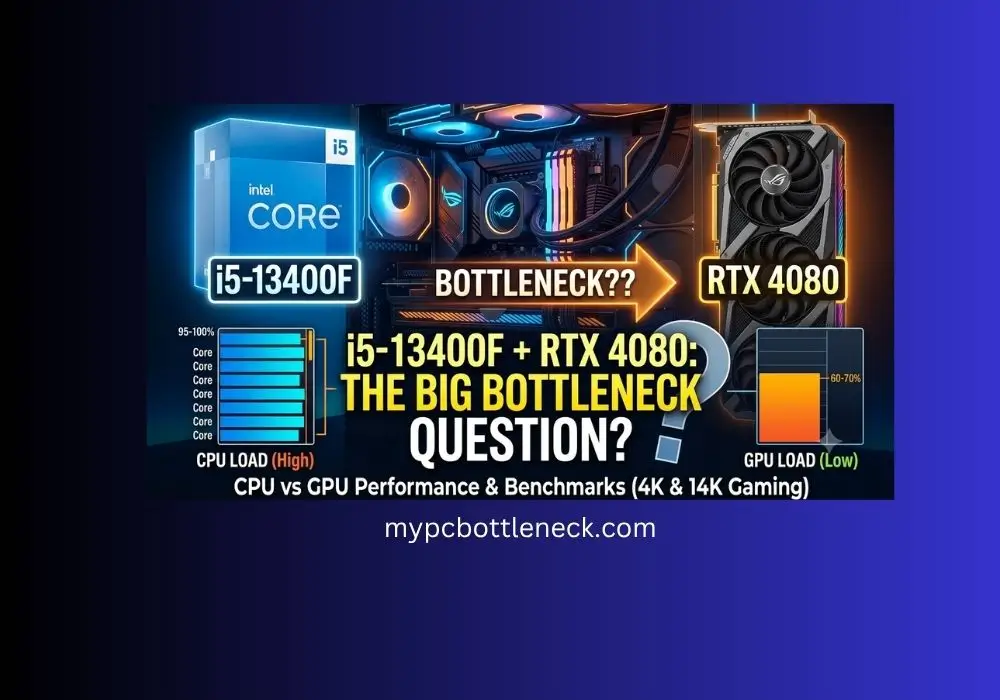
Does the i5-13400F Bottleneck the RTX 4080
A reader emailed me last week asking Does the i5-13400F bottleneck the RTX 4080. He had a build list, an i5-13400F he already owned from a previous PC, and one question: does it make sense to drop an RTX 4080 into it, or would he be wasting the card’s potential? It’s one of the most common questions we get about this CPU and GPU pairing, so let’s break it down properly with real numbers instead of forum guesswork.
Quick answer: the i5-13400F does not meaningfully bottleneck the RTX 4080 at 1440p gaming or 4K gaming. At 1080p you’ll see some CPU-side limitation in a handful of demanding titles, but for anyone gaming above 1080p, this pairing holds up well. If you want to check your own numbers instead of taking our word for it, our CPU and GPU bottleneck calculator will estimate it for your exact setup.
Table of Contents
Why This Question Comes Up So Often
The 13400F gets treated like a budget chip because it’s priced like one, but it’s not actually weak. It’s a 10-core, 16-thread hybrid CPU with 6 Performance-cores and 4 Efficient-cores, a 4.6 GHz boost clock, and 20MB of cache (full specs are on Intel’s official product page if you want to verify against your own chip). That’s a lot of processor for the price, and it shares its core layout with chips that were flagship-tier just a couple of years earlier. The confusion comes from assuming any “i5” automatically can’t keep up with a card like the 4080. That assumption made more sense five years ago than it does now.
What Actually Happens at Each Resolution
1080p: This is where the CPU works hardest relative to the GPU. At 1080p, the RTX 4080 can push frame rates high enough in competitive and moderately demanding titles that the 13400F becomes the limiting factor before the card does. If you’re chasing max frames in fast-paced shooters specifically at 1080p, this is the one scenario where a stronger CPU like a 13600K or a 7800X3D would show a real, measurable difference. If you want to see exactly how this plays out on your own hardware, our guide on CPU bottlenecking GPU performance walks through the symptoms and fixes in more detail.
1440p: This is the sweet spot for this exact pairing. At 1440p, the GPU workload increases enough that the CPU stops being the bottleneck in the vast majority of games. This is genuinely the resolution the RTX 4080 (see NVIDIA’s official RTX 4080 specs for the full breakdown) was designed around, and the 13400F keeps pace with it comfortably.
4K: At 4K, the GPU carries almost the entire workload. The 13400F barely gets stressed at this resolution because the card itself naturally becomes the limiting factor, which is exactly how it’s supposed to work. You get essentially full use of what you paid for. For a broader look at how the GPU side of this equation works, check our GPU bottleneck guide.
The pattern across all three resolutions is consistent: the higher you go, the less the CPU matters, and the more the GPU dictates your frame rate. That’s true of almost every CPU and GPU pairing, but it’s especially relevant here because the 4080 is a card built for 1440p and 4K, not for maxing out 1080p esports titles.
Where People Get Tripped Up
A lot of the panic around this pairing comes from people looking at 1080p numbers and assuming they apply everywhere. If you only look at 1080p benchmarks, the 13400F can look like it’s “holding back” a 4080. But almost nobody buying a 4080 is gaming at 1080p long-term. This card exists for 1440p and 4K, and at those resolutions the story changes completely.
The other factor that trips people up about the i5-13400f RTX 4080 bottleneck is that RAM speed and channel configuration can skew results more than the CPU model itself. If you’re running the 13400F with slow or single-channel memory, you’ll see worse numbers than the chip is actually capable of, and it’ll look like a CPU problem when it’s really a memory configuration problem. Before blaming the processor, confirm XMP or EXPO is enabled in BIOS (here’s exactly how to enable XMP if you haven’t already) and that you’re running dual-channel RAM. The difference between single-channel and dual-channel RAM is bigger than most people expect. This alone accounts for a meaningful chunk of the “my 13400F bottlenecks everything” complaints you’ll see on forums.
Background software matters too. Overlay apps, recording software, and browser tabs sitting open in the background eat into the CPU’s available threads. On a 6+4 core chip, that overhead is more noticeable than it would be on a higher core count CPU, since there’s less spare headroom to absorb it.
Should You Upgrade the CPU Instead?
If you’re building fresh and gaming exclusively at 1440p or 4K, there’s no real reason to pay more for a 13600K or 14600K just to pair with a 4080, and neither one belongs on a shortlist of the best CPU for RTX 4080 builds unless you specifically need the extra cores. You’d see the difference mainly in CPU-heavy genres like simulation and grand strategy games, or if you drop down to 1080p for competitive play.
If you already own the Intel Core i5-13400F and you’re deciding whether to keep your current platform or do a full upgrade, keep it. This isn’t a case where your CPU is quietly wasting the graphics card’s potential. Put the budget into the GPU itself, a better monitor, or faster storage instead of a CPU upgrade you won’t feel at these resolutions.
Not sure where your own build actually stands? Run your exact CPU and GPU through our PC bottleneck calculator to get a percentage instead of guessing from forum posts.
The one exception worth flagging: if your use case is a mix of gaming and heavier multitasking, like streaming while gaming or running CPU-intensive background tasks, the extra cores on a 13600K or a Ryzen chip with more threads will show up in that specific workload, separate from the bottleneck question entirely.
Calculator Estimates vs. Real Benchmarks: What the Gap Actually Looks Like
It’s worth being upfront about something most bottleneck articles gloss over: no major outlet has published a dedicated i5-13400F + RTX 4080 benchmark. Reviewers typically test the 13400F against mid-range cards like the RTX 3060 Ti, and test the 4080 against flagship CPUs like the 7800X3D or 13900K, specifically to keep the CPU out of the equation. That means every claim about this exact pairing, ours included, is an estimate built from scaling patterns, not a single verified test bench.
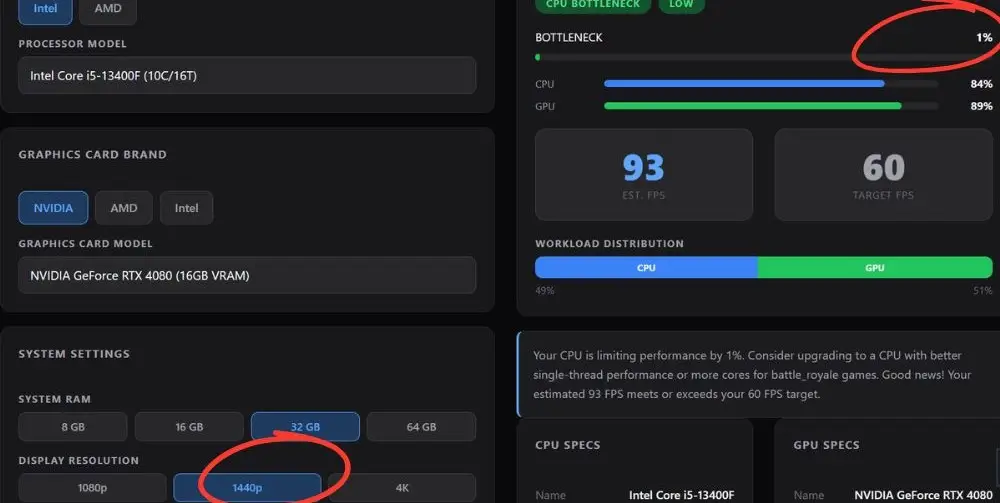
Here’s what that looks like in practice using our own PC bottleneck calculator: at 1440p, this pairing shows a 1% bottleneck with the CPU and GPU both working hard (84% and 89% utilization) and an estimated 93 FPS. That tracks with the real-world pattern independent reviewers have found; the 13400F doesn’t meaningfully hold back GPUs at 1440p.
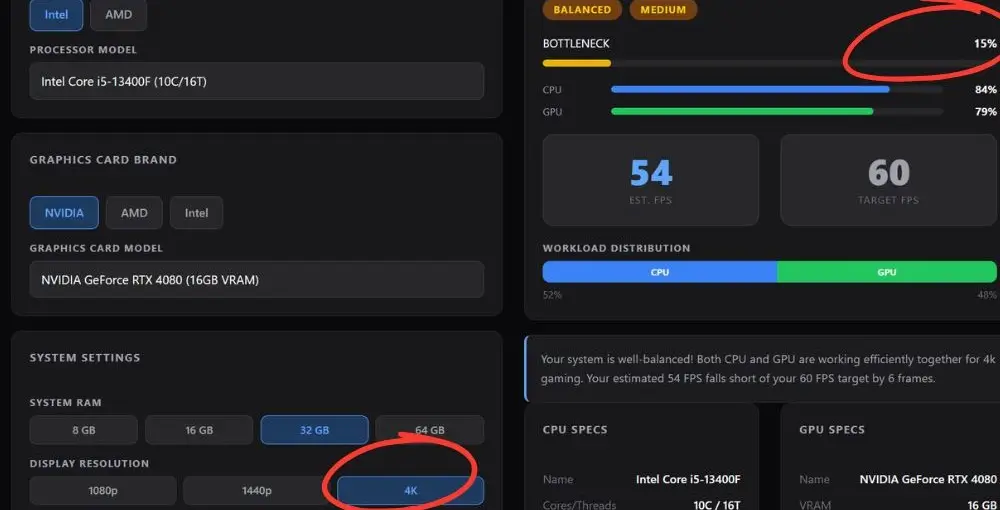
At 4K, though, our calculator shows the bottleneck rising to 15% and GPU utilization dropping to 79%. That’s worth flagging honestly: it runs counter to how bottlenecks are supposed to behave. Going up in resolution shifts more of the workload onto the GPU, so bottleneck percentage should fall as resolution increases, not climb. If you see a result like this on any calculator, ours included, treat it as a sign the model is factoring in something resolution- or game-specific rather than a literal prediction that your 4K performance will lag behind 1440p relative to the GPU’s capability.
The practical takeaway: use calculator output as a rough directional signal, not a lab-verified number. If you want ground-truth data for your specific games, the most reliable approach is still watching CPU and GPU utilization in your own system (via MSI Afterburner, HWInfo, or Task Manager’s performance tab) while actually playing at your target resolution.
Frequently Asked Questions
Will i5 bottleneck 4080 in general, not just the 13400F?
It depends on which i5. Older or lower-tier i5 chips (like an i5-10400 or i5-9400) can bottleneck a 4080 even at 1440p, since they lack the core count and clock speeds newer i5s have. But recent i5 chips, 12th-gen and up, including the 13400F, 13600K, and 14600K, are all strong enough to keep up with a 4080 at 1440p and 4K without meaningful loss.
Is the i5-13400F good enough for a 4080?
Yes. At 1440p and 4K, the two are well matched, and you’ll get close to full use of the GPU’s performance.
Will I lose FPS with this combo compared to a more expensive CPU?
At 1080p, yes, somewhat, in CPU-heavy games. At 1440p and 4K, the difference shrinks to the point where it’s not worth chasing for most people.
Does the 13400F support DDR5?
Yes, it supports both DDR4 and DDR5 depending on your motherboard, which is one reason it’s a popular choice for people upgrading an older build without needing a full platform swap.
Should I upgrade my CPU before buying the RTX 4080, or after?
If you’re gaming at 1440p or above, buy the 4080 first. The CPU is not your limiting factor at those resolutions, and the GPU will make the bigger visible difference.
Is this a better value pairing than a 13600K with a weaker GPU?
For most gamers, yes. Putting more of the budget into the GPU tends to improve average FPS more than putting it into the CPU once you’re above 1080p.
Does RAM speed actually matter for this pairing?
Yes, more than people expect. Dual-channel, XMP-enabled memory at the CPU’s supported speed will get noticeably better results than single-channel or unoptimized RAM, sometimes enough to look like a completely different CPU.
The Bottom Line-Does the i5-13400F Bottleneck the RTX 4080
If you’re gaming at 1440p or 4K, the i5-13400F and RTX 4080 make a genuinely solid pair. You won’t be leaving significant performance on the table, and the money you’d spend stepping up to a pricier CPU is better spent elsewhere in the build. The only scenario where this pairing shows real strain is 1080p in CPU-heavy titles, and even then it’s a matter of losing some headroom, not the GPU being wasted.
