
Does the Ryzen 7 5800X3D bottleneck RTX 5070
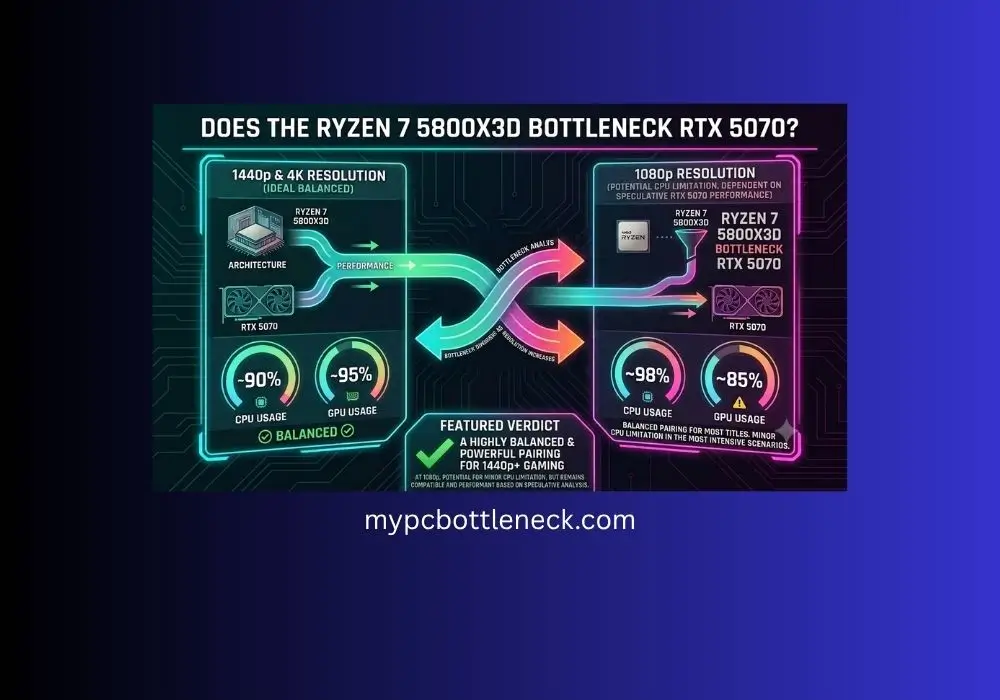
Does the Ryzen 7 5800X3D bottleneck RTX 5070? Short answer: no, not in any way that matters. The 5800X3D keeps up with the RTX 5070 in almost every game once you get past 1080p. The only place it shows its age is in CPU-heavy games at 1080p, and even then the gap is small. Here’s what real testing actually shows, not a percentage guess from a calculator.
Quick Verdict by Resolution
Based on real benchmark scaling data, not a calculator estimate. See the full breakdown below.
Table of Contents
Why the 5800X3D Still Holds Up
Is 5800X3D good for RTX 5070 builds specifically? Based on real testing, yes. The cache advantage this chip has holds up well against this exact tier of GPU, especially once you move past 1080p.
The Ryzen 7 5800X3D came out back in the AM4 days, but it’s not a weak chip. It has 96MB of L3 cache, way more than most CPUs from its era. That giant cache is what makes 3D V-Cache chips so good at gaming, since the CPU can pull game data from super fast on-chip memory instead of waiting on regular system RAM. That’s why this older CPU can still hang with newer GPUs like the RTX 5070 without holding it back much.
Does the Ryzen 7 5800X3D bottleneck RTX 5070? What Real Testing Shows
TechSpot ran a dedicated CPU and GPU scaling test using the 5800X3D against a Ryzen 5 7600X for Ryzen 7 5800X3D RTX 5070 bottleneck, a Ryzen 9800X3D, and a Ryzen 5 5600, paired with GPUs ranging from the RTX 5090 down to the RX 9070. The RTX 5070 wasn’t one of the exact cards tested, but it sits below the RTX 5080 in performance, and the pattern from that testing tells us almost everything we need to know, since a slower GPU means less chance of the CPU holding anything back.
1080p
This is the only resolution where the 5800X3D’s age really shows, and only in certain games. In Marvel Rivals at 1080p on medium settings paired with an RTX 5090, the 5800X3D ran about 7% slower than the 7600X in average frame rate, and 14% slower in 1% lows. In a heavier CPU-bound game, the gap widens. In Space Marine 2, a very CPU-heavy title, the 5800X3D was 31% slower than the 9800X3D at 1080p while paired with an RTX 5090. That said, once the GPU used was a step down to something closer to RTX 5070 territory, the gap tends to shrink a lot, since the GPU itself becomes the limiting factor before the CPU does.
1440p
Looking at 5800X3D vs 5070 1440p performance specifically, this is where the story flips. At 1440p in Marvel Rivals with an RTX 5080, there was no performance difference at all between the 5800X3D, the 7600X, and the 9800X3D, since the game was fully GPU-limited at 94 fps.
The RTX 5070 is slower than the RTX 5080, which means this GPU-limited pattern would show up even more strongly. In plain terms, the RTX 5070 would run out of steam before the 5800X3D does at 1440p in the vast majority of games.
4K
At native 4K, the 5800X3D and 9800X3D delivered identical performance even paired with an RTX 5090, capped at 90 fps. That’s about as clear a sign as you can get that the GPU, not the CPU, is doing all the limiting at 4K. With something in the RTX 5070 class instead of a 5090, this effect would be even more pronounced, since the GPU has far less raw power to begin with.
Source: TechSpot’s dedicated 5800X3D CPU and GPU scaling review, which tested the chip against multiple modern GPUs across resolutions. Full spec sheet for the chip, including its 96MB L3 cache and 105W TDP, is on AMD’s official product page.
Do You Need to Upgrade?
If you already own a 5800X3D and you’re building or buying an RTX 5070, you don’t need to touch your CPU. This pairing lands solidly GPU-limited at both 1440p and 4K, which is exactly where this GPU is meant to be used. Save your money for RAM speed, storage, or a better cooler instead.
The one case where an upgrade makes sense is if you’re chasing high refresh rate competitive gaming at 1080p in CPU-heavy titles. That’s the only scenario where the age of the 5800X3D shows up in real testing. If that’s your use case, a same-socket swap to the Ryzen 7 5700X3D (no motherboard change needed) or a jump to AM5 with something like the 9800X3D would actually get you more frames. For everyone else, especially anyone playing 1440p or 4K, the 5800X3D is not holding your RTX 5070 back in any way that matters.
If you’re searching for the best CPU for RTX 5070 AM4 builds beyond just the 5800X3D, our Best CPU for RTX 5070 and RTX 5070 Ti guide breaks down the full lineup, including AM4 and AM5 picks. And if you’re staying on AM4 and want to compare the 5800X3D against other same-socket chips, check our Best AM4 CPU for Gaming roundup.
Not sure your PC is actually CPU-bound versus GPU-bound in the first place? Our GPU Bottleneck Explained guide breaks down what the usage numbers actually mean before you spend money. If your RAM is old or running below rated speed, that can also fake a CPU bottleneck, worth a check against our RAM Bottleneck Symptoms guide. And if you want to squeeze a bit more out of the 5800X3D without spending anything, our Overclocking CPU beginner’s guide covers safe settings for AM4 chips, though note the 5800X3D has a locked multiplier so core overclocking isn’t an option, memory and Infinity Fabric tuning still help.
Curious what your RAM setup should look like alongside this pairing? Check our DDR4 RAM Speeds for Gaming guide for the sweet spot on AM4.
What Real Owners Are Saying
This exact question comes up a lot on hardware forums, and the consensus from actual builders lines up with what the benchmark testing shows.
From Tom’s Hardware forums: A user asked whether their 5800X-series chip would bottleneck an RTX 5070 at 1440p. Other members pointed out that “bottleneck” gets thrown around too loosely, since the real question is whether the build hits the FPS and experience you actually want. Their take was that these chips still play 1440p well, and the small FPS gap versus a newer CPU usually isn’t something you’d notice mid-game.
From PCPartPicker forums: A builder pairing a 5800-series CPU with a freshly bought RTX 5070 for 1080p high refresh gaming asked the same bottleneck question. Responders noted it depends heavily on the game, since some titles lean CPU-heavy and others lean GPU-heavy, and that what really matters is whether the system delivers the frame rate you’re after, not a percentage on a calculator.
From Overclockers UK forums: A gamer running a 5800-series CPU with a 1440p 165Hz monitor and a newer GPU noticed low GPU usage and dropped frames in a demanding, CPU-heavy game. Other members explained this is exactly what a CPU bottleneck looks like in that scenario, and that lowering in-game settings can sometimes make frame drops worse rather than better, since it shifts more of the load onto the CPU instead of the GPU. Their advice was that a same-socket X3D chip would help far more than tweaking settings.
Frequently Asked Questions
Does the Ryzen 7 5800X3D bottleneck the RTX 5070 at 1440p?
No, not meaningfully. Real testing with a stronger RTX 5080 already showed a full GPU-limited result at 1440p, meaning the CPU wasn’t holding anything back. The RTX 5070 is slower still, so this pairing runs GPU-limited at 1440p in nearly every game.
Is the 5800X3D still good enough for a new RTX 5070 build in 2026?
Yes. The 96MB of 3D V-Cache still keeps it competitive in gaming even years after release. If you already own one, there’s no need to replace it just because you’re adding a new GPU.
When does the 5800X3D actually become the limiting factor?
Mainly at 1080p in CPU-heavy games with a much faster GPU than the RTX 5070, and mainly if you’re chasing very high refresh rates. In GPU-heavy games or at 1440p and 4K, it stays out of the way.
Should I upgrade to the 5700X3D or 9800X3D instead?
Only if you’re chasing high refresh rate 1080p competitive gaming in CPU-heavy titles. For 1440p or 4K gaming with the RTX 5070, the 5800X3D already keeps up with the GPU, so an upgrade wouldn’t add much.
Will lowering in-game settings fix a CPU bottleneck?
Not always, and it can actually backfire. Lowering graphics settings mainly reduces the load on the GPU, not the CPU. If your CPU is already the limiting factor, dropping settings can shift even more of the workload onto it and make frame drops worse instead of better, as forum users running this exact combo have reported firsthand.
Can I overclock the 5800X3D to fix a bottleneck?
Not on the CPU cores. The 5800X3D has a locked multiplier, so there’s no core overclocking available, unlike a regular 5800X. You can still tune memory speed and Infinity Fabric for a small gain, but the bigger fix for a real CPU bottleneck is a same-socket chip swap, not overclocking.
Final Thoughts-Does the Ryzen 7 5800X3D bottleneck RTX 5070
So concluding “Does the Ryzen 7 5800X3D bottleneck RTX 5070”, the Ryzen 7 5800X3D and RTX 5070 make a solid pair. That giant 96MB cache is doing real work even years after this chip launched, and real testing backs that up instead of just a calculator guess. At 1440p and 4K, where this GPU is meant to live, the CPU stays out of the way completely. The only spot where it shows any age is 1080p in CPU-heavy games, and even there the gap is small enough that most people would never notice it mid-game.
If you already own a 5800X3D, keep it. Put your money into the GPU, RAM, or storage instead. The only real reason to swap it out is if you’re chasing max frames at 1080p in competitive, CPU-heavy titles. Everyone else can build this pairing with confidence and skip the upgrade anxiety.
