

Does i7-12700K Bottleneck RTX 5080? Benchmark Breakdown
Does i7-12700K Bottleneck RTX 5080? For most gamers, the answer is no, not in any way that matters, especially once you move past 1080p. The 12700K still holds its own next to a flagship card like the 5080, but the honest answer depends on your resolution and the games you play. Instead of just repeating that answer, this guide walks through what actually happens at each resolution and shows you how to read a bottleneck calculator correctly so you are not left guessing.
Quick Answer
At 1440p and 4K, the RTX 5080 carries most of the workload and the 12700K keeps pace fine. At 1080p, especially in CPU heavy games, the 12700K can start holding the 5080 back a bit more. If you are gaming at 1440p or higher, you do not need to upgrade your CPU just to “unlock” this GPU.
Table of Contents
How This Pairing Performs by Resolution
The RTX 5080 is a strong card all on its own. Independent testing has clocked it around the high 170s for average frames per second at 1440p and roughly the mid 130s at 4K in mixed game testing, putting it close behind the RTX 4090 in raw output. Those numbers come from a fast CPU paired with the card, so they show the GPU’s top speed, not exactly what a 12700K will give you. Still, they tell you how much room the card has to work with. If you want to see which chips get closest to that top speed, check our best CPU for RTX 5080 guide.
Now let’s talk about the 5080 with 12700k specifically, and how much of that top speed the 12700K actually lets you reach. This pairing is a really clean example of a resolution bottleneck, where the part holding you back switches from the CPU to the GPU as you go up in resolution.
| Resolution | Who’s in Charge | What to Expect |
|---|---|---|
| 1080p | CPU has more influence | Some titles, especially competitive shooters and simulation heavy games, can be limited by the 12700K |
| 1440p | Shared, GPU leaning | The 5080 starts doing the heavy lifting, CPU limits become rare |
| 4K | GPU almost entirely | The 12700K has plenty of room to spare, the 5080 is the deciding factor |
What Our Calculator Shows at Each Resolution
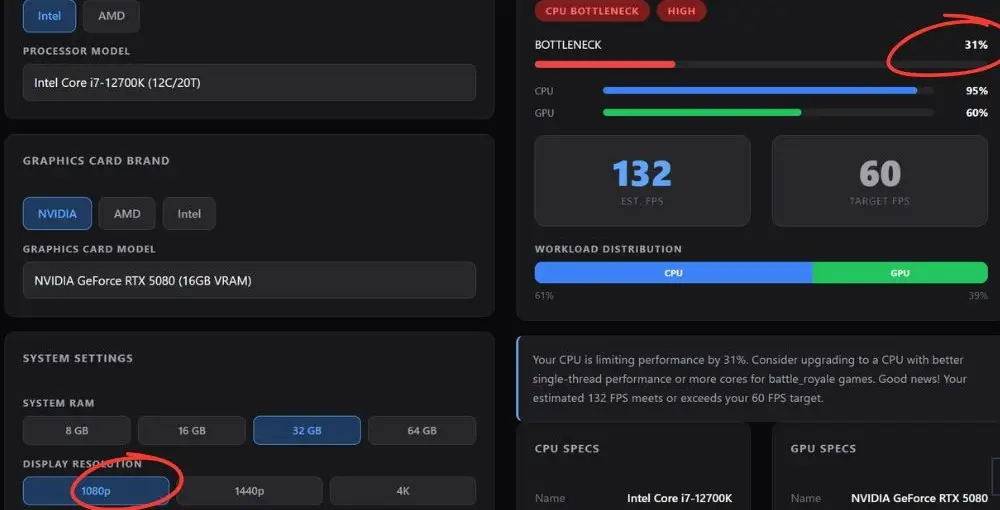
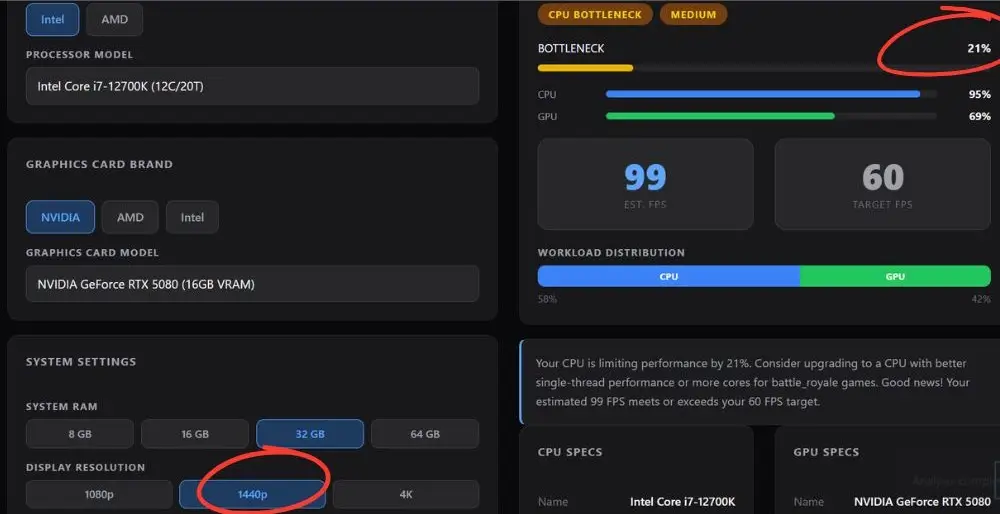
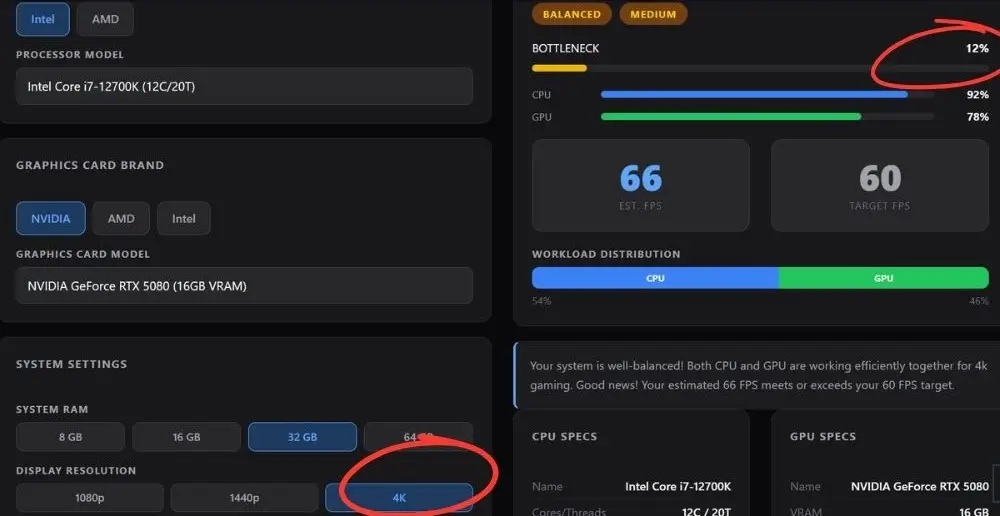
To get the answer to ” Does i7-12700K Bottleneck RTX 5080?, we also ran the i7-12700K and RTX 5080 through our own bottleneck calculator at all three common resolutions. Here is what it estimated, along with how that estimate compares to real-world game testing.
1080p
Our calculator models this as a stronger CPU limitation than most real-world game testing shows at this resolution. This is really the spot where an i7-12700 bottleneck shows up the most. The direction is correct: 1080p is genuinely where the 12700K works hardest, but treat the exact number as a rough estimate rather than a precise measurement.
1440p
Real world testing at 1440p generally shows the GPU carrying more of the load than this estimate suggests. This is a good example of why it helps to read the resolution trend on the calculator rather than treating any single number as final.
4K
This is the estimate that lines up closest with real game testing for 12700kf 5080 pairing. At 4K, the GPU is doing almost all the work and the CPU has room to spare, which matches what independent benchmarks show for this pairing.
How to Correctly Read Bottleneck Calculator Results
This applies to any bottleneck calculator, not just ours, so it is worth understanding once and using every time. We cover this in more depth in are bottleneck calculators accurate, but here is the short version.
It’s a model, not a measurement. A calculator averages performance patterns across a huge library of games at general settings. A real benchmark tests one specific game, on one specific system, at one specific setting. Different methods will always produce different numbers, and that is normal, not a sign that either one is wrong.
Trust the trend more than the exact number. If a calculator shows the bottleneck dropping as resolution goes up, that pattern is almost always accurate even if the precise percentage shifts around. That trend is what should guide your decisions.
Your games matter more than the average. A calculator blends results across roughly a hundred titles. If you mostly play one type of game, competitive shooters versus open world RPGs versus strategy games, your real experience can land above or below the average shown.
Does i7-12700K Bottleneck RTX 5080?-Does DDR4 vs DDR5 Matter Here?
This comes up a lot in PC building forums, and it is a fair question since the 12700K supports both. DDR5 gives you more memory bandwidth, which can help feed the CPU slightly faster in some titles, but it is a small factor compared to resolution and settings. If you already own a DDR4 build, it is not worth tearing apart your system just to chase this. If you are building fresh, DDR5 is the better long term choice, but do not expect it to meaningfully change whether the 5080 feels held back. For the full comparison, see our DDR4 vs DDR5 RAM guide.
How to Tell if You’re Actually Bottlenecked
Instead of relying only on a calculator, you can check your own system directly while gaming for the i7-12700k and 5080 bottleneck. This ties back to the same core idea behind any CPU bottleneck: one component is waiting on the other, and the usage numbers on your screen will tell you which one.
1. Open a monitoring overlay like MSI Afterburner or the built in Windows Task Manager performance tab while playing.
2. Watch your GPU usage percentage. If it is sitting near 95 to 99 percent, your GPU is the limiting factor, which is normal and good.
3. If GPU usage drops well below 90 percent while your CPU usage stays high, that is a real sign the CPU is holding things back in that specific game. Pulling up your actual FPS counter alongside usage percentages makes it a lot easier to confirm what you are seeing.
4. Test this at your actual playing resolution and settings, not the lowest possible settings, since lowering settings shifts more load onto the CPU and can make a bottleneck look worse than it really is during normal play.
Should You Upgrade Your CPU?
| Your Setup | Recommendation |
|---|---|
| Gaming at 1440p or 4K | Keep the 12700K, it is not your limiting factor |
| Competitive 1080p at 240Hz plus | A newer CPU like a 14700K or a Ryzen 7 9800X3D can meaningfully help |
| Mixed use, content creation plus gaming | Keep the 12700K, it still handles multitasking well |
Frequently Asked Questions
These are real questions gamers have asked in PC building communities about the i7-12700K and RTX 5080 pairing. Here are straight answers to each one.
Should I upgrade to a 14900K to remove the bottleneck?
For most gamers, no. The gains at 1440p and 4K are small enough that most people never notice them during real gameplay. It only tends to matter for competitive players chasing every last frame at 1080p.
I’m running a 12700K with an RTX 5080. Even lowering my resolution doesn’t improve my FPS. Is my CPU bottlenecking my GPU?
Not necessarily in the way it seems. Lowering resolution actually shifts more of the workload onto your CPU, so if your FPS stays flat when you drop resolution, that is often a sign your CPU has already hit its ceiling in that specific game, not that something is broken. Try raising your settings back up and watching GPU usage instead. If it climbs toward 95 to 99 percent, your GPU is doing its job properly.
I’m getting a 5080 or 5090. Should I upgrade my 12700K first?
Not right away. If you are gaming at 1440p or 4K, the 12700K keeps up well enough that the GPU remains your main performance driver either way. It only becomes worth prioritizing a CPU upgrade if you are chasing high refresh rate competitive frame rates at 1080p.
Is a CPU upgrade necessary if I already have a 12700K and RTX 5080?
For most people, no. The 12700K and RTX 5080 combination handles 1440p and 4K gaming comfortably. Save the upgrade budget for a better monitor or faster storage unless you have a specific competitive reason to chase every extra frame.
Does DDR4 hold back the 12700K with this GPU?
Only slightly, though it depends on your kit speed. Running lower speed DDR4, like 3200 MHz, can leave a bit of performance on the table compared to a faster DDR4 kit or a full DDR5 platform. It is a minor factor next to resolution and in game settings, and not usually worth a full platform change on its own.
Would a 14900K or a Ryzen 7 9800X3D be a better upgrade path than keeping the 12700K?
Both can meaningfully raise frame rates in CPU heavy titles at 1080p, and the 9800X3D in particular tends to pull ahead in games that lean on cache performance. But if you are gaming at 1440p or higher, the real world difference during actual play is smaller than benchmark charts make it look, and keeping the 12700K a while longer is a reasonable call.
Bottom Line
The Intel Core i7-12700K doesn’t hold the RTX 5080 back in any way that actually matters for most gamers. At 1440p and 4K, the GPU is doing the heavy lifting, and your CPU has plenty of room to spare. The only place this pairing gets tested is 1080p at high refresh rates, and even then it’s a minor dip, not a dealbreaker. Unless you’re chasing every last frame competitively, there’s no need to upgrade just for this GPU to shine.
