

5080 vs 5090- Which NVIDIA GPU Should You Actually Buy
If you’re comparing the RTX 5080 vs 5090, here’s the short version: the RTX 5080 is the smarter pick for most gamers, while the RTX 5090 only makes sense if you want zero compromises at 4K or you’re doing serious AI and rendering work. Both are Nvidia’s current flagship Blackwell GPUs, but they’re built for pretty different people. One is a genuinely excellent high end gaming card. The other is closer to a workstation card that also happens to game really well.
Let’s break down what actually separates them so you can stop guessing.
Both are Nvidia’s current flagship Blackwell GPUs, but they’re built for pretty different people. (If you’re still deciding between brands entirely, check out our Nvidia vs AMD breakdown first.) One is a genuinely excellent high end gaming card.
Quick Answer
Get the RTX 5080 if: you’re gaming at 1440p or 4K, you want strong performance without needing a 1000W+ PSU, and you don’t do heavy AI or 3D rendering work.
Get the RTX 5090 if: you’re gaming at 4K with everything maxed out, you do AI training, large 3D renders, or video work that eats VRAM, or you just want zero compromises and have the case airflow and PSU to back it up.
Table of Contents
RTX 5080 vs RTX 5090 Specs Side By Side
| Spec | RTX 5080 | RTX 5090 |
|---|---|---|
| GPU Die | GB203 | GB202 |
| CUDA Cores | 10,752 | 21,760 |
| VRAM | 16GB GDDR7 | 32GB GDDR7 |
| Memory Bus | 256-bit | 512-bit |
| Memory Bandwidth | ~960 GB/s | ~1.8 TB/s |
| TDP | 360W | 575W |
| Minimum PSU | 750W | 1000W+ |
The 5080 vs 5090 gap on paper looks huge, and it kind of is. The 5090 has basically double the cores, double the VRAM, and double the memory bus of the 5080. That’s a bigger generational split than Nvidia has done between its top two cards before. But raw specs don’t always translate one-to-one into real gameplay, so let’s look at actual performance.
How Much Faster Is the RTX 5090 in Real Games?
In 5090 vs 5080, this is where it gets interesting. The performance gap between these two cards isn’t fixed; it actually grows the higher your resolution goes.
At 1440p, the RTX 5090 lands somewhere around 15 percent faster than the RTX 5080 with a strong CPU behind it. That’s a real bump, but the RTX 5080 is already plenty fast enough for smooth 1440p gaming for most people.
At 4K, the gap opens up much wider, often 40 to 50 percent depending on the game. That’s because 4K leans harder on memory bandwidth and VRAM, which is exactly where the 5090 pulls ahead the most.
So here’s the practical takeaway: while comparing RTX 5080 vs 5090, if you’re on a 1440p monitor, you’re paying for a lot of headroom you may never use with the 5090. If you’re on 4K, especially with ray tracing cranked up, that extra horsepower actually shows up on screen.
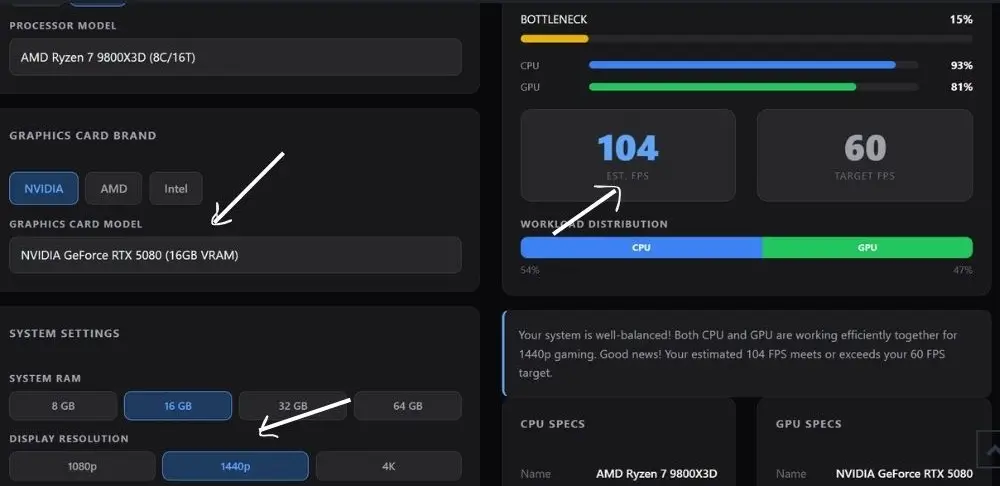
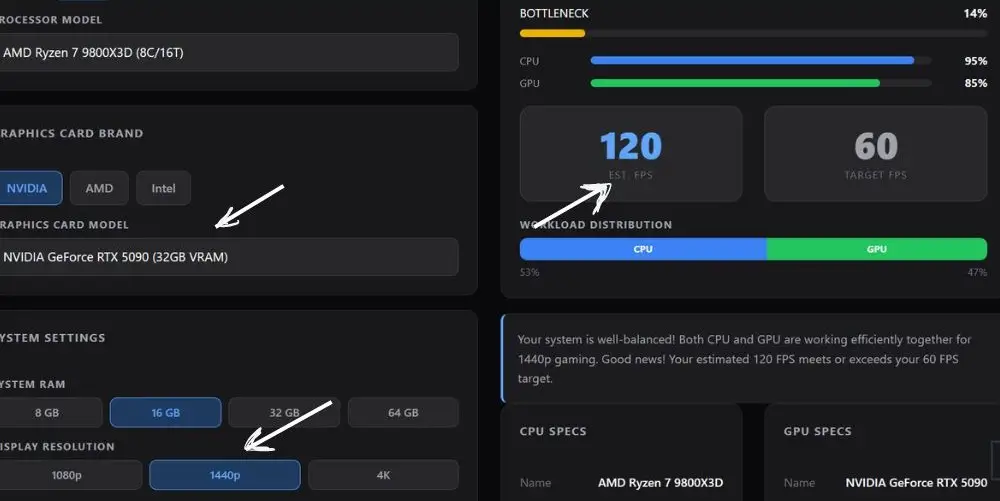
Here’s what our own bottleneck calculator shows running both cards through a Ryzen 7 9800X3D, one of the strongest gaming CPUs available right now.
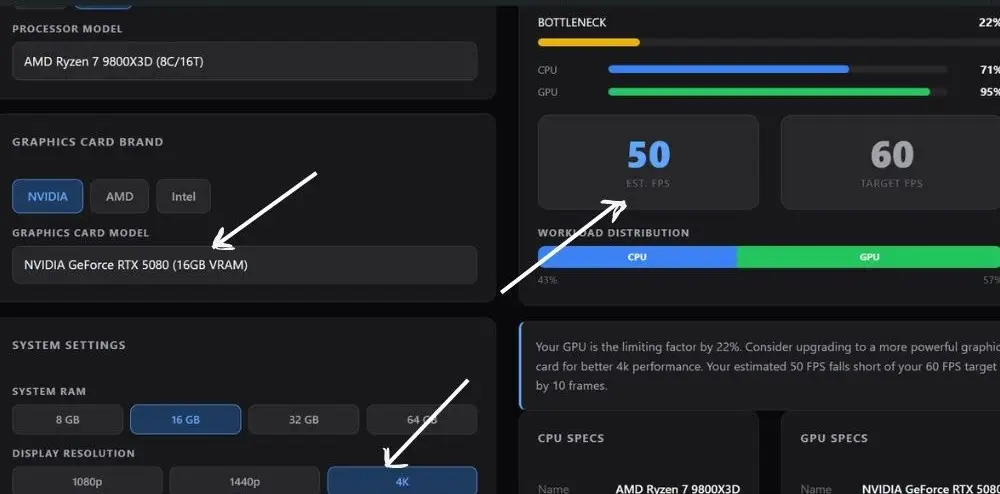
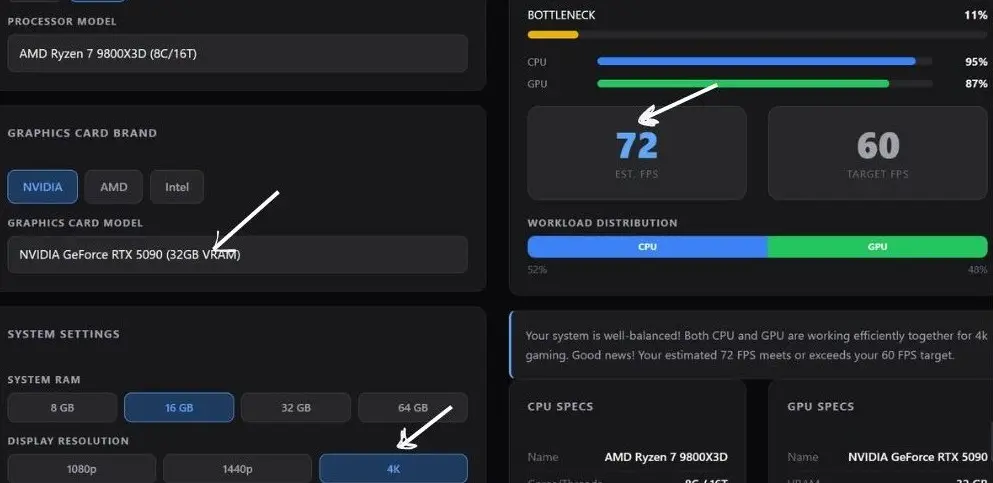
At 4K, the NVIDIA GeForce RTX 5090 hits an estimated 72 FPS with an 11% bottleneck, comfortably clearing the 60 FPS target. The RTX 5080 lands at 50 FPS with a 22% bottleneck, its GPU maxed out at 95% utilization, and falls short of the 60 FPS target by 10 frames. That works out to the RTX 5090 running about 44% faster at 4K, right in line with what we’d expect at this resolution.
At 1440p, both cards clear 60 FPS easily. The RTX 5090 reaches 120 FPS, the NVIDIA GeForce RTX 5080 reaches 104 FPS, a gap of roughly 15%. Look at the CPU usage in both runs though, it’s sitting at 93 to 95% either way. That’s the 9800X3D itself becoming the bigger limiting factor at 1440p, which is exactly why the gap between the two GPUs shrinks compared to 4K. Once the CPU is working that hard, a faster GPU has less room to show off.
Why 16GB vs 32GB of VRAM Actually Matters
It’s tempting to write off the VRAM difference as a spec sheet flex, but it shows up in real situations:
- Texture mods and high res texture packs in games like Cyberpunk 2077 or modded Skyrim can eat well past 12GB on their own.
- DLSS 4 Multi Frame Generation holds extra frames in memory to generate those AI frames, which adds VRAM overhead on top of the base game.
- Ray tracing and path tracing at 4K push VRAM usage up significantly compared to rasterized lighting.
- Future games are only going to ask for more VRAM, not less, so the 5080’s 16GB has less headroom for the next three to four years than the 5090’s 32GB.
For most people gaming at 1440p today, 16GB is still comfortable. For 4K gamers who want their card to age well, the extra memory on the 5090 buys real peace of mind.
Power Draw and What It Means for Your PSU
The RTX 5080 sits at 360W, which most decent 750W power supplies can handle without issue. The RTX 5090 jumps to 575W, and that’s not a small jump. You’re looking at a 1000W or higher PSU, ideally from a reputable brand with a clean single rail design.
A couple of real world notes worth knowing before you buy:
- The 16-pin power connector on both cards has been a recurring topic in build forums, with some users reporting connector heat issues, usually tied to the cable not being fully seated. Push that connector in until it clicks, every time.
- Case airflow matters more with the 5090 than people expect. You want solid intake and exhaust, not just a card that fits.
- If your PSU is older than 4 to 5 years, it’s worth checking that it actually supports the newer connector standard before you buy either card.
Will Your CPU Bottleneck the RTX 5080 or RTX 5090?
This is the part most comparison articles on 5080 vs 5090 skip, and it’s honestly the part that affects your real world FPS the most.
Here’s the short version. At 4K, your GPU is almost always the limiting factor no matter which card you buy, so CPU choice matters less. At 1440p and especially 1080p, the CPU starts to matter a lot more, particularly with the RTX 5090, because the GPU is fast enough to be sitting around waiting on the processor to feed it data.
A few things we’ve seen come up again and again in build forums:
- Pairing either card with an older CPU (think 13th gen Intel or Ryzen 5000 series) can leave noticeable performance on the table at 1440p and below.
- The Ryzen 7 9800X3D consistently comes up as one of the strongest pairings for the RTX 5090, even at 1080p, thanks to its extra cache helping feed the GPU faster.
- “Bottleneck” gets used loosely online. The more accurate way to think about it is a limiting factor, meaning at some point adding more GPU power stops giving you more FPS because your CPU can’t keep up.
Don’t guess on this part. Run your exact CPU and resolution combo through our bottleneck calculator before you buy, especially if you’re eyeing the 5090. It’s a lot cheaper to find out beforehand than after the card is already installed.
You can actually see this play out in the calculator results above. At 1440p with the 9800X3D, one of the fastest gaming CPUs around, CPU usage was already sitting at 93 to 95 percent on both cards. That’s the processor working close to its ceiling, which is exactly why the RTX 5090’s gaming lead over the RTX 5080 shrinks at 1440p compared to 4K. Drop in a weaker CPU and that gap would shrink even further, or the bottleneck percentage would climb even higher.
RTX 5080 vs RTX 5090- Who Should Actually Buy the RTX 5080
- You game at 1440p, or 4K without maxing every ray tracing setting
- You want flagship level performance without needing a case overhaul for cooling and a brand new PSU
- You’re not doing heavy AI training, large scale 3D rendering, or 8K video work
- You’d rather put extra budget toward a better monitor, more RAM, or faster storage
- You’d rather put extra budget toward a better monitor, more RAM, or faster storag
If even the 5080 feels like overkill or overbudget, it’s worth comparing the step down too, see our RTX 5070 vs RTX 5070 Ti breakdown.
Who Should Actually Buy the RTX 5090
- You’re running 4K with ray tracing or path tracing maxed out and want consistently high frame rates
- You do AI work, Stable Diffusion, LLM inference, or model training where VRAM capacity directly speeds up your workflow
- You work in 3D rendering, video editing, or other VRAM hungry creative software
- You want a card that stays relevant for years without needing a VRAM related downgrade in settings
Frequently Asked Questions
Is the RTX 5090 actually worth it over the RTX 5080?
For most gamers, no, not unless you’re specifically gaming at 4K with everything maxed out or doing AI and rendering work. The 5080 delivers most of the gaming experience at a noticeably lower power draw and PSU requirement. The 5090 makes the most sense for people who need the extra VRAM for non-gaming workloads or refuse to compromise at 4K. GamersNexus’ RTX 5090 review breaks down the gap against the 5090 in detail if you want the full benchmark numbers.
Will an older CPU bottleneck the RTX 5090?
It can, especially at 1080p and 1440p. At 4K, the GPU usually carries the workload regardless of CPU, but at lower resolutions, an older chip can hold back the 5090’s full performance. Run your specific CPU through a bottleneck calculator before buying if you’re not on a recent high-end chip. PC Guide’s best CPUs for the RTX 5090 has a solid rundown of which chips actually keep up.
Is the RTX 5090 overkill for 1440p gaming?
For most current games, yes. At 1440p you’re more likely to run into a CPU limiting factor before you run out of GPU headroom on the 5090. The RTX 5080 is generally seen as the better fit for 1440p, with the 5090 making more sense once you move up to 4K. HowManyFPS’s side-by-side comparison lets you toggle resolution to see the gap per game.
Does the extra VRAM on the RTX 5090 matter for gaming, or is it just for AI work?
It helps with both. Gaming benefits show up with heavily modded games, high-res texture packs, and frame generation overhead at 4K. But the bigger jump in usefulness is for AI training, large model inference, and 3D rendering, where 16GB can become a real ceiling. Tom’s Hardware covered this VRAM demand gap when modders started pushing 32GB onto 5080 boards for AI use specifically.
What PSU do I actually need for these cards?
A quality 750W unit is generally enough for the RTX 5080’s 360W TDP. The RTX 5090’s 575W TDP calls for a 1000W or higher PSU from a reliable brand, with extra headroom for power spikes during heavy loads.
Final Verdict- 5080 vs 5090
We may earn a commission from purchases made through these links, at no extra cost to you.
The RTX 5080 is the smarter buy for the vast majority of gamers. It handles 1440p and 4K well, doesn’t demand a PSU and cooling overhaul, and leaves you room to upgrade your CPU or monitor instead. The RTX 5090 earns its spot for a narrower group: 4K purists who refuse to compromise, and anyone doing AI, rendering, or creative work where 32GB of VRAM actually translates into faster workflows.
Before you buy either card, the one thing that’ll affect your real world FPS more than the GPU choice itself is your CPU. Check your exact pairing with our bottleneck calculator above so you’re not leaving performance on the table.
If your budget doesn’t stretch to either of these flagships, you’re better off looking one or two tiers down, our RX 9060 XT vs RTX 5060 Ti comparison covers that more budget-friendly matchup.
