Best GPU for Ryzen 5 9600X Without Bottleneck
The best GPU for Ryzen 5 9600X is the RTX 5060 Ti (16GB) for most people at 1080p and 1440p. If you game mostly at 1080p and want to save some money, the RX 9060 XT (16GB) beats it in raw raster performance and gives you more VRAM for future games. Want to push 1440p really hard with ray tracing and DLSS 4? Step up to the RTX 5070, and the 9600X will keep up just fine. None of these combos will give you a bottleneck worth worrying about, and we will break down exactly why below.
The Ryzen 5 9600X is a Zen 5 chip with 6 cores, 12 threads, and a 5.4 GHz boost clock. It is built on a 4nm process and sits on the AM5 platform, which means PCIe 5.0 support and a real upgrade path down the road. For gaming, it is a very fast CPU. The single-core speed is what matters most in most games, and the 9600X is excellent there. It will not hold back a mid-range or high-end GPU at 1080p or 1440p in the vast majority of titles.
We checked our bottleneck calculator for each pairing in this guide. Every GPU listed here sits in a balanced range with the 9600X at its target resolution. Let us get into it.
We may earn a commission from purchases made through these links, at no extra cost to you.
Quick Picks at a Glance
What the Ryzen 5 9600X Actually Does in Games
Before picking a GPU, you need to know what the 9600X can actually handle. A lot of people see “6 cores” and get nervous. Do not be. Modern games still lean heavily on fast single-core speeds, and the 9600X’s 5.4 GHz boost puts it at the top of its class in that department.
In Apex Legends at 1440p, benchmarks show the 9600X delivering around 284 FPS on average, paired with a fast GPU. In Fortnite and competitive titles, it keeps frame times incredibly tight. In heavier open-world games like Cyberpunk 2077 at 1440p, the GPU becomes the bottleneck long before the CPU does, which is exactly what you want.
The one thing to know is that if you are gaming at 1080p with a very high refresh rate monitor, the GPU finishes frames so fast that the CPU has to work harder to keep feeding it. At 1080p competitive gaming on a 240Hz or 360Hz panel, the 9600X is a great choice. It can fully feed a mid-range GPU at that resolution without choking it.
At 1440p, the resolution shifts more load to the GPU, which means even less CPU pressure. This is where the 9600X really shines because the GPU is always the limiting factor, not the CPU. You can check any of these combos in our bottleneck calculator to see the exact balance numbers for your setup.
Best GPU for Ryzen 5 9600X: Our Top Picks
1. RTX 5060 Ti (16GB) — Best Overall
We may earn a commission from purchases made through these links, at no extra cost to you.
The RTX 5060 Ti with 16GB of GDDR7 is the sweet spot for the Ryzen 5 9600X right now. It handles 1080p at very high frame rates and pushes strong numbers at 1440p in most AAA titles. Paired with the 9600X, you get a genuinely balanced build with zero wasted performance on either side.
In Dragon’s Dogma 2 at 1440p, the RTX 5060 Ti runs around 57 FPS on average in native rendering, which is a smooth experience that gets even better with DLSS 4 Quality mode enabled. In less demanding titles like CS2, Fortnite, and Valorant at 1080p, expect well over 200 FPS, which is exactly what a 240Hz monitor needs.
The 16GB VRAM is the big deal here. The RTX 5060 without the Ti suffix only has 8GB, and that is already showing its limits in some 2026 titles. The 16GB version future-proofs your build for at least two more years of AAA gaming without having to drop texture settings.
Ray tracing is also meaningfully better than the last generation. The 5060 Ti runs Cyberpunk 2077 ray tracing at 1440p at around 40 to 45 FPS before DLSS, and with DLSS 4 Quality, you are looking at a very smooth and beautiful experience. The 9600X does not create any CPU-side bottleneck in ray-traced workloads either.
Who should pick this: anyone building a 1080p or 1440p gaming PC with the 9600X who wants DLSS 4, solid ray tracing, and 16GB of VRAM in one package without going overboard on the GPU.
2. RX 9060 XT (16GB) — Best Value Pick
The RX 9060 XT from AMD’s RDNA 4 lineup is the best pure raster value GPU you can pair with the 9600X right now. It actually trades blows with the RTX 5060 Ti in many raster workloads and wins outright in some titles. It also uses less power, which means less heat and quieter fans in a typical build.
In Hogwarts Legacy at 1440p ultra, the 9060 XT leads the RTX 5060 Ti by around 5 percent. In CS2 and Valorant, the difference is basically zero. Where the RTX 5060 Ti pulls ahead is in ray-traced games, where it leads by around 10 percent in titles like Cyberpunk 2077 with RT enabled.
The 16GB SKU is the one to get. An 8GB version also exists, but we would steer you away from it in 2026. Some newer titles are already pushing past 8GB at high settings and 1440p. Spending the extra amount to get the 16GB version is one of the smartest moves you can make for long-term value.
The 9600X pairs extremely well with this card because neither component holds the other back. At 1440p, the GPU is doing the heavy lifting, and the CPU stays at comfortable usage levels. At 1080p competitive, the 9600X’s fast clock speed means you are getting the most out of RDNA 4’s strong raster performance.
Who should pick this: AMD fans, people who mostly play raster games without ray tracing, and anyone who wants the best FPS per dollar at 1080p and 1440p.
3. RTX 5060 (8GB) — Budget 1080p Option
The RTX 5060 is a solid 1080p card and a legitimate option for the 9600X if you are on a tighter budget. At 1080p, it runs Cyberpunk 2077 at around 76 FPS average and handles most esports titles at well over 200 FPS. For a 1080p 144Hz or even 1080p 165Hz gaming setup, it does the job.
The catch is the 8GB of VRAM. Some 2026 AAA titles are already hitting VRAM limits at 1080p ultra settings. Indiana Jones and the Great Circle, for example, uses over 8GB at high texture settings. If you plan to stick to competitive games like CS2, Valorant, Apex Legends, or Fortnite, 8GB is completely fine. If you play AAA open-world games at max settings, you may need to drop textures occasionally.
The 9600X does not bottleneck this card at 1080p, and at 1440p, the GPU becomes the clear limit, so there is no CPU side problem here either. It is just the VRAM ceiling you need to plan around.
Who should pick this: pure esports players, 1080p 144Hz gamers, and people on a budget who do not need max settings in every AAA title.
4. RX 9070 — High Value 1440p Option
The RX 9070 is one of the best deals at the 1440p tier. It sits a step below the 9070 XT and delivers very strong performance for the money. Paired with the Ryzen 5 9600X, it creates a genuinely competitive 1440p rig that handles most modern AAA games at high to ultra settings without breaking a sweat.
The 9600X does not bottleneck the RX 9070 at 1440p. At this resolution, the GPU is doing nearly all the work, and the CPU just needs to be fast enough to keep up, which the 9600X absolutely is. Benchmark data shows the 9600X fed the RX 9070 in Apex Legends at 1440p to the tune of 280 plus FPS, which means the CPU side is doing fine.
AMD’s FSR 4 upscaling is built into the 9070 as well. This gives you a clean way to boost frame rates in supported games at 1440p and even makes 4K playable in some less demanding titles. Ray tracing is decent but not as strong as Nvidia’s offering at this tier.
Who should pick this: 1440p gamers on the AMD ecosystem who want strong raster performance and a price advantage over Nvidia at this tier.
5. RTX 5070—High-end 1440p with DLSS 4
The RTX 5070 is the most powerful GPU we would recommend pairing with the 9600X. Above this, you start running into diminishing returns because the 9600X’s 6 cores can become a minor limiting factor at 1080p in some very CPU-heavy titles when paired with a flagship card. At 1440p and above, that is not a concern.
The RTX 5070 runs Cyberpunk 2077 at 1440p at around 107 FPS average in raster mode, and with DLSS 4 Quality, that climbs significantly. Ray tracing performance is strong, and DLSS 4 Multi Frame Generation is available on this card, which is a Blackwell exclusive feature that boosts frame rates in supported titles even further.
At 4K, the RTX 5070 just about manages 48 FPS in Cyberpunk 2077 natively, but with DLSS 4 Quality, you get a much smoother experience. If 4K is your goal long term and you are okay with upscaling, this card does the job with the 9600X nicely.
Who should pick this: serious 1440p gamers who want ray tracing, DLSS 4, and future headroom for 4K gaming using upscaling.
6. Intel Arc B580 — Tight Budget Entry Point
The Arc B580 is a surprisingly capable card for the money. It packs 12GB of GDDR6 and delivers very strong 1080p performance, even edging out the RTX 4060 in several benchmarks. For a builder who needs to keep costs down and plans to game at 1080p, it pairs decently with the 9600X.
The main thing to know about Arc cards is driver maturity. Intel has improved dramatically since the B580 launched, but older or niche game titles can still have issues. If you mainly play popular games that are well supported, you will be fine. If you have a very specific library of older titles, check Intel’s compatibility list first.
The 12GB of VRAM is genuinely impressive at this price tier and gives the B580 a real advantage over 8GB competitors when it comes to future-proofing your texture settings.
Who should pick this: 1080p gamers on a tight budget who play mainstream titles and want more VRAM than the 8GB Nvidia options at this tier.
Will the Ryzen 5 9600X Bottleneck These GPUs?
This is the most common question people ask, and the answer is no for any of the cards in this guide at their target resolutions. Here is the full breakdown by resolution.
The slight bottleneck notes for the RX 9070 and RTX 5070 at 1080p refer to very specific scenarios like CS2 at 500 FPS targets or other esports titles where a faster CPU like the 9800X3D would pull slightly ahead. For the vast majority of gaming, the 9600X keeps up perfectly fine.
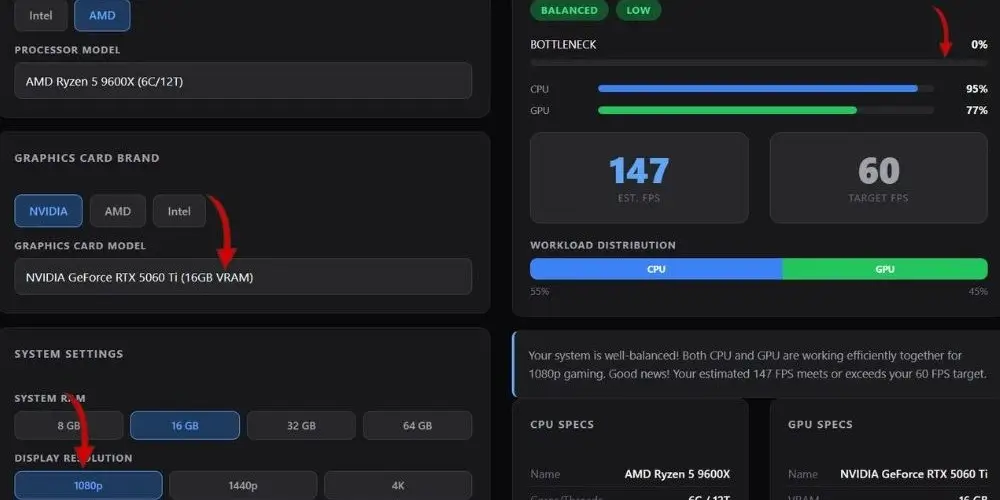
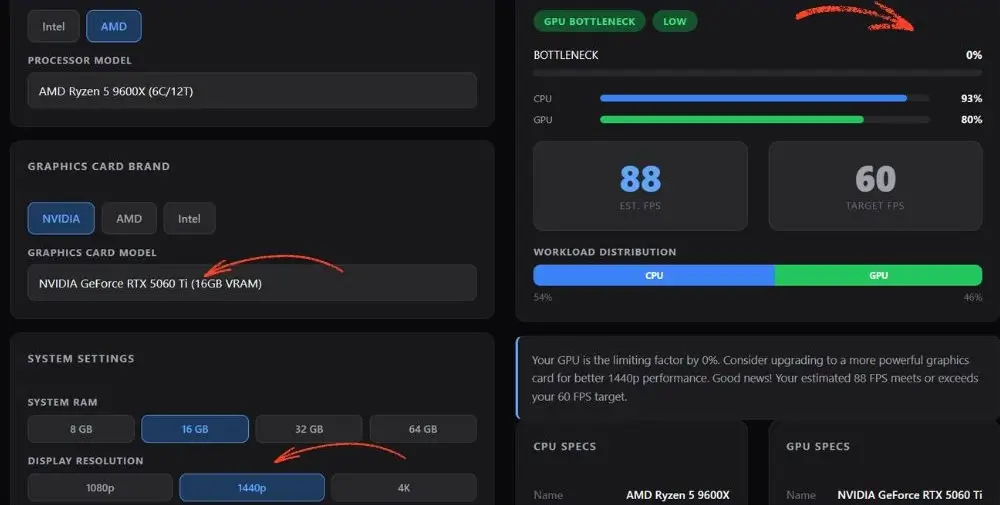
Below are screenshots from our bottleneck calculator showing zero bottleneck for the RTX 5060 Ti at both 1080p and 1440p when paired with the Ryzen 5 9600X. A lot of people ask are bottleneck calculators accurate, and results like these show exactly why ours can be trusted. Every pairing in this guide was verified through the calculator before we recommended it, so you are not just getting an opinion. You are getting a data-backed answer.
Best GPU for Ryzen 5 9600X- Choosing a GPU by Resolution
If you are not sure which card is right for you, the fastest way to decide is by your monitor’s resolution and refresh rate. Here is the simplified breakdown.
1080p 60Hz to 144Hz
The Arc B580 or RTX 5060 (8 GB) covers this range well. Either card handles modern AAA titles at 1080p high to ultra settings, and competitive titles run at well over 144 FPS with headroom to spare. The RX 9060 XT and RTX 5060 Ti are overkill for a 60 Hz panel, but make sense if you plan to upgrade your monitor later.
1080p 165Hz to 240Hz
This is where the RTX 5060 Ti or RX 9060 XT becomes the right answer. You need a card that can consistently push 165 to 240 FPS in your game of choice, and both of these cards do that in esports titles while also handling AAA games smoothly. The 9600X’s fast single-core speed is a real asset here.
1440p 60Hz to 144Hz
The RX 9060 XT or RTX 5060 Ti handles this beautifully. Both cards run modern AAA games at 1440p high-to-ultra settings at 60 to 90 FPS natively, and with FSR 4 or DLSS 4 quality, you can push that above 100 FPS comfortably. The RX 9070 is the next step up if you want more headroom.
1440p 144Hz to 165Hz
The RX 9070, or RTX 5070, is the right tool here. These cards push 1440p at high refresh rates in a wide range of games. With upscaling enabled, you can hit 144 FPS in even the most demanding 2026 titles. The 9600X does not limit either of these cards at this resolution.
Getting the Most Out of Your 9600X and GPU Combo
The GPU choice is only part of the equation. Here are a few things that make a real difference with the 9600X specifically.
Use Fast DDR5 RAM
The 9600X is on the AM5 platform, which uses DDR5 memory. Running your RAM at 6000 MHz with tight timings is the sweet spot for Ryzen 9000 series chips. If you want to understand exactly why DDR5 makes a real difference over DDR4 for gaming, we broke it all down in our DDR4 vs DDR5 RAM guide. Slow RAM will artificially reduce the CPU’s gaming performance and make it look like a bottleneck when it really is not. Aim for DDR5 6000 CL30 as your starting point.
Enable XMP or EXPO
If you have fast DDR5 installed, make sure XMP or EXPO is enabled in your BIOS. A lot of builds run memory at the default 4800 MHz even when 6000 MHz sticks are installed. That alone can cost you 5 to 10 percent of your gaming performance for free if left unconfigured.
Learn how to enable XMP in BIOS.
PCIe 5.0 for Your GPU
The 9600X supports PCIe 5.0, and most new GPUs in 2026 use PCIe 4.0 or 5.0 slots. This means your GPU is getting full bandwidth with no compromise. Make sure your B650 or X670 motherboard’s primary PCIe slot is set to the correct generation in the BIOS.
Keep Temperatures in Check
The 9600X has a 65W TDP and runs cool for a gaming CPU. A decent 240mm AIO or even a good tower cooler is more than enough. Keeping the CPU below 85 degrees Celsius under load makes sure it holds its boost clocks consistently during gaming, which matters for CPU-limited scenarios at 1080p.
Questions Real People Are Asking About the 9600X and GPU
These questions come directly from threads on Linus Tech Tips, Hardware Canucks, Tom’s Hardware, Yo Motherboard, and Slickdeals. These are the things people are actually confused about before buying.
Is the RX 6600 good enough for the 9600X, or should I step up to the RX 9060 XT?
This exact question got asked on Yo Motherboard, and the forum agreement was unanimous: go for the RX 9060 XT, specifically the 16GB version. The RX 6600 is a last-gen card built for 1080p at medium settings. The 9600X is a current-gen CPU on the AM5 platform, and pairing it with a card that old wastes the platform.
The 9060 XT handles 1440p properly, uses less power, and gives you 16GB of VRAM that will still be relevant in two or three years. The price difference is small enough that nobody in those threads thought the RX 6600 was worth it.
I have a 9600X. Should I upgrade to the 9800X3D or just get a better GPU?
Someone on Hardware Canucks asked almost this exact question, and a user who owned a 9600X paired with an RTX 5070 on a 3440×1440 ultrawide said they noticed basically no difference when swapping CPUs but a very large difference when upgrading the GPU. The community’s answer was clear: upgrade the GPU first.
The 9800X3D does pull ahead in esports at very high frame rates, especially in CS2 on certain maps, but for most people, the GPU is doing far more of the work. If you are chasing 300-plus FPS at 360Hz, then the 9800X3D starts making sense. If you are gaming at 1440p in AAA titles, just get a better GPU and keep the 9600X.
Is 6 cores enough in 2026? Will the 9600X hold back my GPU?
This comes up constantly on Linus Tech Tips and Tom’s Hardware. The answer depends heavily on resolution. At 1440p and above, the GPU is doing the heavy lifting, and 6 fast Zen 5 cores are completely fine. At 1080p in competitive games on a 240Hz or 360Hz monitor, you will want a fast single-core CPU, and the 9600X delivers that at 5.4 GHz.
Where 6 cores can feel tight is in heavily threaded open world games with lots of streaming and AI, but even there the 9600X holds its own much better than older 6-core chips because Zen 5’s IPC is so much stronger.
I want to run Fortnite at 1440p 240Hz with my 9600X. Should I get the RTX 5070 or RTX 5070 Ti?
This was directly posted on Linus Tech Tips. The forum advice was to get the fastest card you can comfortably afford, with a note that the RTX 5070 Ti gives you 16GB of VRAM over the RTX 5070’s 12GB, which helps at 1440p long-term.
For Fortnite specifically at 1440p, both cards deliver well above 240 FPS. The 9600X is not the limiting factor at 1440p in that game. If budget is the concern, the RTX 5070 is enough. If you want to futureproof for AAA titles and keep the monitor for several years, the Ti’s extra VRAM is worth it.
Does the 9600X have enough PCIe bandwidth for a new GPU? Do I need PCIe 5.0?
This was a recurring question on Slickdeals when people were buying 9600X bundles with B650 boards. The 9600X supports PCIe 5.0 natively, but you need a B650E or X670 board to get a full PCIe 5.0 x16 slot. A standard B650 board typically runs the GPU slot at PCIe 4.0 x16, which is still completely fine for every GPU available in 2026, including the RTX 5090. No GPU today saturates PCIe 4.0 x16 bandwidth. It is not a performance concern for any pairing in this guide.
Is the 9600X a good pick if I want to upgrade to a faster CPU later without changing the whole platform?
Yes, and this is one of the biggest reasons people recommend it on Linus Tech Tips forums. AM5 still has life left in it, and AMD has committed to the platform. Buying a 9600X now and upgrading to a 9800X3D or a future X3D chip later is a legitimate plan. You keep your motherboard and your DDR5 RAM and just drop in a faster CPU.
That is the same logic that made AM4 so popular for years, and AM5 is doing the same thing.
I went from a 3080 to an RTX 5070 with my 9600X on ultrawide and barely noticed a difference. Why?
A Hardware Canucks user reported exactly this experience. The reason is that ultrawide 1440p is already very GPU-heavy, and if you were already at high frame rates with the 3080 on that panel, the jump to a 5070 mostly raises your frame rate ceiling rather than fixing a visible problem. If you are already at 100 FPS and jump to 140 FPS, you notice it less than if you were at 45 FPS and jumped to 90 FPS.
The 9600X is not the problem here. The issue is diminishing returns at high resolution when the bottleneck shifts. For this use case, people recommended checking 1 percent lows rather than averages to see where real-world improvement shows up.
Final Thoughts
The Ryzen 5 9600X is genuinely one of the best mid-range gaming CPUs you can build around in 2026. It has enough single-core speed to feed any mid-range GPU without creating a bottleneck, it runs cool, and it sits on AM5, which gives you upgrade options later.
For most people, the RTX 5060 Ti (16GB) is the move. It hits the sweet spot between performance and value, comes with DLSS 4 and real ray tracing capability, and works perfectly at both 1080p and 1440p with zero bottleneck concerns alongside the 9600X.
If you are on AMD’s ecosystem or want the best raster FPS per dollar, grab the RX 9060 XT (16GB) instead. You will get very similar performance, lower power draw, and the same generous 16GB VRAM buffer.