

Best GPU for Ryzen 7 9700X in 2026-Top Picks Ranked
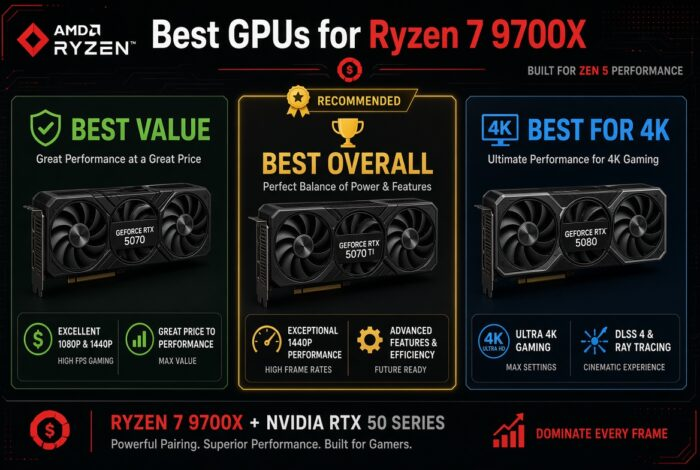
The best GPU for Ryzen 7 9700X is the RTX 5070 Ti. It is the top pick for most 1440p builds. Want to spend less? Get the RTX 5070. Do you play at 4K? Then get the RTX 5080.
The Ryzen 7 9700X is a very fast gaming CPU. It has 8 cores. It plays games well. It also handles heavy work like video editing. At 1440p and 4K, it is fast enough for every card here. It will not slow them down.
We may earn a commission from purchases made through these links, at no extra cost to you.
Run the 9700X with any of these GPUs through our free Bottleneck Calculator. See your estimated FPS and bottleneck percent at your resolution.
Open the Bottleneck Calculator →For a Ryzen 7 9700X, buy the RTX 5070 Ti. It is the best all-round card for 1440p. Want to pay less? Get the RTX 5070. Want 4K? Get the RTX 5080. Like AMD? The RX 9070 XT gives the most speed for your money. The 9700X is fast enough for all of them.
Best GPU for Ryzen 7 9700X: Full Comparison
Every card here works well with the 9700X. The main question is simple. How much do you want to spend? And do you want 4K or ray tracing? Our full graphics card rankings cover every card, from cheap to top-end.
Best GPU for Ryzen 7 9700X-Top Picks in Detail
RTX 5070 Ti: Best Overall
The RTX 5070 Ti is my top pick for a 9700X. It is made for 1440p at high frame rates. It can play 4K too, with DLSS. It has 16GB of memory. That is plenty for new games. The 9700X keeps it fed with no trouble.
RTX 5070: Best Value
Want to save money? Get the RTX 5070. It plays 1440p games very well. It uses DLSS for the hardest games. It has 12GB of memory. That is fine for 1440p. It is a bit tight for 4K. So treat it as a strong 1440p card.
RTX 5080: Best for 4K
Do you play at 4K? The RTX 5080 is the one to get. It has 16GB of memory. It has all of NVIDIA’s DLSS and frame tools. It turns the 9700X into a strong 4K PC. Most 1440p gamers do not need it. But for 4K, it is the right card.
RX 9070 XT: Best AMD Card
The RX 9070 XT gives the most speed for your money. In raw frame rate, it keeps up with pricier NVIDIA cards. It has 16GB of memory. You give up some ray tracing power. You also miss DLSS. But if you just want high FPS, it is a smart buy.
RTX 5060 Ti 16GB: Budget Pick
On a tight budget? The 16GB RTX 5060 Ti is the smart floor. It plays 1080p and 1440p well. The 16GB version lasts longer than the 8GB one. The 9700X will not hold it back at all. Start here. Then add a stronger GPU later.
Match the GPU to Your Monitor
Your screen is the best guide. Do not buy a 4K card for a 1080p screen. And do not buy a 1440p card for a 4K screen. Here is a simple match.
1080p, high refresh
The 9700X shines here. An RTX 5060 Ti 16GB or RTX 5070 will push past 240 FPS in esports games. They also run big games on high settings. A pricier card mostly helps if you upgrade your screen later.
1440p, high refresh
Most 9700X builds land here. The RTX 5070 Ti is the star. It runs almost everything past 144Hz. DLSS lifts the heaviest games. The RX 9070 XT is the AMD choice if you want raw speed over ray tracing.
4K gaming
For a 4K screen, start with the RTX 5080. The RX 9070 XT can do 4K in many games. But the 5080 is the smoother 4K pick with this CPU.
Gaming Benchmarks (1440p)
The 9700X takes the CPU out of the way at 1440p. So these numbers follow the GPU. Esports games run very fast. Big ray-traced games show the real gaps.
| Game (1440p, high) | RTX 5070 | RTX 5070 Ti | RTX 5080 |
|---|---|---|---|
| Counter-Strike 2 | 380+ FPS | 440+ FPS | 480+ FPS |
| Fortnite (Performance) | 230+ FPS | 250+ FPS | 270+ FPS |
| Call of Duty: Warzone | 150-190 FPS | 165-200 FPS | 190-230 FPS |
| Cyberpunk 2077 (RT + DLSS) | 85-105 FPS | 95-115 FPS | 120-140 FPS |
| Starfield | 100-120 FPS | 110-130 FPS | 130-150 FPS |
| Black Myth: Wukong (DLSS) | 70-85 FPS | 80-95 FPS | 100-115 FPS |
Bottleneck Analysis
A bottleneck is the slow part. It is the part that runs out of power first. At 1440p and 4K, the GPU is the slow part here, not the 9700X. That is what you want.
The CPU only works hard at 1080p. It also works hard in some game types. Think flight sims, racing sims, and big online maps. There the X3D chips pull a bit ahead. But at 1440p and up, the 9700X gives you every frame. Want your exact numbers? Try our bottleneck calculator.
Run the 9700X with any of these GPUs through our free Bottleneck Calculator. See your estimated FPS and bottleneck percent at your resolution.
Open the Bottleneck Calculator →Power Supply and Platform
The 9700X uses little power. So the GPU sets your needs. A good 750W 80+ Gold unit runs the 9700X with cards up to an RTX 5070 Ti or RX 9070 XT. Use 850W for an RTX 5080. Use 1000W for an RTX 5090. The 9700X uses the AM5 socket. So you have room to grow. You can add a stronger GPU next year. You can even add a future X3D chip. You keep the same board, the kind we cover in our best AM5 motherboard guide.
Upgrade Recommendations
On an RTX 30-series or RX 6000 card? The RTX 5070 Ti or RX 9070 XT is a big jump at 1440p. On a 40-series card like a 4070 or 4070 Ti? Only the 5080 is a big enough jump. A smaller step is not worth it. Building new? Buy the card that fits your screen now. Then use AM5 to upgrade later.
Value for Money
Here is the best value with a 9700X. The RTX 5070 Ti is the smart-money pick. The RX 9070 XT wins on raw speed if you skip ray tracing. The RTX 5070 is the value 1440p card. The RTX 5080 is worth it only for real 4K play. The RTX 5060 Ti 16GB is the budget floor. It is a fine place to start.
Alternative Recommendations
On a tighter budget? An RX 9060 XT 16GB or RX 9070 will play 1080p and 1440p fine with the 9700X. Want top ray tracing below the best cards? The 5080 is still the pick. Do you stream or make videos? Go NVIDIA for NVENC. The RTX 5070 Ti or 5080 is the balanced choice. Building around a cheaper chip? Our best GPU for the Ryzen 5 9600X guide covers the value end.
Frequently Asked Questions
Does the Ryzen 7 9700X bottleneck the RTX 5080 or 5090?
No, not at 1440p or 4K. There the GPU is the slow part, not the CPU. At 1080p the 9700X gives up a little to the X3D chips. But it still feeds high-end cards well at the resolutions people buy them for.
Is the 9700X good enough, or do I need a 9800X3D?
The 9700X is great for high-end gaming. The 9800X3D is faster in a few cases, like 1080p esports and sims. At 1440p or 4K, the gap is small. If you chase the highest competitive FPS, get the X3D. If not, the 9700X is plenty.
What is the best value GPU for the 9700X?
The RTX 5070 Ti for 1440p. Or the RTX 5070 to spend less. Both leave the 9700X with power to spare.
RTX 5070 Ti or RX 9070 XT for the 9700X?
The RTX 5070 Ti is better at ray tracing. It also has DLSS frame generation. The RX 9070 XT usually wins on raw speed per dollar. Pick NVIDIA for ray tracing and streaming. Pick AMD for the most FPS for your money.
How much VRAM do I need at 1440p?
12GB works for 1440p today. But 16GB is safer for 4K and new games with big textures. Most picks here have 16GB for that reason.
What power supply do I need for a 9700X build?
A good 750W 80+ Gold unit covers the 9700X with cards up to an RTX 5070 Ti or RX 9070 XT. Use 850W for an RTX 5080. Use 1000W for an RTX 5090.
Will the 9700X bottleneck a mid-range card like the RTX 5060 Ti?
No. It is the other way around. The 9700X has more than enough power for a 5060 Ti. That pairing is fine for 1080p and 1440p on a budget. The CPU has room to grow into a better GPU later.
Is the 9700X good for streaming while gaming?
Yes. Its 8 cores run a game and OBS at the same time. With an NVIDIA card you get NVENC. It records and streams without hurting your game. The RTX 5070 Ti or 5080 is the balanced streaming pick.
Final Verdict
Our pick for the best GPU for Ryzen 7 9700X is the RTX 5070 Ti. It fits most builds. The 9700X is a great all-round CPU. The GPU you pick should match your screen. Buy the RTX 5070 Ti for the best 1440p build. Buy the RTX 5070 to save money. Buy the RTX 5080 for 4K. Shopping the other way? Our best CPU for the RTX 5080 guide covers the CPU side. Pick the RX 9070 XT if you want raw speed over ray tracing. Whatever you pick, run it through our bottleneck calculator first. It shows your exact numbers.
Run the 9700X with any of these GPUs through our free Bottleneck Calculator. See your estimated FPS and bottleneck percent at your resolution.
Open the Bottleneck Calculator →