

Best RAM for Ryzen 7 9800X3D (2026 Top Picks)
The best RAM for Ryzen 7 9800X3D is usually a DDR5-6000 CL30 kit with AMD EXPO. This speed and timing give you a good mix of performance, low latency, stability, and price for AM5 gaming PCs.
Whether you use an RTX 5070, RTX 5080, or RTX 5090, DDR5-6000 CL30 gives great gaming performance without paying extra for much faster RAM that may not help much. Want to know how your RAM, CPU, and GPU work together? Run your build through our PC bottleneck calculator first.
🏆 Top Picks at a Glance
We may earn a commission from purchases made through these links, at no extra cost to you.
Quick Answer
For most gamers, the G.Skill Trident Z5 Neo RGB 32GB DDR5-6000 CL30 is the best DDR5 RAM for Ryzen 7 9800X3D.
It uses DDR5-6000 CL30, a very good speed for AM5 gaming PCs. It also supports AMD EXPO, so setup is easy and you get excellent gaming performance without changing many settings yourself. Want to compare more kits, including DDR4 options? See our full best RAM for gaming guide.
Why Trust Us?
We don’t pick RAM just because a brand says it’s good. We looked at the things that matter most for Ryzen 7 9800X3D users:
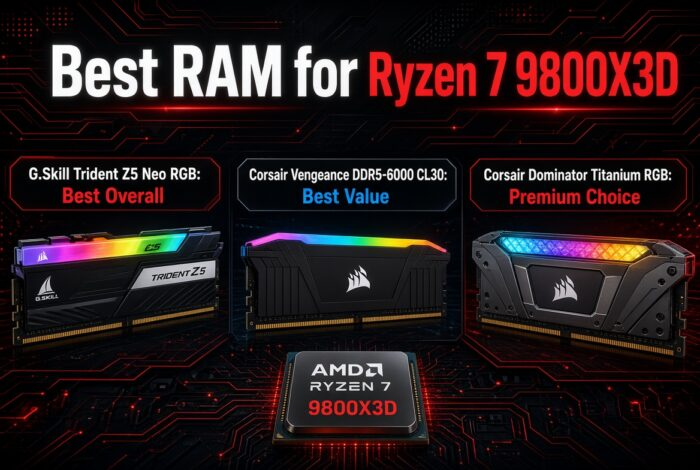
Best RAM for Ryzen 7 9800X3D: Top Picks in Detail
G.Skill Trident Z5 Neo RGB: Best Overall
The G.Skill Trident Z5 Neo RGB is the best 32GB DDR5 RAM for Ryzen 7 9800X3D because it gives the CPU everything it needs without unnecessary compromises. We chose it as our Best Overall pick because it combines the ideal DDR5-6000 CL30 spec for AM5 with excellent stability, AMD EXPO support, and premium build quality. It is the RAM kit most gamers can buy with confidence.
- You want the best overall RAM for the Ryzen 7 9800X3D.
- You want plug-and-play EXPO support.
- You want RGB lighting.
- You’re building a high-end gaming PC.
- You want the cheapest possible RAM.
- RGB doesn’t matter to you.
- You prefer low-profile memory.
Corsair Vengeance DDR5-6000 CL30: Best Value
The Corsair Vengeance DDR5-6000 CL30 gives you almost everything that makes Ryzen 7 9800X3D memory perform well, at a lower price. We chose it as our Best Value pick because it has the same sweet-spot spec as more expensive kits, so you can save money for a better GPU.
- You want the best value for money.
- You plan to spend more of your budget on a GPU.
- You don’t need RGB.
- You want proven reliability.
- You want premium looks.
- RGB lighting is important.
- You’re building a showcase PC.
Corsair Dominator Titanium RGB: Premium Choice
The Corsair Dominator Titanium RGB is built for enthusiasts who want top-tier looks and premium construction. We chose it as our Premium Choice because it combines flagship design, excellent cooling, and high-end RGB lighting without hurting performance.
- You want one of the best-looking RAM kits available.
- You are building a premium gaming rig.
- You want strong RGB customization.
- Budget is not a concern.
- You want maximum value.
- You don’t care about RGB.
- You’re trying to keep build costs low.
G.Skill Flare X5: Best Low-Profile Option
The G.Skill Flare X5 is made for builders who use large air coolers and need extra room around the CPU socket. We chose it as our Best Low-Profile pick because it gives the same Ryzen sweet-spot performance while avoiding clearance problems with bulky coolers.
- You use a large air cooler.
- You want guaranteed RAM clearance.
- You don’t need RGB.
- You want strong gaming performance.
- You prefer RGB lighting.
- You care a lot about looks.
G.Skill Trident Z5 Neo RGB 64GB: Best 64GB Kit
Most gamers only need 32GB, but some users want extra memory headroom. We chose this as our Best 64GB Kit because it gives you the same DDR5-6000 CL30 sweet spot with much more capacity for creators, streamers, and power users.
- You want 64GB of RAM.
- You stream while gaming.
- You often multitask.
- You edit videos or work with large projects.
- Gaming is your only workload.
- You’re on a strict budget.
- You don’t need more than 32GB.
Which RAM Should You Buy?
Why DDR5-6000 CL30 Is Best for Ryzen 7 9800X3D
DDR5-6000 CL30 for Ryzen 7 9800X3D builds is the sweet spot because it balances speed, latency, and stability. Many 9800X3D memory guides recommend it with AMD EXPO, since it gives excellent gaming performance without the stability problems or small gains you often see with higher-speed kits.
Real testing backs this up. In its 9800X3D review, TechSpot found that a DDR5-6000 CL30 kit gave optimal performance in Star Wars Jedi: Survivor, and that moving up to low-latency DDR5-8000 improved results by only 1.3%. TechPowerUp’s 9800X3D memory scaling test also found that the gap between memory kits shrinks to under 2.5% once you reach 1440p.
Here is the simple reason. On AM5, DDR5-6000 lets the memory and the CPU’s memory controller run in sync at a 1:1 ratio, which keeps latency low. Going much faster often forces a different ratio, which can cancel out the benefit. On top of that, the 9800X3D has a large 3D V-Cache, so it depends less on RAM speed than most CPUs do.
Thinking about upgrading from an older X3D chip? Our 7800X3D vs 9800X3D comparison shows why you can keep your AM5 board and RAM.
If you’re also choosing other parts, check our guides on the Best GPU for Ryzen 7 9800X3D, Best Motherboard for Ryzen 7 9800X3D, and Best CPU Cooler for Ryzen 7 9800X3D to finish your build.
Frequently Asked Questions (FAQs)
What is the best RAM for Ryzen 7 9800X3D?
The best RAM for the Ryzen 7 9800X3D is a DDR5-6000 CL30 kit with AMD EXPO support. Our top pick is the G.Skill Trident Z5 Neo RGB 32GB DDR5-6000 CL30 because it is stable, fast, and easy to set up.
Is DDR5-6000 CL30 good for the Ryzen 7 9800X3D?
Yes. DDR5-6000 CL30 is widely seen as the sweet spot for AM5 CPUs, including the 9800X3D. It gives low latency and strong gaming performance at a fair price.
How much RAM for Ryzen 7 9800X3D do you really need?
32GB is enough for almost all gamers. Choose 64GB only if you stream, edit video, run virtual machines, or work with very large files while gaming. Not sure if the jump is worth it? Read our test-based guide on whether 32GB RAM is worth it for gaming.
Is 16GB RAM enough for the Ryzen 7 9800X3D?
16GB can run many games, but it is not ideal for a high-end CPU like the 9800X3D. Newer games and background apps can use a lot of memory, so 32GB is the safer choice for a long-lasting build.
What is the best RAM speed for Ryzen 7 9800X3D?
DDR5-6000 CL30 is the best RAM speed for most 9800X3D gaming builds. Faster kits like DDR5-6400 or DDR5-7200 cost more and can be harder to keep stable on AM5. Because the 9800X3D has a big 3D V-Cache, the extra speed often gives only small gains in games.
Should I use AMD EXPO or Intel XMP with the 9800X3D?
Use AMD EXPO. It is made for AMD Ryzen systems, and turning it on in the BIOS sets the right speed and timings for you. Many XMP kits also work on AM5, but EXPO is the easiest and safest option.
Should I use 2 sticks or 4 sticks of RAM?
Use 2 sticks (for example, 2x16GB or 2x32GB). Two sticks are easier on the memory controller and usually run at higher speeds with better stability. Four sticks often need lower speeds or extra tuning. If you are new to building, our how to install RAM guide shows the right slots step by step.
Does RAM speed matter for the 9800X3D in gaming?
It matters less than with most CPUs, but it still helps. Going from slow RAM to DDR5-6000 CL30 gives a clear boost, while going beyond that gives smaller gains for the money.
Will DDR5-6000 CL30 work well with an RTX 5070, RTX 5080, or RTX 5090?
Yes. DDR5-6000 CL30 pairs well with all three GPUs. The RAM helps the CPU feed frames to the graphics card smoothly, and this speed avoids holding back even a fast GPU like the RTX 5090.
Do I need RGB RAM?
No. RGB only changes how the RAM looks, not how fast it is. If you want to save money or have a clean, simple build, non-RGB kits like the Corsair Vengeance or G.Skill Flare X5 perform the same.
Will RAM fit under my big CPU air cooler?
Tall RAM can hit large air coolers. If you use a big cooler, choose a low-profile kit like the G.Skill Flare X5 to be safe, and always check your cooler’s RAM clearance before buying.
Conclusion
Picking the best RAM for Ryzen 7 9800X3D is simple. Get a DDR5-6000 CL30 kit with AMD EXPO, and you will get great gaming performance without wasting money.
Here is a quick way to choose:
- Best overall: G.Skill Trident Z5 Neo RGB. It is the safest pick for most people.
- Best value: Corsair Vengeance. Same great speed, lower price, so you can spend more on your GPU.
- Premium looks: Corsair Dominator Titanium RGB. It is the best choice if budget is not a worry.
- Big air cooler: G.Skill Flare X5. It is low-profile, so it fits easily.
- Heavy multitasking: G.Skill Trident Z5 Neo RGB 64GB. It gives extra memory for streaming and editing.
For most gamers, 32GB is plenty. Use 2 sticks, turn on EXPO in your BIOS, and you are ready to go. Before you buy anything else, check your full build in our bottleneck calculator to make sure every part works well together.
