Best SSD for Gaming in 2026-5 SSDs Worth Buying
Written by Muhammad Asif · Last updated October 2026
The best SSD for gaming is the WD_BLACK SN850X. It is the top pick for most people. Want the most polished PCIe 4.0 drive? Get the Samsung 990 Pro. Want the fastest drive money can buy? The Crucial T705 is the one. Want to spend less? The Crucial P3 Plus or Lexar NM790 keep costs down.
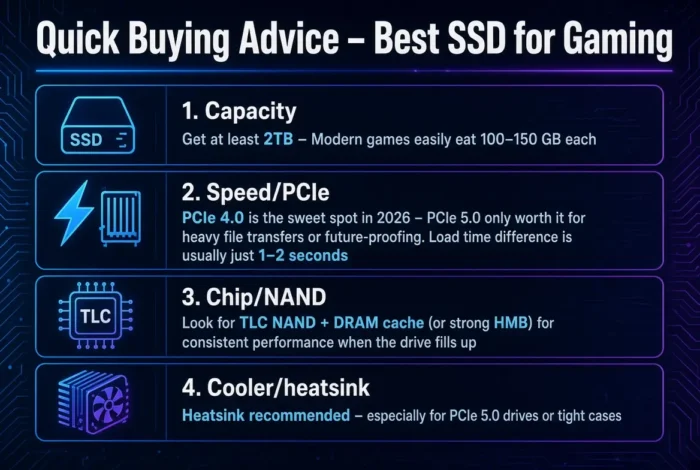
Games are huge now, and a slow drive means long loading screens and texture pop-in. A good NVMe SSD fixes both. For most gamers, a 1TB or 2TB PCIe 4.0 drive is the sweet spot. PCIe 5.0 is faster on paper, but you will not feel much difference in games. So pick the drive that fits your budget and your motherboard.
Top Picks at a Glance
We may earn a commission from purchases made through these links, at no extra cost to you.
Quick Answer
For gaming, buy a 2TB PCIe 4.0 NVMe SSD. The WD_BLACK SN850X is the best all-round choice. Want a flagship with a strong track record? Get the Samsung 990 Pro. Only buy PCIe 5.0, like the Crucial T705, if you also edit video or move huge files. Use a PCIe 4.0 drive with a heatsink if you plan to put it in a PS5.
How we evaluate
This guide is based on desk research, not hands-on lab testing. We compare published manufacturer specifications, weigh real-world compatibility and value for each use case, and reference publicly available reviews from established outlets. We do not run our own hardware tests. Speeds are manufacturer ratings, and prices change often, so check the current price before you buy.
Best SSD for Gaming: Full Comparison
Every drive here loads games far faster than a hard drive or SATA SSD. The real questions are how much you want to spend and whether your motherboard supports PCIe 5.0. Our what is SSD guide explains the basics if you are new to this.
| SSD | Interface | Rated read / write (up to) | Best for | Buy |
|---|---|---|---|---|
| Samsung 990 Pro | PCIe 4.0 | 7,450 / 6,900 MB/s | Premium all-rounder | Buy on Amazon |
| WD_BLACK SN850X | PCIe 4.0 | 7,300 / 6,600 MB/s | Best overall, PS5 | Buy on Amazon |
| Crucial T705 | PCIe 5.0 | 14,500 / 12,700 MB/s | Maximum speed | Buy on Amazon |
| Lexar NM790 | PCIe 4.0 | about 7,400 MB/s read | Value and capacity | Buy on Amazon |
| Crucial P3 Plus | PCIe 4.0 | 5,000 / 4,200 MB/s | Tight budgets | Buy on Amazon |
Best SSD for Gaming: Top 5 Picks in Detail
WD_BLACK SN850X: Best Overall
The WD_BLACK SN850X is my top pick for most gaming PCs. It reads up to 7,300 MB/s and writes up to 6,600 MB/s. It comes in several sizes, and a heatsink version is sold for the PS5. It has been a trusted gaming drive for a couple of years now. It gives you flagship feel without a flagship price.
Samsung 990 Pro: Best Premium PCIe 4.0
The Samsung 990 Pro is the fastest PCIe 4.0 drive here, at up to 7,450 MB/s read. It runs cooler than PCIe 5.0 drives and comes in 1TB, 2TB and 4TB sizes. A heatsink model is offered for PS5 owners. Pick it if you want a famous brand and do not mind paying a little more.
Crucial T705: Best PCIe 5.0
Want the fastest drive you can buy? The Crucial T705 is rated up to 14,500 MB/s read on the 2TB model. It was the first drive to pass 14,000 MB/s. It runs hot and costs more. Your motherboard must have a PCIe 5.0 M.2 slot. For games alone, you will not notice a big gain over the drives above. It shines when you edit video or move huge files.
Lexar NM790: Best Value
The Lexar NM790 is the smart-money pick. It gives you PCIe 4.0 speeds near the top of the chart at a lower price. It is also a good choice if you want a big 2TB or 4TB drive for a large game library. You give up the brand name and some extras, not real gaming speed.
Crucial P3 Plus: Best Budget
Need to keep costs low? The Crucial P3 Plus reads up to 5,000 MB/s and writes up to 4,200 MB/s. That is slower than the rest, but still far faster than a SATA SSD or hard drive. Games load fine on it. Think of it as a good way to get lots of space cheaply.
PCIe 4.0 vs PCIe 5.0 for Gaming
This is the question most buyers get wrong, so here is the short version. PCIe 5.0 drives are faster on paper, but most users will not notice much difference in normal Windows use or gaming. Game loading depends on more than raw speed. The CPU, the game engine and how the game uses storage all matter.
Pick PCIe 4.0 if: you mostly play games, want lower heat and want to save money.
Pick PCIe 5.0 if: you also edit 4K video, work with huge files, or want the newest tech and your board supports it.
Our pick for gaming is PCIe 4.0. Put the money you save toward more storage or a better graphics card.
WD_BLACK SN850X vs Samsung 990 Pro
These two are very close. The Samsung 990 Pro is a touch faster on paper and has a strong reputation. The WD_BLACK SN850X is built with gaming and the PS5 in mind and often costs a little less. In real games, you will not feel the gap.
Pick the WD_BLACK SN850X if: you want the best balance of price and gaming performance.
Pick the Samsung 990 Pro if: you want a premium brand and the fastest PCIe 4.0 numbers.
Is a PCIe 5.0 SSD Worth the Extra Cost?
For most gamers, no. The jump in game loading is small, and the drive runs hotter, so it needs a good heatsink and airflow. It is worth it if any of these are true for you:
- You edit 4K or 8K video
- You copy very large files every day
- You want to future-proof for games that use DirectStorage heavily, as we explain in our what is DirectStorage guide
- Money is not a factor and you want the fastest drive, full stop
If none of those apply, a PCIe 4.0 drive will serve you well for years.
How Much SSD Storage Do You Need for Gaming?
Modern games are big, so capacity matters as much as speed. Here is a simple guide.
| Capacity | Good for | Our take |
|---|---|---|
| 500GB | Windows and a few games | Too small for most gamers |
| 1TB | A handful of big games | Fine for light players |
| 2TB | A solid library | The sweet spot for most people |
| 4TB | A huge library or creator work | Best if you hate uninstalling games |
If you can, buy 2TB. A full drive can slow down, and you will spend your time deleting games to make room.
Match the SSD to Your Use Case
Your setup is the best guide. Here is a simple match.
Gaming PC
Buy a 2TB PCIe 4.0 drive such as the WD_BLACK SN850X or Samsung 990 Pro. It is fast enough for every game today and runs cool.
PS5
The PS5 needs a PCIe 4.0 M.2 drive with a heatsink. The WD_BLACK SN850X and Samsung 990 Pro both come in heatsink versions made for it. Check the PS5 requirements for size and speed before you buy.
Budget build
Get the Lexar NM790 or Crucial P3 Plus. Both are many times faster than a hard drive and are cheap per gigabyte.
Gaming and content creation
If you also edit video, consider the Crucial T705. The extra speed helps when you move large project files.
Does Your SSD Bottleneck Your Gaming PC?
A bottleneck is the slow part that holds everything back. For most games, your SSD will not limit your frame rate. Your CPU and GPU decide that. Read our what is bottlenecking my PC guide to see the difference.
Where the SSD does matter is load times and streaming. A slow drive causes long loading screens, texture pop-in and stutter in open-world games. We cover this in our storage bottleneck guide. If you see stutter when you move through a big map, check your drive first.
Newer games also use DirectStorage to send data to the GPU faster. It works best with an NVMe SSD, which is another reason to skip SATA and hard drives.
Compatibility and Installation
- M.2 slot. Check that your motherboard has a free M.2 slot. Most modern boards have at least one.
- PCIe 5.0 support. Only buy a PCIe 5.0 drive if your board has a PCIe 5.0 M.2 slot. A PCIe 4.0 drive works on any slot that supports it, and many boards run PCIe 5.0 drives in a slower mode.
- Heatsink. Fast drives run hot. Many motherboards include a heatsink. A drive that overheats slows itself down, so keep it cool. Our free PC benchmark software guide lists tools you can use to check temperatures.
- Size. Most gaming drives use the M.2 2280 size. Check this before you buy.
Complete Gaming PC Build Recommendations
Picking the SSD is only one step. Here is how to round out the build so nothing else holds it back.
GPU: Match the card to your screen. See our best GPU for Ryzen 7 9800X3D guide for high-end picks.
RAM: 32GB of DDR5 is the sweet spot. See our best RAM for gaming guide.
Power supply: Do not skimp here. See our best PSU for gaming PC picks.
| Part | Recommendation |
|---|---|
| Main game drive | 2TB PCIe 4.0 NVMe (WD_BLACK SN850X) |
| Budget option | 1TB to 2TB Lexar NM790 |
| Creator option | Crucial T705 |
| PS5 | PCIe 4.0 drive with a heatsink |
| Extra storage | A second M.2 or SATA SSD for older games |
Run your exact build through our bottleneck calculator to make sure the CPU and GPU are balanced before you buy.
Upgrade Recommendations
Still on a hard drive? Any NVMe SSD here will be a huge jump. On a SATA SSD? A PCIe 4.0 NVMe drive loads faster and handles DirectStorage games better. Already on a good PCIe 4.0 drive? Do not upgrade to PCIe 5.0 just for games. Add a second drive when you run out of space instead.
Value for Money
Here is the best value. The WD_BLACK SN850X is the smart-money pick for most people. The Samsung 990 Pro is the one to buy if you want a premium brand. The Lexar NM790 wins on price per gigabyte for big libraries. The Crucial T705 is a want, not a need, and is only worth it for creators or people who want the very fastest drive.
Prices swing often, so check the current price on each drive before you buy. As a rough guide from recent reviews, 2TB models of the 990 Pro and SN850X have sold in the $150 to $160 range, and the Crucial P3 Plus has been cheaper. Treat these as approximate.
Alternative Recommendations
On a very tight budget, a 1TB PCIe 4.0 drive with a good controller still beats any hard drive by a wide margin. Want a drive made for the PS5? Seagate sells a Game Drive built for it. Want even more speed? The Samsung 9100 Pro is another PCIe 5.0 flagship. Building around the fastest gaming CPU? See our best GPU for Ryzen 7 9800X3D guide for the graphics side.
Frequently Asked Questions
What is the best SSD for gaming?
The WD_BLACK SN850X for most people. It is fast, reliable and fairly priced. The Samsung 990 Pro is a great premium alternative, and the Crucial T705 is the choice if you want PCIe 5.0 speed.
Is NVMe better than SATA for gaming?
Yes. NVMe drives are much faster and work better with DirectStorage. Budget NVMe drives now cost close to SATA drives, so if you have a free M.2 slot, get NVMe.
Do I need a PCIe 5.0 SSD for gaming?
No. PCIe 4.0 is fast enough for every current game. PCIe 5.0 mainly helps with video editing and very large file transfers.
How much SSD storage do I need for gaming?
2TB is the sweet spot. 1TB is the minimum for a modern game library, and 4TB is best if you keep many large games installed.
Do SSDs make games run faster?
They make games load faster and reduce texture pop-in and stutter. They do not raise your frame rate. That depends on your CPU and GPU.
Do I need a heatsink on my NVMe SSD?
Often yes, especially on fast drives and in a PS5. Many motherboards include one. Without cooling, a hot drive slows itself down.
Can I use any NVMe SSD in a PS5?
No. The PS5 needs a PCIe 4.0 M.2 drive with a heatsink that fits the bay. Check the console’s requirements before you buy.
Does DirectStorage need a special SSD?
It works best with an NVMe SSD. Read our what is DirectStorage guide for the details.
Final Verdict
Our pick for the best SSD for gaming is the WD_BLACK SN850X. It fits most builds, and you will not feel the difference to pricier drives in games. Buy the Samsung 990 Pro for a premium PCIe 4.0 flagship. Buy the Crucial T705 only if you need PCIe 5.0 speed. Pick the Lexar NM790 or Crucial P3 Plus to save money. Whatever you choose, aim for 2TB. Then run your build through our bottleneck calculator to see your exact numbers.