

Best 1000W PSU 2026-Top Picks Matched to Every GPU & CPU
The best 1000W PSU for most gaming PCs in 2026 is the Corsair RM1000x. It is fully modular, ATX 3.1 ready and has a native 12V-2×6 cable for RTX 50 cards. Hardware Busters measured Cybenetics Platinum efficiency and silent operation in its lab review. itechguides lists a 10-year warranty.
But “best” depends on your build. A 1000W power supply is great for some PCs and a waste for others. This guide shows which one to buy and when to skip it. If you are not sure what size you need, run your parts through our PSU calculator first.
Table of Contents
Quick Answer: Best 1000W Power Supply Picks
🏆 Best 1000W PSU Picks for 2026
We did not lab test these units. Every pick comes from published lab reviews, and each one names its source.
Do You Actually Need a 1000W PSU?
Many guides skip this question, and many people buy 1000W when 850W is enough. Here are NVIDIA’s own numbers for the RTX 50 series:
- RTX 5090: 575W graphics power, 1000W recommended PSU. corsair
- RTX 5080: 360W graphics power, 850W recommended PSU. corsair
- RTX 5070 Ti: 300W graphics power, 750W recommended PSU. racunalniske-novice
- RTX 5070: 250W graphics power, 650W recommended PSU. racunalniske-novice
NVIDIA’s numbers are a baseline, not a promise for every PC. They assume a test system with a Ryzen 9 9950X-class CPU. Your real needs change with your CPU, drives and overclocking. dropreference
Here is how our own PSU calculator turns this into a number. It adds the GPU power, the CPU power and a 100W allowance for the rest of the PC, then multiplies by 1.4 for power spikes and upgrades.
- RTX 5080 + Ryzen 7 9800X3D: 360W + 120W + 100W = 580W. Times 1.4 is about 812W, so the answer is 850W.
- RTX 5090 + Ryzen 7 9800X3D: 575W + 120W + 100W = 795W. Times 1.4 is about 1113W, so the answer is 1200W.
So 1000W is the right fit in three cases:
- You have an RTX 5090. It meets NVIDIA’s minimum, though the math above shows 1200W gives more margin. itechguides also suggests 1200W when a 5090 partner card or heavy overclock leaves little headroom.
- You have a power-hungry CPU or you overclock. Evetech says 850W is enough for most RTX 5080 builds, but suggests 1000W for a high-wattage Ryzen 9 or Core i9, or for overclocking.
- You want room to upgrade your GPU later without replacing the PSU.
On an RTX 5070 or 5070 Ti, you can probably skip 1000W. Our best 750W PSU guide covers that tier. Still planning your parts? See our best CPU for RTX 5070 and 5070 Ti and best CPU for RTX 5080 guides, or check our best GPU for Ryzen 7 9800X3D picks.
What to Look For in a 1000W PSU
ATX 3.1 and a native 12V-2×6 cable. Modern GPUs can spike in power for a split second. ATX 3.1 supports PCIe Gen 5.1 and is built to handle these transient spikes. A native cable also means you don’t need an adapter. If your PSU is older, check which cable the PSU maker approves, plus case space and airflow.
Low ripple. Ripple is small shaking in the power the PSU sends out. Less is better. Hardware Busters ranks 1000W units by 12V ripple suppression, and names the ASUS ROG Strix 1000G Aura, PCCooler YN1000 and Super Flower Leadex VII XP among the best. hwbusters
Efficiency (Gold or Platinum). A higher rating wastes less power as heat. It’s nice to have, but it matters less than the first two points.
Fully modular cables. You plug in only the cables you need, which helps airflow and looks cleaner. Not sure if you need it? Read our modular vs non-modular PSU guide.
A long warranty. Ten years is common on good units. It is a sign the maker trusts the part.
1000W PSU Comparison at a Glance
| PSU | Best for | ATX standard | Efficiency | Standout trait |
|---|---|---|---|---|
| Corsair RM1000x | Most gaming PCs | ATX 3.1 | Cybenetics Platinum | Fan-speed knob, fan failure protection |
| FSP Hydro Ti Pro | Top measured performance | ATX 3.0 (12VHPWR) | 80 Plus Titanium | Best 200% transient response in HWB’s 1000W chart |
| Corsair RM1000x Shift | Clean cable routing | ATX 3.1 | Platinum-level (sold as Gold) | Side-mounted connectors |
| Super Flower Leadex VIII | Tight cases | ATX 3.1 | Cybenetics Platinum | 125mm long, white version available |
| Corsair HX1000i Shift | Corsair iCUE builds | ATX 3.1 | Cybenetics Platinum | Built-in iCUE Link hub |
| Corsair RM1000e | Lower-cost Corsair option | ATX 3.1 | 80 Plus Gold | Compact, 7-year warranty |
| Corsair SF1000 (2024) | Small form factor | ATX 3.1 | 80 Plus Platinum | Best SFX transient response in HWB’s chart |
Best 1000W Power Supply Picks
Best Overall: Corsair RM1000x
This is the safest buy for most people. It does nothing flashy, but it scores well almost everywhere. Hardware Busters says the unit is silent in operation thanks to a 140mm fluid dynamic bearing fan that doesn’t need to spin fast. It also suits a high-end build. In the review comments, the reviewer told a reader with an RTX 5090 and a Core i7-14700K that the RM1000x is safe for that setup if the cables are connected carefully. Pros
- ATX 3.1 and PCIe 5.1 ready, with a 600W 12+4 pin GPU connector.
- Cybenetics Platinum efficiency and Cybenetics A noise rating.
- Fan failure protection, which Hardware Busters says most high-end PSUs lack.
- Tight load regulation, good ripple suppression, good transient response and a long hold-up time.
- A knob on the front sets the lowest fan speed, and the bundle has two EPS and four PCIe 6+2 pin cables.
- 10-year warranty, per itechguides.
Cons
- Hardware Busters found the efficiency could be better at very light loads (20 to 80W).
- The peripheral connectors sit close together
- Our take: Buy this if you want one answer. If the fan seems loud at idle, check the fan-speed knob first. The reviewer gave that tip to a reader with the same complaint. For an RTX 5080 build, this has plenty of room
Best for Lab Performance: FSP Hydro Ti Pro
If you care most about measured results, this is the one. Hardware Busters called it the new king of the 1000W category, with standout transient response. In its 2026 1000W chart, it is first for overall performance at 115V, first for average efficiency, and first for 200% load transient response. That last test matters because power spikes are why RTX 50 cards need headroom.
Pros
- Tom’s Hardware gave it an Editor’s Choice, praising its 95% efficiency, quiet operation, robust build and premium components.
- 10-year warranty.
- Semi-passive design, so the fan stops at low loads.
- Small 15cm body, per KitGuru.
Cons
- High price, according to Tom’s Hardware.
- It is ATX 3.0 with a 12VHPWR connector rated at 600W, not ATX 3.1. Make sure the GPU cable you use is approved for your card.
- KitGuru says availability has long been a problem with FSP.
Best for Easy Cabling: Corsair RM1000x Shift
The Shift moves the cable sockets from the back of the PSU to the side. That makes cable routing much easier in a case built for it. Hardware Busters says it offers the side-mounted panel without the HXi Shift price. It ranked second in its comparison group for overall performance.
Pros
- ATX 3.1 and PCIe CEM 5.1 compliant, with a 600W 12+2 pin PCIe connector.
- High efficiency at every load range, silent operation, and a 140mm fluid dynamic bearing fan.
- Good transient response on the 12V rail, extended hold-up time and tight regulation.
- KitGuru confirms ATX 3.1, PCIe 5.1 and a 12V-2×6 cable.
Cons
- Hardware Busters measured Platinum-level efficiency, but Corsair sells it with a lower Gold label.
Our take: check your case manual first. Also check the model number on the listing: Corsair sells a 2023 version and the 2025 ATX 3.1 version (CP-9020300), and the 2025 one is the one reviewed here.
Best Compact ATX: Super Flower Leadex VIII
Short cases need a short PSU. The Leadex VIII 1000W is ATX 3.1 with a native 12V-2×6 cable, Cybenetics Platinum efficiency, and is billed as the smallest ATX PSU at 125mm. It comes in black and white. The 10-year warranty is listed by a Japanese retailer. Hardware Busters ranks it third for overall 1000W performance at 115V.
Pros
- Very short body, good for tight cases.
- Native 12V-2×6 cable and ATX 3.1.
- White version for matching builds.
Cons and a warning
- Hardware Busters ranks it well, but I could not find a full review in its list, so there is less detail than for the Corsair units.
Our take: a good pick when case length is your main problem. Check that the Amazon listing says SF-1000F14SP, 1000W and ATX 3.1 before buying.
Best Premium Look: Corsair HX1000i Shift
This one is about design more than raw performance. Tom’s Hardware says it moves the connectors to the side and suits Corsair ecosystem builders with the right hardware, but others may find the compromises outweigh the benefits.
Pros
- Cybenetics Platinum efficiency and an integrated iCUE hub.
- Native 12V-2×6 cable, ATX 3.1 and PCIe 5.1, per the Amazon listing.
- Clean side-routed cables.
Cons
- Hardware Busters says it is expensive and offers decent performance, but they expected more for the price, about $100 over the plain HX1000i
- It is 170mm deep, longer than the 140mm ATX guideline, and it uses Corsair’s proprietary Type-5 cables.
- Most of the internal parts match the regular HX1000i, so the extra cost goes to iCUE Link hardware.
Our take: buy it only if you want the iCUE Link hub and a clean side-routed look. If you just want side connectors, the RM1000x Shift gives you that for less.
Best on a Tighter Budget: Corsair RM1000e
I would not call this a bargain, but it is the lower-cost way into a 1000W Corsair with ATX 3.1. Hardware Busters says it is a fine PSU for RTX 5000 cards, but its performance is notably lower than the RM1000x. Back2Gaming rated it 8.6.
Pros
- Tom’s Hardware lists ATX 3.1 and PCIe 5.1, compact size, a 7-year warranty, quiet operation in typical conditions and flexible cables.
- Zero RPM fan mode keeps it silent at low to moderate loads.
- KitGuru praises its load regulation, cable quality and solder quality.
Cons
- Hardware Busters says the price is not very competitive, and 3.3V regulation and transient response are weak spots.
- Tom’s Hardware notes mid-tier components, signs of thermal stress and limited connectors.
- KitGuru wanted a longer warranty and a better fan bearing.
Our take: buy it when the RM1000x costs too much or is out of stock. If you can stretch, the RM1000x is the better unit.
Best Small (SFX) PSU: Corsair SF1000 (2024)
Pros
- ATX 3.1 and 80 Plus Platinum.
- Strong transient response for an SFX unit.
Cons
Check that your case supports SFX, and use the right mounting bracket if your case is ATX.anty for your own build. For a broader view across all wattages, see our best PSU for gaming PC guide.
SFX is a tighter fit for cables and cooling than a full ATX unit.
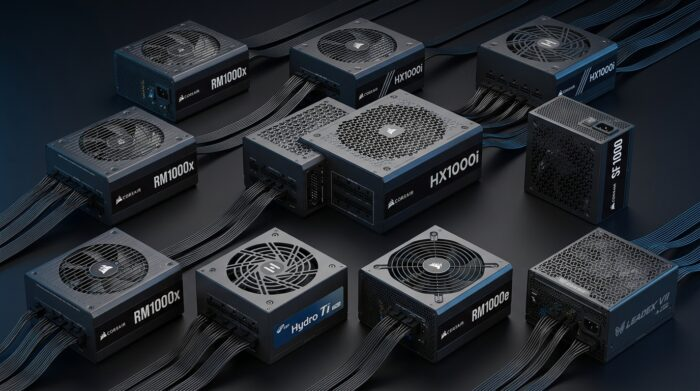
Which 1000W PSU Should You Buy?
- RTX 5080 with a normal CPU: the RM1000x. Our calculator says 850W is enough, so 1000W is headroom.
- RTX 5090: 1000W meets NVIDIA’s minimum, but our calculator suggests 1200W for extra margin. If you stay at 1000W, the RM1000x or FSP Hydro Ti Pro are the strongest options here.
- Tight case: Leadex VIII (ATX) or Corsair SF1000 (SFX).
- Cable mess drives you crazy: RM1000x Shift, if your case supports it.
- Tighter budget: RM1000e.
- Want more choice: see our PSU tier list and our best PSU for gaming PC guide.
Also worth a look: Hardware Busters’ 1000W chart ranks the NZXT C1000 Gold second at 115V and first at 230V, so it is a good unit to check if you cannot find the picks above.
Who Should Skip a 1000W PSU?
- You have an RTX 5070 or 5070 Ti. NVIDIA’s figures for these cards are 650W and 750W (see above).
- You have an RTX 5080 and a mainstream CPU. Evetech says a quality 850W unit leaves healthy headroom for most RTX 5080 builds
- You are not overclocking and don’t plan a GPU upgrade soon.
A bigger PSU than you need is not harmful, but you may pay for headroom you never use. Already own a PSU and wondering if it is enough? Find out what PSU you have first. Random shutdowns under load are a warning sign, so read our list of PSU failing symptoms too.
Best 1000W PSU FAQ
Is a 1000W PSU overkill for an RTX 5080?
This comes up a lot on build forums. One Yo Motherboard thread asks it for a Ryzen 7 7800X3D and RTX 5080 build. NVIDIA recommends 850W for this card, so 1000W is not required. It is a fine choice if you want headroom. One forum reply put a 9800X3D plus RTX 5080 system at about 550 to 600W normally and 700 to 750W when overclocked. That is a user estimate, not a lab number.
Is 1000W enough for an RTX 5090?
Forum users ask this often, for example in a TechPowerUp thread about a Seasonic Focus GX 1000W unit. NVIDIA recommends 1000W for the RTX 5090, so it meets the baseline. Our PSU calculator suggests 1200W with a Ryzen 7 9800X3D for extra margin.
Can an older 1000W PSU run an RTX 50 card?
One Overclockers UK user asked this about a Phanteks Revolt Pro 1000W that is likely not ATX 3.0 or 3.1. It may work with the right cable. Check which cable your PSU maker approves before you plug anything in. A new ATX 3.1 unit with a native cable is the simpler option.
Is 850W enough instead of 1000W?
A Tom’s Hardware forum user asked this about an RTX 5080 with a Ryzen 9 7900X and an 850W Corsair unit. NVIDIA’s own recommendation for the RTX 5080 is 850W. Go to 1000W if you have a flagship CPU or plan to overclock.
Final Verdict
For most people, the Corsair RM1000x is the safest best 1000W PSU. Choose the RM1000x Shift if cable access matters and your case fits it. Choose the Corsair HX1000i Shift if you want a premium look. If you have an RTX 5070 or an RTX 5080 with a normal CPU, check whether 750W or 850W is enough first.
Not sure a weak PSU is your problem? Read can a PSU bottleneck your PC, then test your CPU and GPU pair on our PC bottleneck calculator.
