

Elden Ring System Requirements for PC- Can Your PC Run It?
The Elden Ring system requirements are 12GB of RAM, an Intel Core i5-8400 or Ryzen 3 3300X, and a GTX 1060 or RX 580 for the minimum, with 16GB of RAM and a GTX 1070 class card for the recommended setup. Below you will find both spec lists in plain words, what they mean for your PC, and what to do if your computer is close to the line.
Elden Ring System Requirements at a Glance
The minimum list is Windows 10, an Intel Core i5-8400 or AMD Ryzen 3 3300X, 12GB of RAM, and a GTX 1060 3GB or Radeon RX 580 4GB. The recommended list is an Intel Core i7-8700K or Ryzen 5 3600X, 16GB of RAM, and a GTX 1070 or Radeon RX Vega 56. pcgamerkitguru
The game uses DirectX 12 as its base API. The base game needs 60GB of free space, and Windows Central lists 80GB if you add the Shadow of the Erdtree DLC. That means you want a graphics card that supports DirectX 12 and a drive with room to spare. wccftechgamesradar
Table of Contents
What the Specs Mean in Plain Words
CPU. The processor runs the game world, enemies, and physics. The minimum chips are older mid-range parts from around 2018 to 2019, so most gaming PCs from the last few years are above them.
RAM. This is the number that surprises people. GamesRadar noted that the 12GB RAM minimum was a surprise, since FromSoftware’s recent games had only needed 4GB. Most PCs sold with 8GB will need an upgrade to meet the official list. gamesradar
GPU. The graphics card draws the picture. The minimum cards are a GTX 1060 or RX 580, and the recommended cards sit one step above.
Storage. Plan on at least 60GB free. An SSD is the safer pick because the game streams in new areas as you ride and walk around.
The published specs list hardware only. They do not give a resolution or frame rate target, so “minimum” means the game should run, not that it will feel smooth at high settings.
Minimum vs Recommended: What to Expect
The minimum list is for getting the game to start and run at lower settings. The recommended list is for a steadier experience with better settings. If you want higher resolution or smoother frames, aim above recommended. Our guide on the resolution bottleneck explains why a higher resolution puts more work on the GPU and less on the CPU.
Real-world reports are mixed, so treat the official list as a starting point.
- Some players say the game ran on less than the listed RAM. TechRadar tested a Ryzen 3 3300X with 8GB of RAM and a GTX 1650 and found it worked, though the same test crashed on a GTX 1050 Ti. You can read their notes in TechRadar’s live testing blog. techradar
- Players on Steam forums have reported both good and bad results on older cards like the GTX 1050, so results depend on the rest of the PC.
This is why we say “can run” and “runs well” are two different things.
What Our Bottleneck Calculator Shows for Elden Ring Specs
We entered both official spec lists into our bottleneck calculator at 1080p, with the game type set to open world. The calculator does not know Elden Ring itself, so treat these results as a general open world estimate, not a benchmark.
Minimum specs
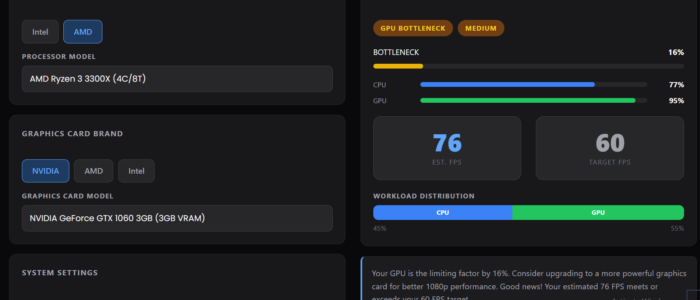
For the minimum pairing, we entered a Ryzen 3 3300X and a GTX 1060 3GB with [8GB / 16GB, whichever you selected] of RAM. The calculator shows a medium GPU bottleneck of 16%. The GPU sits at 95% use and the CPU at 77%, so the graphics card is the part working hardest. The estimate is 76 FPS against a 60 FPS target. Keep in mind that the calculator’s RAM options are 8, 16, 32 and 64GB, so it cannot match the official 12GB minimum.
Recommended specs
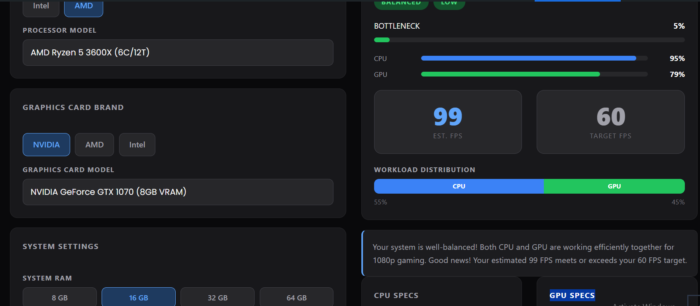
For the recommended pairing, we entered a Ryzen 5 3600X and a GTX 1070 8GB with 16GB of RAM. The calculator shows a balanced system with a low 5% bottleneck. The CPU is at 95% use and the GPU at 79%, so the processor is the slightly busier part. The estimate is 99 FPS against a 60 FPS target. Players often say this game leans on the CPU, so a CPU that is close to its limit is worth noticing.
What the two results tell us
Moving from the minimum to the recommended parts changes the result from a medium GPU bottleneck of 16% to a balanced 5%. In the calculator’s numbers, the graphics card stops being the main limit, which fits why the recommended list asks for a stronger GPU. These are estimates, not promises. Real results depend on settings, drivers, background apps, and the game itself.
How to Check Your PC Specs
You need three numbers: CPU, RAM, and GPU.
- Press Ctrl + Shift + Esc to open Task Manager.
- Click the Performance tab.
- Click CPU, Memory, and GPU one at a time and read the model name and size.
For storage, open File Explorer, click This PC, and look at the free space on the drive where you will install the game.
Match your parts to the table above. If any part is below the minimum, that part is your weak spot.
Can My PC Run Elden Ring?
Use this quick guide:
- All parts at or above recommended: You should have a good experience. Turn up settings step by step.
- Between minimum and recommended: It should run. Start with lower settings and raise them one at a time.
- One part below minimum: It may still start, but expect crashes or hitches. RAM and GPU are the most common weak spots.
- Several parts below minimum: Plan an upgrade before you buy.
Players often say this game leans on the CPU and RAM, not just the graphics card. If your CPU is old, read our CPU bottleneck guide. If your RAM is low, read our RAM bottleneck guide.
You can also run your exact parts through our PC bottleneck calculator. Use the result as a hint, not a promise. Real games depend on settings, drivers, and the game itself.
If Your PC Is Close to the Minimum
Try these steps in order:
- Lower graphics settings first. Drop shadows and effects before anything else.
- Close background apps like browsers, launchers, and recording tools.
- Turn off overlays. In one Steam forum thread about heavy stutter on a near-minimum PC, other players suggested turning down graphics options, turning off NVIDIA ShadowPlay, and checking for overheating.
- Watch temperatures. A hot PC slows itself down and can look like a weak PC.
- Install on an SSD if you can.
If the game freezes for short moments, read our guide on how to fix stuttering in games. If it feels slow in a different way, see why your game is lagging. To measure how smooth the game really is, learn about 1% low FPS.
What to Upgrade First
If you are below the list, upgrade in this order:
- RAM to 16GB if you have 8GB. It is the simplest fix.
- GPU if yours is below the GTX 1060 class.
- CPU if it is much older than the i5-8400 class. This one often means a new motherboard too.
- SSD if you are on a hard drive.
Before you buy, check that the new part will not just move the problem somewhere else. Our guide on how to fix bottlenecks without upgrading and our page on CPU bottlenecking your GPU will help you decide.
Elden Ring System Requirements FAQ
These questions are based on real questions from Steam Community and PC Gamer forum threads.
Can I run Elden Ring with 8GB of RAM?
Some players say yes. One Steam user said it ran fine on 8GB with only two crashes in about 150 hours. Still, the official minimum is 12GB, and low RAM can cause hitches, so 16GB is the safer choice.
Can I run Elden Ring on a GTX 1050?
Reports are mixed. One Steam user said it ran on medium settings with a GTX 1050 and 8GB of RAM, while in TechRadar’s test the GTX 1050 Ti crashed. It is below the official minimum, so expect compromises.
Will my old CPU be a problem?
It can be. In a Steam thread about an older i5, one player said the game is heavy on the CPU because of its threading. If your CPU is far below the i5-8400 class, expect a rougher time.
Is a GTX 1060 enough for Elden Ring?
It matches the minimum GPU on the official list. In a PC Gamer forum thread, a player with a GTX 1060 6GB, 16GB of RAM, and an i5-7400 asked this exact question, and the only part below the list was the CPU.
Why does Elden Ring stutter on my PC?
Common causes are low RAM, a weak CPU, background apps, or heat. Start with lower settings and close overlays.
Does Elden Ring need an SSD?
The official list gives storage space but does not name a drive type. An SSD is the safer choice for smoother loading.
Final Thoughts
The Elden Ring system requirements are not extreme, but the 12GB RAM minimum catches many budget PCs. Check your CPU, RAM, GPU, and free space against the table. If you are near the line, lower your settings and watch your temperatures. If you are far below it, upgrade RAM first.
