Motherboard PCB: Layers, Quality and Why It Matters
Jake was comparing two motherboards for his new gaming PC. They had the same chipset, the same socket and almost the same features. But one product page boasted about an “8-layer PCB with 2oz copper” and a “server-grade low-loss PCB”, while the cheaper board did not mention its PCB at all.
Jake had no idea what any of that meant. Would a better PCB give him more FPS? Was the cheaper board going to crash? Or was it all just marketing?
If you have wondered the same thing, this guide explains what a motherboard PCB actually is, what layer counts and copper weights mean, and how much PCB quality really affects stability and performance. No jargon you do not need.
How we checked: PCB claims come from motherboard makers’ own published materials (MSI, Gigabyte and ASRock), and are labeled as maker claims where they cannot be measured independently. We did not test boards hands-on.
Quick answer: the motherboard PCB (printed circuit board) is the flat board itself: layers of fiberglass and copper that connect the CPU, memory, graphics card and every other part. A better PCB, with more layers and thicker copper, mainly improves signal quality and power delivery. That helps stability, memory overclocking and high-end CPUs, but it does not add FPS on its own. For most gamers running memory at its rated XMP or EXPO speed, any decent board from a major brand is fine. PCB quality matters most for high-end CPUs, fast DDR5 memory and overclocking.
Table of Contents
Table of Contents
What Is a Motherboard PCB?
PCB stands for printed circuit board. On a motherboard, the PCB is the motherboard circuit board itself: the large flat board that everything else sits on. The CPU socket, RAM slots, PCIe slots, M.2 slots, power phases and chips are all soldered or mounted onto it.
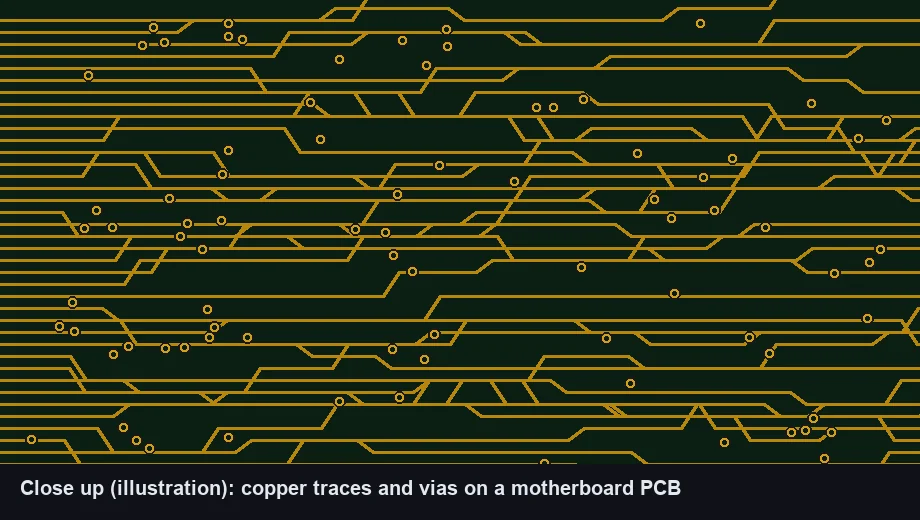
Think of it as the road network of your PC. Every signal between the CPU, memory, graphics card and storage travels along thin copper paths, called traces, printed onto and inside the board. Power travels through it too, from the power supply connectors to the CPU and other parts.
What a motherboard PCB is made of
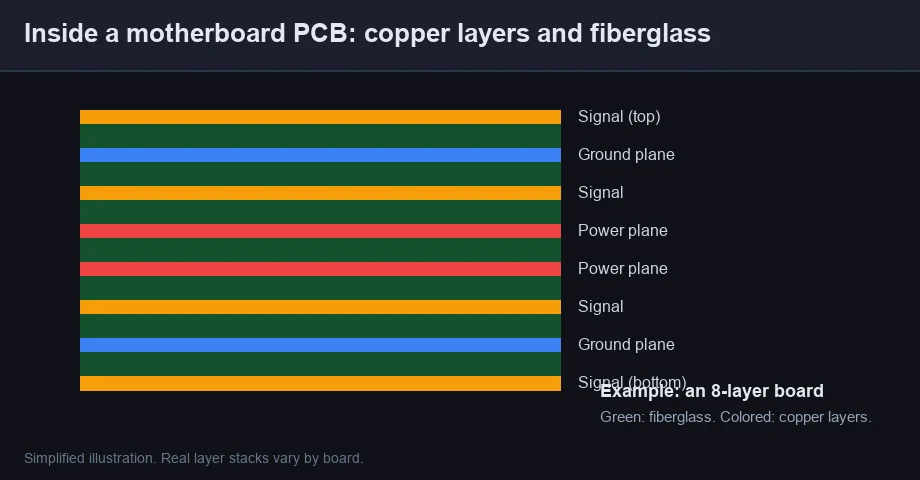
- Fiberglass layers: the stiff base material, usually a woven fiberglass and epoxy laminate. It holds the board’s shape and keeps copper layers electrically separated.
- Copper layers: thin sheets of copper, etched into traces and wide areas called planes. Some layers carry signals, others carry power or act as ground.
- Vias: tiny plated holes that connect copper layers to each other.
- Solder mask: the colored coating (usually black on modern boards) that protects the copper and prevents short circuits.
- Silkscreen: the printed labels you see, such as slot names and connector markings.
You only see the top surface, but a modern motherboard PCB hides several more copper layers stacked inside it.
Motherboard PCB Layers Explained
The layer count, often just called motherboard layers, is the number of copper layers inside the board. More layers give designers more room to route signals and power cleanly.
Why more layers help
An MSI technical article on PCB layers and memory overclocking explains it simply. On a 4-layer board, signal traces are limited to the top and bottom layers, so they have to be longer and routed around each other. More layers let designers place traces on different layers, keep them shorter, and reduce interference between them. That is why the article says 6- and 8-layer boards should have better memory overclocking capability than 4-layer boards.
Typical layer counts
| Layer count | Where you usually find it | What it means for you |
|---|---|---|
| 4 layers | Older and very cheap boards | Fine for basic use and rated memory speeds |
| 6 layers | Many budget and mainstream boards | A solid baseline for most gamers |
| 8 layers | Mid-range and many gaming boards | Better signal quality, helps fast DDR5 and PCIe 5.0 |
| 10 to 12 layers | High-end and overclocking boards | Maximum signal quality and power handling for enthusiasts |
These are general patterns, not rules. Always check the exact model’s spec page, and note that many makers only list the layer count when it is a selling point.
Why modern boards need more layers
Newer platforms carry much faster signals. ASRock, for example, says its server-grade low-loss PCB improves signal integrity so the board can support PCIe 5.0 for both the graphics card and M.2 SSD, and improves memory overclocking potential. Fast DDR5 and PCIe 5.0 are less forgiving of a noisy or poorly routed board, so better PCBs matter more today than they did a few years ago.
Copper Weight, Low-Loss Materials and Other PCB Specs
Besides layer count, motherboard makers advertise a few other PCB features. Here is what they mean in plain words.
| Spec | What it means | Who benefits |
|---|---|---|
| 2oz copper (also called “2x copper”) | Thicker copper in the power and ground layers. Gigabyte says its 2x copper design lowers impedance by 2x, allowing more current with less heat | High-power CPUs and overclockers |
| Server-grade or low-loss PCB | A higher-grade board material that loses less signal strength at high speeds. ASRock says it improves signal integrity for PCIe 5.0 and memory overclocking | Fast DDR5, PCIe 5.0 GPUs and SSDs |
| More layers | More room for clean signal routing and dedicated power and ground planes | Stability, memory overclocking |
| Back-drilled or optimized memory traces | Memory traces tuned for cleaner signals | Very fast memory kits |
What “2oz copper” actually measures: it is the weight of copper spread over one square foot of board. Gigabyte lists it as 56.7 grams of copper per square foot, which is double the common 1oz standard.
A fair warning: these features are real engineering improvements, but most of the benefits makers list (cooler, more stable, better overclocking) are their own claims and are rarely measured independently. Treat them as signs of a higher-quality board, not as guaranteed performance gains.
Can Motherboard PCB Quality Affect PC Stability and Performance?
Yes, but probably not in the way you expect. A better motherboard PCB does not make your games run faster by itself. What it does is help the rest of your hardware run at its full, stable speed.
Where PCB quality really matters
- Stability at high memory speeds: cleaner signal routing helps fast DDR5 kits run stable. MSI’s PCB article notes memory makers validate their kits on basic boards, so rated XMP or EXPO speeds usually work on most boards. Going beyond those speeds is where better PCBs help most.
- PCIe 5.0 signals: the faster the signal, the more a low-quality board can cause errors. This is why high-end boards advertise low-loss PCBs.
- Power delivery to high-end CPUs: thicker copper and good power planes help the VRM (the CPU power circuit) deliver steady power with less heat.
Can a motherboard affect gaming performance at all?
Yes, in these indirect ways, most of which have nothing to do with the PCB itself:
| Motherboard factor | How it can cost performance |
|---|---|
| Weak VRM (power delivery) | A budget board can overheat and throttle a high-core-count CPU under heavy load |
| PCIe version | An older board can run your graphics card or SSD at a slower PCIe version. See our PCIe 4.0 vs 5.0 guide |
| Memory support | A board that cannot run your RAM at its rated speed leaves performance on the table. Our how to enable XMP guide shows how to check |
| Outdated BIOS | Old firmware can cause instability, missing CPU support or poor memory compatibility. See how to update BIOS |
| Wrong slot | Installing the GPU in a lower slot can limit it to fewer PCIe lanes |
The bottom line: for a mid-range gaming PC running memory at its rated speed, PCB quality rarely changes your frame rate. It matters most for high-end CPUs, fast DDR5 overclocking and PCIe 5.0 hardware.
How to Check a Motherboard’s PCB Quality Before You Buy
You cannot see inside the board, but you can still judge it.
- Read the spec page and feature page. Look for the layer count (“6-layer”, “8-layer PCB”), “2oz copper” and “server-grade” or “low-loss PCB”. If a board’s page says nothing, it is usually a basic design.
- Look at the board tier. Within a chipset, higher models usually get better PCBs and power delivery. Our B650 vs B850 guide explains how chipset tiers differ.
- Check the memory support list. The rated memory speed for your exact board, and its QVL (qualified memory list), tell you more about memory stability than marketing words do.
- Read independent VRM reviews if you plan to use a high-end CPU. Power delivery is the most common real-world weakness of cheap boards.
- Match the board to your CPU. A Ryzen 5 or Core i5 does not need a flagship board. A Ryzen 9 or Core i9 does benefit from a stronger one.
Want picks that already balance PCB quality, power delivery and price? See our best AM5 motherboard guide and our best motherboard for Ryzen 7 9800X3D guide.
Motherboard PCB Damage: Signs, Causes and Repair
A damaged PCB is one of the most serious motherboard problems, because the copper layers inside cannot simply be replaced.
Signs of a damaged motherboard PCB
- Burn marks, dark spots or a burning smell
- Cracks in the board, often near screw holes or the CPU socket
- Scratched or lifted traces on the surface
- Corrosion, usually green or white residue after liquid exposure
- Bulging or leaking capacitors on the board
- The PC will not power on or POST, shuts down randomly, or crashes even with working parts
Common causes
- A screwdriver slipping during installation and scratching traces
- Over-tightening the CPU cooler or screws, which bends or cracks the board
- Liquid spills or water cooling leaks
- Static discharge while handling the board
- A failing power supply sending bad power
- Long-term overheating
Can a motherboard PCB be repaired?
- Surface trace damage can sometimes be repaired by a skilled electronics repair shop.
- Damage to internal layers, cracks or burn-through is almost never worth repairing, because the inner copper layers cannot be reached.
- Under warranty: contact the maker first. Opening or attempting repairs yourself may void the warranty.
For most people, a badly damaged PCB means replacing the motherboard.
Motherboard PCB: FAQs
What does PCB mean on a motherboard?
PCB means printed circuit board. It is the flat board that holds all the motherboard’s parts and connects them through copper traces printed on and inside its layers.
How many layers does a motherboard PCB have?
Most modern consumer motherboards use 6 to 8 layers. High-end overclocking boards often use 10 or more, while very old or very cheap boards may use 4.
Is an 8-layer PCB better than a 6-layer PCB?
Generally yes for signal quality and memory overclocking, because extra layers give more room for clean routing. For memory at its rated XMP or EXPO speed, a well-designed 6-layer board is usually fine.
What does 2oz copper mean on a motherboard?
It means the power and ground layers use twice the standard copper thickness. Gigabyte says this lowers impedance by 2x, which lets more current flow with less heat.
Can motherboard PCB quality affect PC stability?
Yes. A better PCB carries cleaner signals and steadier power, which helps stability with fast memory, PCIe 5.0 parts and high-end CPUs. For mid-range builds at stock settings, the difference is usually small.
Can a motherboard affect gaming performance?
Not directly, but it can limit it through weak power delivery, an older PCIe version, poor memory support or an outdated BIOS.
Can a cracked motherboard PCB be fixed?
Rarely. Surface trace damage can sometimes be repaired by a specialist, but cracks and damage to inner layers usually mean the board must be replaced.
Final Verdict: Does the Motherboard PCB Matter?
Jake chose the board with the better PCB in the end, but not for extra FPS. He was pairing it with a fast DDR5 kit and planned to try memory overclocking, which is exactly where more layers and cleaner signals help. His friend, building a mid-range PC with memory at stock XMP speed, bought the cheaper board and is just as happy.
That is the honest answer. The motherboard PCB is the foundation every part of your PC relies on. More layers, thicker copper and low-loss materials improve stability, memory overclocking and power delivery, especially for high-end CPUs, fast DDR5 and PCIe 5.0. But a better PCB does not raise FPS on its own, and for most mid-range gaming builds any decent board from a major brand is enough.
Not sure whether your motherboard, CPU or graphics card is holding your PC back? Run your parts through our free PC bottleneck calculator.
Sources
- MSI: Motherboard PCB layer vs memory overclocking
- Gigabyte: 2x copper PCB explained
- ASRock: server-grade ultra low-loss PCB, 10-layer PCB and 2oz copper (Z890 Taichi AQUA)