

9800X3D vs 9700X- Which CPU Makes a More Balanced Build
We have run both the Ryzen 7 9800X3D and the Ryzen 7 9700X through our bottleneck calculator with dozens of GPU pairings across 1080p, 1440p, and 4K. The results tell a clear story, and if you are stuck choosing between the 9800X3D vs 9700X for your next build, this guide gives you a straight answer based on real bottleneck data rather than spec sheet comparisons.
The short verdict: the 9800X3D bottlenecks your GPU less in gaming, especially at 1080p high refresh rate with a powerful card. The 9700X builds a more balanced system when paired with a mid tier GPU or when your workload goes beyond pure gaming. Neither chip will choke a modern GPU at 1440p or 4K in any meaningful way, but once a game becomes even slightly CPU sensitive, the 9800X3D pulls ahead every time.
Both CPUs share the same AM5 socket, Zen 5 architecture, and 8 core 16 thread design. What separates them is AMD’s 3D V Cache, a stacked layer of L3 cache on the 9800X3D that changes how the chip feeds data to your GPU under load. That single difference is why these two chips behave so differently in games despite looking nearly identical on a spec sheet.
This guide breaks down the bottleneck behavior by GPU tier and resolution so you can build the most balanced rig for your setup in 2026.
9800X3D vs 9700X- Specs at a Glance
| Spec | Ryzen 7 9800X3D | Ryzen 7 9700X |
|---|---|---|
| Architecture | Zen 5 (Granite Ridge) | Zen 5 (Granite Ridge) |
| Cores / Threads | 8 / 16 | 8 / 16 |
| Base Clock | 4.7 GHz | 3.8 GHz |
| Boost Clock | 5.2 GHz | 5.5 GHz |
| L3 Cache | 96 MB (3D V Cache) | 32 MB |
| TDP | 120W | 65W |
| Socket | AM5 | AM5 |
| Process Node | 4nm TSMC | 4nm TSMC |
| PCIe Support | PCIe 5.0 | PCIe 5.0 |
| Memory | DDR5 | DDR5 |
| Gaming Rating (100+ games avg) | 95 / 100 | 79 / 100 |
Why the L3 Cache Gap Changes Everything
The 9700X has 32 MB of L3 cache. The 9800X3D has 96 MB thanks to AMD’s second generation 3D V Cache, which stacks extra cache vertically below the Zen cores rather than on top, giving it better thermals than the previous generation. That extra cache is not a marketing number. It directly changes how the CPU feeds data to your GPU.
When a game needs data quickly, the CPU has to pull it from somewhere. If the data is sitting in L3 cache, the CPU grabs it instantly. If the cache misses, the CPU has to reach out to system RAM, which is many times slower. In CPU sensitive games, that delay creates a stall, and the GPU ends up waiting for data instead of rendering frames. This is exactly what people mean when they say a CPU is bottlenecking a GPU in gaming.
The 9800X3D’s massive L3 cache drastically reduces those stalls. It is why the chip scores 20 percent higher than the 9700X across more than 100 games on average, even though the 9700X actually has a slightly higher peak boost clock of 5.5 GHz versus the 9800X3D’s 5.2 GHz. Clock speed alone does not tell the full story in gaming.
Bottleneck Breakdown by GPU Tier and Resolution
This is the part that most comparison articles skip. Knowing which CPU bottlenecks less is only useful when you know what GPU it is paired with and what resolution you are gaming at. Here is how each CPU behaves across different GPU tiers.
With a Budget GPU (RTX 4060 / RX 7600 level)
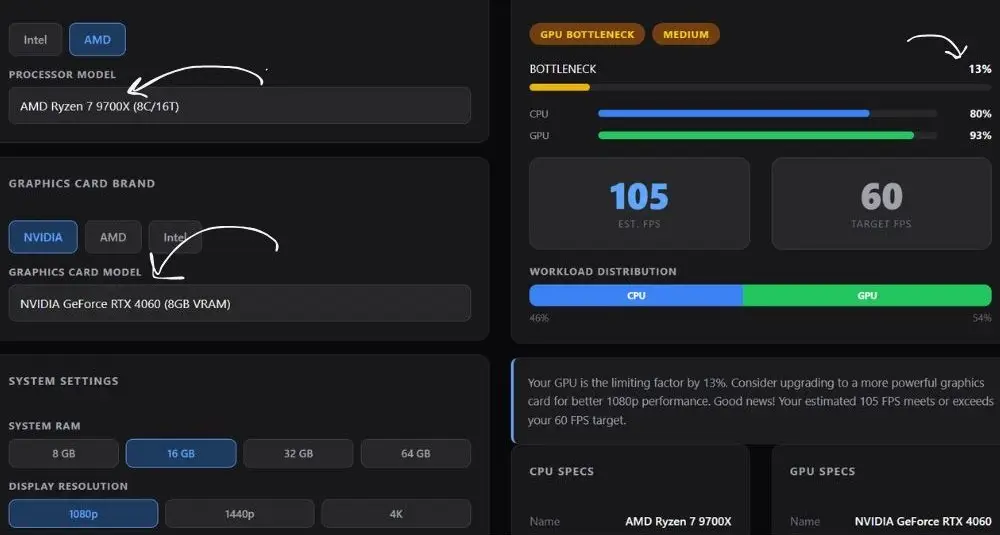
At this GPU tier, in 9700X vs 9800X3D, neither CPU will bottleneck you. A mid-range, card like the RTX 4060 or RX 7600 is already limited by the GPU in most games before either CPU gets close to becoming the weak link. At 1080p the 9800X3D will still deliver higher frame rates in CPU heavy titles, but the gap between the two processors shrinks because the GPU itself is the ceiling. The 9700X is the smarter pairing here. Its 65W TDP runs cooler, draws less power, and leaves more budget for a GPU upgrade. Pairing a 9800X3D with a budget GPU is technically possible but not a balanced build.
With a Mid Range GPU (RTX 5060 Ti / RX 9060 XT level)
This is where the difference between the two CPUs starts to show up. At 1080p in CPU sensitive titles like competitive shooters, simulation games, and open world games with heavy AI, the 9800X3D delivers noticeably smoother minimum frame rates.
The 9700X keeps up reasonably well at 1440p where the GPU becomes the main workload, but at 1080p high refresh rate gaming, the extra cache of the 9800X3D gives it a real edge. Both CPUs avoid meaningful bottlenecking at 1440p with this GPU tier. Either one makes a balanced build here, but the 9800X3D gives you more headroom as the GPU tier grows.
With a High End GPU (RTX 5080 / RX 9070 XT level)
At this tier the gap between the two CPUs becomes meaningful in real gameplay. The 9700X can create a CPU bottleneck at 1080p high refresh rate in CPU intensive titles when paired with an RTX 5080 or above.
The GPU has so much rendering power that it starts waiting for the CPU to feed it work. The 9800X3D with its 96 MB cache eliminates most of that waiting. For 1440p gaming at this tier, the 9800X3D is the correct pairing. For 4K, both CPUs perform comparably since the GPU is doing virtually all the heavy lifting at that resolution and the CPU bottleneck largely disappears.
With a Flagship GPU (RTX 5090 level)
At the very top of the GPU stack, the 9800X3D is essentially the only logical pairing for 1080p and 1440p. Testing confirms the 9800X3D handles the RTX 5090 without issue even at 1080p, where CPU bottlenecks are most likely to appear. The 9700X paired with an RTX 5090 at 1080p will create a noticeable CPU bottleneck in many titles, meaning you would be paying flagship GPU money while leaving performance on the table. At 4K, however, the 9700X holds its own even here since the GPU is the bottleneck at that resolution.
9800X3D vs 9700X- Recommended GPU Pairings for Each CPU
| GPU Tier | Best CPU Match | Why |
|---|---|---|
| RTX 4060 / RX 7600 | Ryzen 7 9700X Balanced | GPU is the limit, 9700X saves budget for a better card |
| RTX 5060 Ti / RX 9060 XT | Either works Flexible | Both CPUs keep the GPU fully fed at 1440p. 9800X3D has a small edge at 1080p high refresh in CPU heavy games, but real world difference is minimal |
| RTX 5070 Ti / RX 9070 XT | Ryzen 7 9800X3D Gaming | CPU cache gap matters at 1080p, 9800X3D keeps GPU fully fed |
| RTX 5080 | Ryzen 7 9800X3D Gaming | 9700X becomes the bottleneck in CPU sensitive titles at 1080p |
| RTX 5090 | Ryzen 7 9800X3D Gaming | Best available match, but expect some CPU bottleneck at 1080p with ray tracing off. Built for 1440p and 4K |
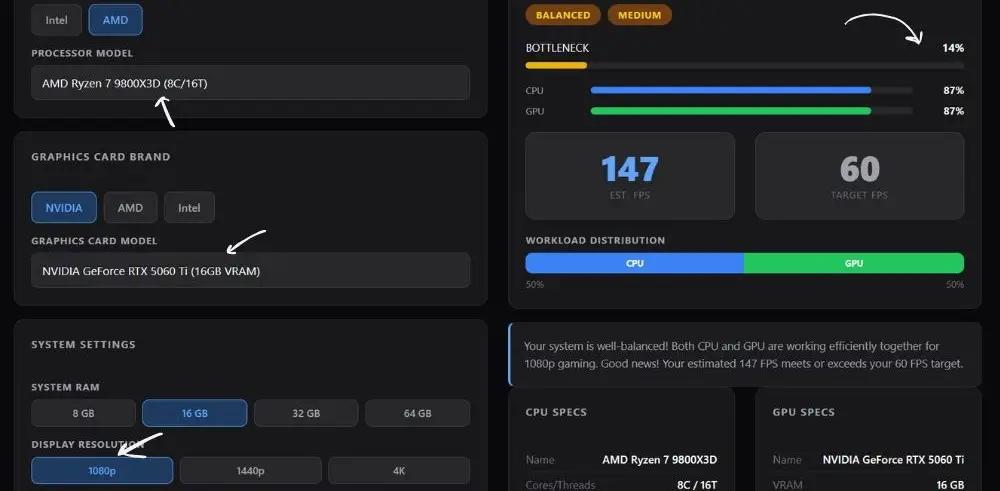
The Ryzen 7 9800X3D pairs cleanly with the RTX 5060 Ti at 1080p, with both components pulling equal weight and zero bottleneck concerns according to our bottleneck calculator.
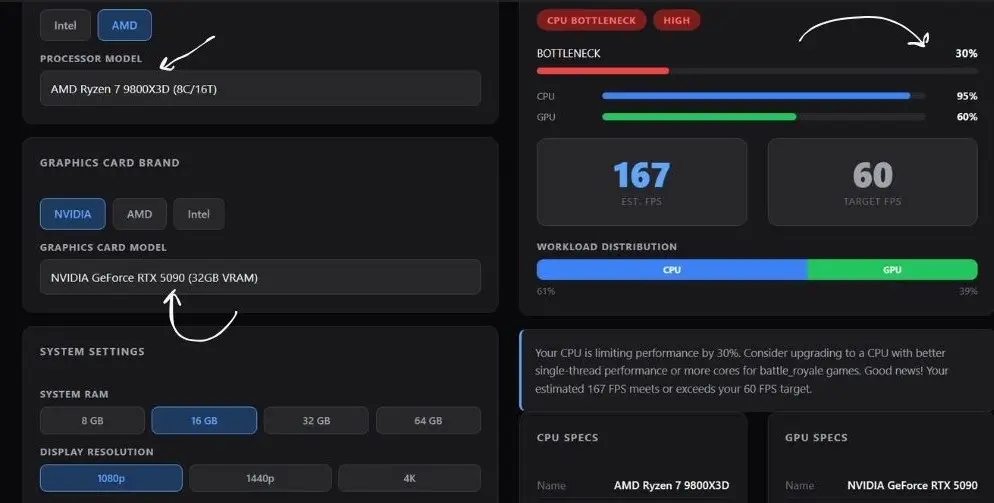
At 1080p, our bottleneck calculator shows a 30% CPU bottleneck with the Ryzen 7 9800X3D and RTX 5090. Even the best gaming CPU available gets held back by this GPU at 1080p.
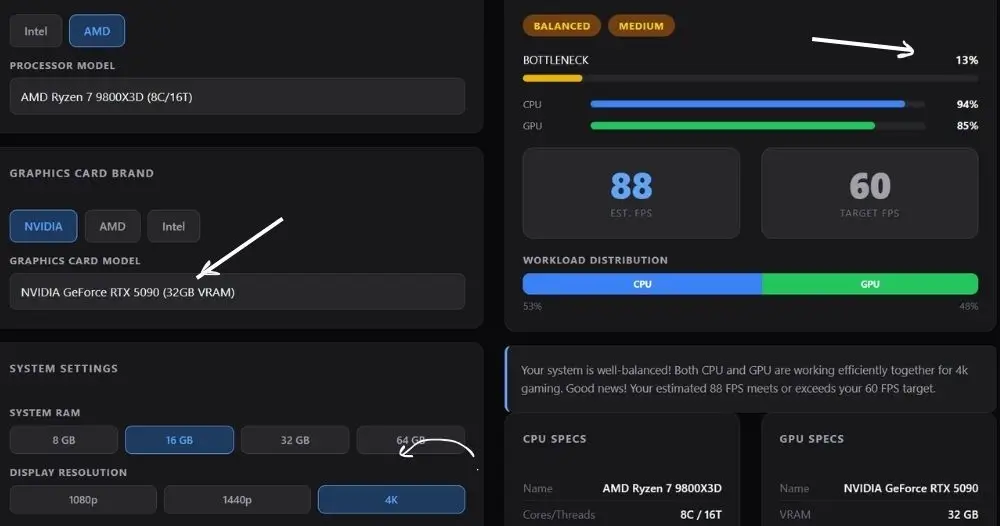
Switch to 4K and the story changes completely. The Ryzen 7 9800X3D pairs cleanly with the RTX 5090 according to our bottleneck calculator, with a balanced 13% result and both components working efficiently together.
What About Productivity and Mixed Use Workloads?
Gaming is not the only reason people build PCs, and the 9700X actually competes well with the 9800X3D once you leave pure gaming territory. Both chips run identical Zen 5 cores, so single core performance is nearly the same between them. In multithreaded workloads like video rendering, compiling, and content creation, the 9800X3D holds a slight edge because its higher 120W TDP allows it to sustain higher all core frequencies for longer than the 9700X, which is limited to 65W by default.
That said, the 9700X is a remarkably power efficient chip. In real world tests it draws around 88 watts versus the 9800X3D reaching 150 watts at peak. If you run a machine that doubles as a workstation, the 9700X is a quieter, cooler, and more efficient choice. The 9800X3D may need a 240mm or 360mm AIO cooler to perform at its best, while the 9700X runs comfortably on a quality air cooler.
Quick note on cooling: The 9800X3D’s second generation 3D V Cache moved below the Zen cores, improving heat transfer compared to the 7800X3D. Temperatures stay manageable under gaming loads, but the higher TDP still means you need a decent cooler. The 9700X is far more forgiving on cooling requirements.
Which CPU Actually Makes the More Balanced Build?
The answer depends on what you mean by balanced. If balanced means no CPU bottleneck at 1080p and 1440p gaming with a high end GPU, the 9800X3D wins clearly. It is purpose built for gaming and the extra cache is the single most impactful difference between these two chips in that context.
If balanced means a CPU that handles gaming well while also being efficient, cool, flexible for productivity, and appropriate for a mid range GPU setup, the 9700X is genuinely excellent. It is not a compromise chip. It is a deliberate design choice by AMD for users who do not need the full weight of 3D V Cache technology.
Think of it this way. The AMD Ryzen 7 9800X3D is a purpose-built gaming chip. The 9700X is a well-rounded everyday performer that also games very well. Which one is more balanced for your build depends entirely on what GPU you are pairing it with and whether you game at high refresh rates at 1080p or 1440p.
Want to know exactly how much bottleneck either CPU creates with your specific GPU? Run your build through the PC Bottleneck Calculator for a precise result. You might also find it helpful to read the what is bottlenecking my PC guide and the how to fix a bottleneck guide to understand what the numbers actually mean.
Final Verdict
We may earn a commission from purchases made through these links, at no extra cost to you.
| Category | Winner |
|---|---|
| 1080p High Refresh Rate Gaming | 9800X3D |
| 1440p Gaming (High End GPU) | 9800X3D |
| 4K Gaming | Tie — GPU bottleneck dominates |
| Paired with Budget / Mid GPU | 9700X |
| Paired with RTX 5080 or Higher | 9800X3D |
| Power Efficiency | 9700X |
| Productivity and Mixed Use | 9700X / Tie |
| Cooling Requirements | 9700X — easier to cool |
| Raw Gaming Performance | 9800X3D — 20% avg lead |
| Most Balanced All Round Build | 9700X mid GPU / 9800X3D high end |
Frequently Asked Questions
These are real questions people have asked across Reddit, Tom’s Hardware, Linus Tech Tips forums, PCPartPicker, and Steam discussions.
Is the 9800X3D overkill if I am gaming at 1080p?
This comes up a lot in PCPartPicker and Reddit build threads, and the honest answer is: it depends on your GPU and refresh rate. If you are gaming at 1080p with a mid-range GPU like an RTX 5060 Ti, the GPU is usually the bottleneck, and the 9800X3D’s cache advantage shows up less.
But if you are running a 144Hz or 165Hz monitor and pairing with an RTX 5080 or higher, the 9800X3D’s ability to push high minimum frame rates without CPU stalls is very real. For pure 1080p with a budget GPU, the 9700X is the smarter pick and you will not feel the difference in most games.
Will the 9700X bottleneck an RTX 5080 or RTX 5090?
This is one of the most asked questions on Tom’s Hardware and LTT forums. At 4K, the 9700X will not bottleneck even the RTX 5090 because the GPU is overwhelmed with rendering work. At 1440p it holds up well with an RTX 5080 in most games. The concern is 1080p gaming at high refresh rates in CPU sensitive titles.
That is where the 9700X starts to cap performance when paired with flagship GPUs. If you plan to stay at 1440p or 4K, the 9700X handles high end GPUs fine. If you want maximum 1080p frames in competitive games, the 9800X3D is the safer choice.
Is the 9700X good for gaming or is it worth paying for the 9800X3D?
The 9700X is genuinely good for gaming. It scores 79 out of 100 in gaming ratings across 100 plus titles compared to 95 out of 100 for the 9800X3D. The real world difference in everyday gaming is noticeable but not night and day for most players.
Where it becomes more clear is in CPU heavy titles like open world games, city builders, simulation games, and competitive shooters at high frame rates. If your GPU is mid range, the 9700X is plenty. If you have a high end GPU and want the CPU to stay out of the way, the 9800X3D earns its spot.
Do both the 9800X3D and 9700X use the same AM5 socket and DDR5?
Yes, both CPUs use the AM5 socket and require DDR5 memory. If you are still deciding between memory types for your build, check out our DDR4 vs DDR5 RAM guide to understand why DDR5 is the only option on AM5. They are compatible with B650, X670, and X870 motherboards. The 9800X3D draws significantly more power at 120W TDP compared to the 9700X at 65W, so you want to make sure your motherboard has solid VRM power delivery if you are running the 9800X3D, especially on a B650 board. X870 boards released in late 2024 and beyond natively support both without needing a BIOS update in most cases.
Which is better for streaming while gaming, the 9800X3D or 9700X?
Both chips from the AMD 9000 series have 8 cores and 16 threads, so both handle gaming plus streaming simultaneously. The 9800X3D’s higher TDP and ability to run at higher sustained all-core frequencies give it a small edge in multithreaded workloads, but the real-world difference in streaming quality between the two is minimal.
If you stream heavily and game at the same time, consider whether the 9700X’s lower power draw and cooler temperatures give you a more comfortable margin. Neither chip will make streaming the weak link in your setup.
Is the Ryzen 7 9700X worth it over the 9800X3D in 2026?
The 9700X is absolutely worth it in 2026 if you are pairing it with a mid tier GPU or building a system that does more than just game. It is one of the most power efficient chips on the AM5 platform and still a strong gaming performer.
The 9800X3D is worth it if gaming performance at high refresh rates with a powerful GPU is your main priority. With the newer Ryzen 7 9850X3D now available as an even higher clocked alternative, the 9800X3D also sits in a slightly more competitive position than it did at launch, which makes the 9700X an even more sensible choice for budget conscious builders who do not need the top tier.
Can the 9700X handle a high end GPU without bottlenecking at 1440p?
In the 9700X vs 9800X3D 1440p battle, the 9700X handles high-end GPUs very well. At 1440p, the rendering demand on the GPU increases enough that CPU bottlenecks become far less common, even in games that are sensitive to cache and CPU speed at lower resolutions.
Users on LTT forums and PCPartPicker threads who game exclusively at 1440p with cards like the RTX 5070 Ti or RX 9070 XT generally report no bottleneck issues with the 9700X. The 9800X3D still pushes slightly higher minimum frame rates, but the gap shrinks significantly at 1440p.
Final Words-9800X3D vs 9700X
After testing both CPUs across multiple GPU tiers and resolutions, the answer comes down to one question: what GPU are you pairing this with?
If your GPU is at the RTX 5070 Ti level or above, the AMD Ryzen 7 9800X3D is the right call. Its 96 MB L3 cache keeps your GPU fully fed at 1080p and 1440p, and it removes CPU bottlenecking as a concern entirely for the current GPU generation. Pair it with a high-end GPU and you get a build that leaves nothing on the table.
If your GPU sits at the RTX 5060 Ti level or below, the 9700X builds the more balanced system. At that GPU tier the card itself is the performance ceiling in most games, the 9800X3D’s cache advantage shrinks significantly, and the 9700X’s lower power draw and cooler thermals make it the smarter foundation. The money you save on the CPU can go straight toward a better GPU, which is almost always the more impactful upgrade for gaming.
For builders who game and also stream, edit, or run creative applications, the 9700X is the more versatile chip. It matches the 9800X3D in single core performance, handles multithreaded workloads efficiently within its 65W envelope, and runs comfortably on a quality air cooler.
The 9800X3D is a purpose built gaming chip. The 9700X is the chip for everyone else who still games seriously. Both are strong options on AM5 in 2026. Pick based on your GPU, your resolution, and how much of your workload is pure gaming.
