

Best CPU for RTX 5080-No Bottleneck Picks for 2026
The best CPU for RTX 5080 is the AMD Ryzen 7 9800X3D. It keeps bottlenecks near zero at 1440p and 4K, costs less than most alternatives, and currently sits at the top of every gaming benchmark chart that matters.
But the 9800X3D is not the only option. If you need to stream, edit video, or run heavy workloads on top of gaming, a different CPU might serve you better. This guide covers every realistic pairing, what our bottleneck calculator shows for each one, and who should buy what.
We may earn a commission from purchases made through these links, at no extra cost to you.
Why the CPU You Pick Actually Matters With the RTX 5080
The RTX 5080 is a serious piece of hardware. It delivers around 178 FPS average at 1440p and roughly 134 FPS at 4K in real game benchmarks. When you enable DLSS 4 Multi Frame Generation, that number climbs even higher in supported titles.
The problem is that the RTX 5080 can only push those frames if your CPU keeps up. A slow CPU cannot feed the GPU fast enough, so your GPU sits at 50 or 60 percent utilization while your FPS tanks. That is what a CPU bottlenecking your GPU looks like in practice.
This matters more at 1440p and 1080p than at 4K. At 4K, the GPU is doing so much work per frame that almost any modern CPU can keep up. At 1440p, the frames are easier to render, so the GPU finishes faster and starts waiting on the CPU. That is where a weak CPU costs you real FPS.
Run your current build through the bottleneck calculator at mypcbottleneck.com before spending anything. It will show you exactly how much performance you are leaving on the table.
How the Ryzen 7 9800X3D Works With the RTX 5080
Understanding why this CPU pairs so well with the RTX 5080 comes down to four things: how the CPU and GPU communicate, how the CPU handles draw calls, how it schedules threads, and how PCIe 5.0 fits into the picture.
CPU to GPU Communication and Draw Calls
Every frame your GPU renders starts with the CPU. The CPU sends instructions called draw calls to the GPU telling it what to render, where objects are, and how to handle lighting and effects. In modern games, this can mean thousands of draw calls per frame.
A faster CPU processes these draw calls quicker and keeps a steady stream of work flowing to the GPU. If the CPU is too slow, it creates gaps where the GPU is sitting idle waiting for the next set of instructions. The 9800X3D handles this exceptionally well because of its cache architecture, which we cover in the next section.
Thread Scheduling and Frame Pacing
Games today typically use multiple CPU threads to handle different tasks simultaneously: physics, audio, AI, rendering prep, and so on. The 9800X3D has 8 cores and 16 threads running on Zen 5 architecture, which means it can handle these tasks in parallel without creating scheduling conflicts.
Frame pacing, which is how evenly your frames are delivered, also depends on the CPU. Even if your average FPS looks good, uneven frame delivery makes gameplay feel stuttery. The 9800X3D produces consistently smooth frame pacing when paired with the RTX 5080, something older and weaker CPUs struggle with at high refresh rates.
PCIe 5.0 and Future Bandwidth
The RTX 5080 uses a PCIe 5.0 x16 slot, which doubles the bandwidth of PCIe 4.0. All AM5 CPUs support PCIe 5.0, so any of the CPUs in this guide give you that bandwidth. Full specs for the card, including its Blackwell architecture and GDDR7 memory, are listed on NVIDIA’s official RTX 5080 page. This matters because as games push more data between the GPU and system memory, having that bandwidth headroom means you are not creating a transfer bottleneck on top of a CPU bottleneck.
PCIe 5.0 also future proofs your build. As NVMe SSDs and next generation GPUs continue to push bandwidth demands higher, having a platform that already supports PCIe 5.0 means you will not need a motherboard upgrade to keep up.
Inside the Ryzen 7 9800X3D: Why the Architecture Wins in Gaming
Zen 5 IPC and Front End Improvements
IPC stands for instructions per clock, and it measures how much useful work a CPU core completes in a single clock cycle. Zen 5 delivers a meaningful IPC uplift over Zen 4, which means at the same clock speed, each core is doing more work. For gaming, where a handful of threads are doing the heavy lifting, higher IPC directly translates to more frames.
The Zen 5 front end is also redesigned. It has a wider decode pipeline that can process more instructions per cycle, improved branch prediction that reduces wasted cycles from mispredicted code paths, and a larger instruction window. In practice, games that are sensitive to single core throughput see real gains from these front end changes.
Cache Hierarchy: L1, L2, and L3 Explained Simply
Think of CPU cache as ultra fast temporary storage that lives on the chip itself. The further data has to travel from main memory to the CPU cores, the more time it takes. Cache eliminates those long trips by keeping frequently used data close to where the cores need it.
- L1 cache is the smallest and fastest, sitting right next to each core. The 9800X3D has 48KB of L1 data cache per core.
- L2 cache is a middle layer, larger and slightly slower. Each core on the 9800X3D has 1MB of L2 cache.
- L3 cache is the big shared pool all cores can access. This is where 3D V-Cache makes its impact.
How 3D V-Cache Reduces Latency in Gaming
Standard CPUs have around 32 to 64MB of L3 cache. The 9800X3D has 96MB, achieved by physically stacking an extra cache die on top of the CPU using AMD’s 3D V-Cache technology.
Why does this matter for gaming? Modern game engines load large chunks of game world data, textures, geometry, and AI states into cache constantly. With 96MB of L3, the 9800X3D holds far more of this data on chip. That means the CPU spends less time waiting for data to arrive from slower system RAM, and more time sending ready instructions to the GPU. The result is higher and more consistent frame rates, especially in open world and simulation heavy titles.
Real Bottleneck Calculator Result: 9800X3D + RTX 5080 in Cyberpunk 2077
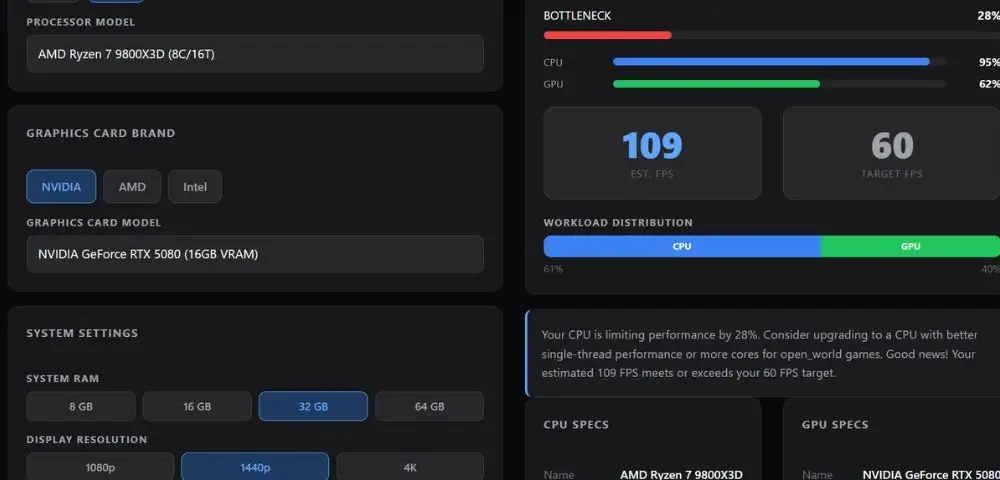
To put numbers behind the claims above, we ran the Ryzen 7 9800X3D paired with an RTX 5080, 32GB RAM, at 1440p in Open World mode (Cyberpunk 2077, one of the most CPU-demanding genres there is) through our bottleneck calculator. The result showed a 28 percent CPU bottleneck, with the CPU running at 95 percent utilization against the GPU at 62 percent. That might sound high until you look at the actual output: an estimated 109 FPS against a 60 FPS target, comfortably clearing it by nearly double.
This is the honest picture of CPU heavy open world titles. Even the best gaming CPU on the market cannot fully eliminate a CPU bottleneck in a game engine this demanding, but it does not need to. The 9800X3D still delivers far more frames than you need, which is the real test of whether a pairing works. Compare that to a weaker chip like the Ryzen 5 9600X, which posts a 45 percent bottleneck in the same scenario and barely scrapes past the 60 FPS target.
Quick Picks at a Glance
| CPU | Best For | Socket |
|---|---|---|
| Ryzen 7 9800X3D | Pure gaming, best overall | AM5 |
| Ryzen 9 9950X3D | Gaming plus heavy workloads | AM5 |
| Ryzen 7 7800X3D | Budget AM5 gaming | AM5 |
| Ryzen 7 9700X | Value gaming build | AM5 |
| Core Ultra 9 285K | Intel platform, productivity | LGA 1851 |
Not sure which AM5 chip fits your build? Our 9800X3D vs 9700X comparison breaks down the gap between the two most popular picks across 1080p, 1440p, and 4K.
1. AMD Ryzen 7 9800X3D: Best CPU for RTX 5080 Overall
Who it is for: Anyone building a gaming-focused RTX 5080 rig and wanting zero bottleneck at 1440p and 4K.
The 9800X3D combines Zen 5 architecture with AMD’s 3D V-Cache technology to produce the fastest gaming CPU available right now. As covered above, the 96MB L3 cache keeps game data on chip, eliminates cache misses, and feeds the RTX 5080 a steady stream of draw calls without gaps. AMD’s own product page for the 9800X3D confirms the core spec sheet referenced throughout this guide.
In head to head gaming tests, the 9800X3D outperforms Intel’s Core Ultra 9 285K by around 26 to 35 percent on average across dozens of games. In CPU heavy titles like Cyberpunk 2077 and Assetto Corsa Competizione, that gap stretches to 40 to 75 percent. Paired with the RTX 5080, it consistently delivers 150 plus FPS at 4K while keeping temperatures well within range.
It also runs on AM5, a platform AMD has committed to through 2027 and beyond, which means you can upgrade the CPU later without buying a new motherboard.
Ryzen 7 9800X3D — Specs
AM5- Architecture Zen 5 with 3D V-Cache
- Cores / Threads 8C / 16T
- Base / Boost 4.7 GHz / 5.2 GHz
- L3 Cache 96MB
- TDP 120W
- Socket AM5
What to pair with it: B650E or X670E motherboard, DDR5-6000 CL30 RAM, 240mm or 360mm AIO cooler. If you want help narrowing down a board, see our best motherboard for Ryzen 7 9800X3D picks.
Want to know more detail about fastest gaming chip for this card? See our Ryzen 7 9800X3D + RTX 5080 guide for bottleneck results and FPS.
2. AMD Ryzen 9 9950X3D: Best for Gaming Plus Work
Who it is for: Gamers who also do video editing, 3D rendering, streaming, or other heavy CPU workloads on the same machine.
The 9950X3D is AMD’s 16 core flagship with 3D V-Cache. It has two core complex dies, 128MB of L3 cache, and a 5.7 GHz boost clock. In pure gaming, the 9950X3D and the 9800X3D trade blows very closely because at 1440p and 4K the GPU becomes the limiting factor before the CPU does.
Where the 9950X3D separates itself is in multi threaded productivity. Blender rendering, video encoding, compiling code, and running virtual machines all benefit from the extra eight cores. If you run those tasks regularly alongside gaming, the 9950X3D is the right call. If you just game, the AMD Ryzen 7 9800X3D gives better value.
Want to see the numbers? Read our Ryzen 9 9950X3D + RTX 5080 guide for bottleneck results and FPS.
Ryzen 9 9950X3D
AM5 FlagshipWhat to pair with it: X670E motherboard for full PCIe 5.0 access, 360mm AIO cooling required at this TDP, DDR5-6000 or faster RAM.
3. AMD Ryzen 7 7800X3D: Best Budget Pick for AM5
Who it is for: Gamers who want strong RTX 5080 performance without paying 9800X3D prices, especially those already on AM5.
Before the 9800X3D arrived, the 7800X3D was the fastest gaming CPU available. It still performs well today. Zen 4 architecture with 3D V-Cache and 96MB L3 gives it the same cache advantage the 9800X3D uses, just with older per core performance.
Paired with the RTX 5080, the Ryzen 7 7800X3D keeps up well at 1440p and 4K in most games. It starts showing a gap against the 9800X3D in the most CPU demanding titles, at 1080p with high refresh rate monitors, and in future games that push single core performance harder. For a budget conscious AM5 build it remains a solid choice, and stock availability and pricing are much better now than in previous years.
Ryzen 7 7800X3D
AM5 Value PickOn a tighter budget? See our Ryzen 7 7800X3D + RTX 5080 guide for bottleneck results and real FPS.
4. AMD Ryzen 7 9700X: Best Value Non X3D Option
Who it is for: Gamers on a tighter budget who primarily play at 1440p or 4K and can live without the X3D cache advantage.
The Ryzen 7 9700X runs on Zen 5 without 3D V-Cache, giving it strong single core performance and a 65W TDP that makes it easy to cool. In most gaming scenarios at 1440p and 4K, it performs respectably when paired with the RTX 5080. The gap versus X3D chips appears most clearly in CPU heavy titles or at high refresh rates where the GPU is fast enough to expose the smaller cache.
For casual gaming or primarily 4K play, the 9700X is a good value option that does not significantly bottleneck the RTX 5080 in typical use. It also pairs well with affordable B650 motherboards, which keeps total build cost down.
Ryzen 7 9700X
AM5 Budget Pick5. Intel Core Ultra 9 285K: Best Intel Option
Who it is for: Builders already invested in the Intel LGA 1851 platform, or those who need high core counts for specific productivity software.
The 285K is Intel’s Arrow Lake flagship with 24 cores, a 5.7 GHz boost, and 36MB of L3 cache. In multi threaded workloads it competes well. In gaming it loses clearly to the 9800X3D by around 26 to 35 percent on average, with some titles showing gaps up to 75 percent.
Intel has released overclocking features and updates for the 285K, but these close the gaming gap by only about 3 percent. For pure gaming with the RTX 5080, AMD is the stronger platform in 2026. The 285K makes sense if you are already on LGA 1851 and switching platforms would mean replacing your motherboard and RAM, or if your specific workloads genuinely benefit from 24 cores.
Core Ultra 9 285K
Intel FlagshipSingle Core vs Multi Core Performance: Why Gaming Is Different
This is one of the most misunderstood topics in CPU buying decisions. When you see a 24 core CPU next to an 8 core CPU, it is easy to assume more cores means better performance. For gaming, that is not how it works.
Most game engines are not built to use more than 8 to 12 threads at once. The physics engine, the render thread, audio, and AI all run on dedicated threads, but the total thread count used by even the most demanding modern games rarely pushes beyond that. Extra cores beyond what the game uses sit idle.
What matters more for gaming is single core speed, how fast one core can complete work, and cache size, how much data the CPU can keep on chip near those fast cores. This is exactly why the Ryzen 7 9800X3D, an 8 core CPU, beats 24 core Intel chips in most gaming scenarios.
Eight cores is the right number for gaming at this GPU tier in 2026. It is enough to handle every modern game without thread count becoming a limitation, and it lets AMD focus die space on more cache and higher clock speeds rather than adding cores that would not help.
Multi core performance matters if you are also doing video rendering, 3D work, or running multiple demanding applications at the same time. For gaming only, single core speed and cache size are what you should prioritize.
Memory and DDR5 Scaling: Why RAM Speed Matters for These Builds
Picking the right CPU is only half the equation. How your RAM is configured directly affects how much performance you get from any of the CPUs in this guide.
Why DDR5 is Required for RTX 5080 Builds
All AM5 CPUs require DDR5, and that is a good thing for RTX 5080 pairings. DDR5 delivers significantly higher memory bandwidth than DDR4, which means the CPU can move data in and out of system memory faster. For a GPU as powerful as the RTX 5080, that bandwidth matters, especially at 1440p where CPU to GPU data throughput is a real factor in frame rates. If you want the full breakdown of why this generation jump matters, check our DDR4 vs DDR5 RAM guide.
Any new build targeting the RTX 5080 should be on DDR5. If you are on a DDR4 platform, the honest answer is that you need a platform upgrade alongside the GPU.
DDR5-6000 CL30: The Sweet Spot for AM5
For AM5 CPUs, DDR5-6000 with CL30 timings is the recommended memory configuration. Here is why that specific combination matters.
AMD’s Infinity Fabric, the internal interconnect that links the CPU cores, cache, and memory controller, runs at its best when the memory speed lands at exactly 1:1 ratio with the Fabric clock. On current AM5 CPUs, that ratio locks in at DDR5-6000. Going faster than 6000 pushes the Infinity Fabric into a 1:2 ratio, which can actually increase latency and hurt gaming performance.
CL30 is the latency rating. Lower latency means data arrives at the CPU faster. At DDR5-6000, CL30 is achievable without excessive overclocking risk and gives you near maximum performance from the memory subsystem. For specific kit recommendations, our best RAM for gaming guide covers picks across DDR4 and DDR5.
EXPO Profiles and Easy Setup
Most DDR5-6000 kits include an EXPO profile, which is AMD’s equivalent of Intel’s XMP. Enabling EXPO in your BIOS automatically configures the correct speed and timings with one toggle. Without it, your RAM defaults to DDR5-4800, leaving real performance on the table. If you have never done this before, our how to enable XMP in BIOS walkthrough applies the same way to EXPO on AMD boards.
32GB (two sticks of 16GB) is the recommended capacity for gaming builds paired with the RTX 5080. 16GB can feel tight in some modern games, and 64GB is more than any game needs right now.
Intel LGA 1851 Memory
For Intel builds with the Core Ultra 9 285K, Intel recommends DDR5-6400 or faster. The Arrow Lake memory controller was designed around higher memory speeds than AM5, so running at DDR5-6000 leaves some performance behind on that platform.
PCIe 5.0 and Long Term Value
The RTX 5080 connects to your motherboard through the PCIe slot, and the generation of that slot determines how much data can flow between the GPU and the rest of your system.
What PCIe Lanes Actually Do
PCIe lanes carry data between the GPU and CPU. A PCIe x16 slot running at PCIe 5.0 delivers 128 GB/s of total bandwidth, double what PCIe 4.0 provides at 64 GB/s. The RTX 5080 is designed to take advantage of this bandwidth for transferring textures, frame data, and other assets.
In current games at 1440p and 4K, the difference between PCIe 4.0 and PCIe 5.0 with the RTX 5080 is minimal in most titles. The GPU does not yet saturate the PCIe 4.0 bandwidth limit in typical gaming. But that margin is shrinking as game assets get larger.
Why It Matters for Future Proofing
PCIe 5.0 is where the industry is going. Next generation GPUs beyond the RTX 5080 will increasingly rely on that extra bandwidth. DirectStorage, which streams game data directly from NVMe to the GPU bypassing the CPU, also benefits from higher PCIe bandwidth as games adopt it more widely.
All AM5 CPUs support PCIe 5.0 on the primary x16 slot, so any build in this guide is already positioned for that future. LGA 1851 also supports PCIe 5.0. If you are on an older AM4 or LGA 1700 platform, you do not have PCIe 5.0 on the GPU slot, which is another reason those platforms are not recommended for RTX 5080 pairings.
What CPUs to Avoid With the RTX 5080
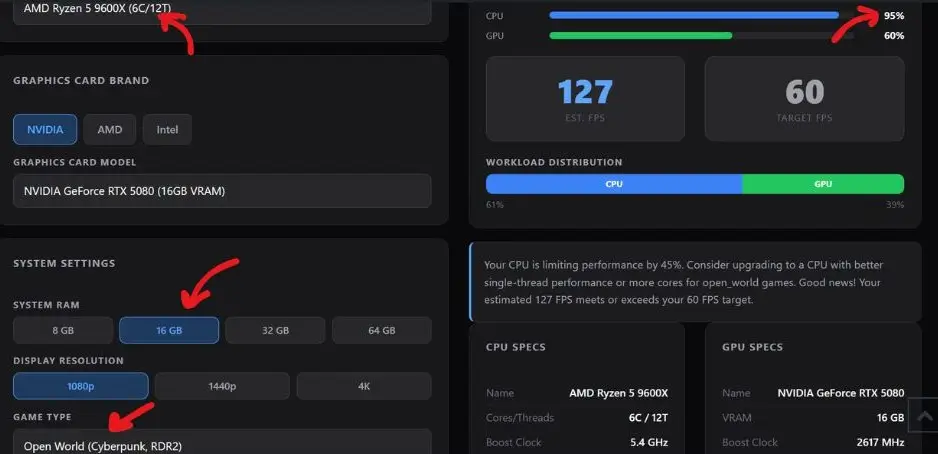
Ryzen 5 9600X and below: Six cores and no 3D V-Cache. This creates a clear CPU bottleneck with the RTX 5080, especially in CPU heavy games and at lower resolutions. In our testing with our bottleneck calculator with the 9600X and RTX 5080 at 1080p in an open world title like Cyberpunk 2077, CPU usage sat at 95 percent while the GPU sat at only 60 percent, a CPU bottleneck of around 45 percent. The RTX 5080 is too powerful a GPU to pair with a six core chip.
Ryzen 5 3600, Ryzen 5 5600, i7-10700K, and older chips: Outdated platforms that cap the RTX 5080 well below its potential. A Ryzen 5 3600 paired with the RTX 5080 can create a CPU bottleneck of 34 percent or higher. You are paying for GPU performance you will never actually see.
Any DDR4 platform for a new build: DDR4 platforms are end of life for high end GPU pairings. The RTX 5080 deserves DDR5 bandwidth. If you are upgrading from an older DDR4 system, a full platform upgrade alongside the GPU is the right move.
How to Check Your Bottleneck Before Buying
Before spending anything, run your current CPU and GPU combination through our bottleneck calculator. It will show your exact bottleneck percentage at your target resolution and tell you whether upgrading the CPU, GPU, or both makes the most sense for your situation.
If your result shows a CPU bottleneck above 15 percent with the RTX 5080, that is a clear sign the CPU is holding back the GPU. If it shows near zero, your pairing is already balanced.
You can also check the 9800X3D vs 9700X comparison page on the site if you are deciding between the two most popular AM5 options for gaming builds.
Motherboard Tips for RTX 5080 Builds
For the 9800X3D or 9950X3D, a B650E or X670E board with good VRM is all you need. You do not have to spend $400 on a board to get full performance from these CPUs. A quality B650E board in the $200 to $250 range handles everything these CPUs need. Our best motherboard for Ryzen 7 9800X3D guide goes through specific board picks if you want a shortlist.
For the 9700X, a standard B650 board is fine and keeps costs even lower. For the Core Ultra 9 285K, an Z890 motherboard is recommended to fully support the Arrow Lake platform.
Make sure your motherboard has a BIOS that supports your chosen CPU out of the box, or that you have access to a compatible older CPU to do a BIOS update if needed before installing your new chip.
Frequently Asked Questions
What is the best CPU for RTX 5080?
The AMD Ryzen 7 9800X3D. It delivers the strongest gaming performance at 1440p and 4K and keeps CPU bottlenecks near zero when you pair it with the NVIDIA GeForce RTX 5080.
Will the Ryzen 7 7800X3D bottleneck the RTX 5080?
Not significantly at 1440p or 4K. At 1080p with high refresh rates or in very CPU heavy titles, you may see a small bottleneck compared to the 9800X3D. For most use cases it is a solid pairing.
Is Intel or AMD better for an RTX 5080 build?
AMD. The Ryzen 7 9800X3D beats the Core Ultra 9 285K by 26 to 35 percent on average in gaming. The only reason to choose Intel is if you are already invested in the LGA 1851 platform or need high core counts for specific workloads.
Do I need DDR5 for the RTX 5080?
Yes, for any new AM5 or Intel LGA 1851 build. DDR4 platforms are not the right pairing for a GPU at this level. DDR5-6000 is the recommended speed for AM5 builds.
How much RAM do I need with the RTX 5080?
32GB is the recommended amount for a gaming build paired with the RTX 5080. Two sticks of 16GB in dual channel gives you enough headroom for modern games while keeping memory bandwidth high. 16GB can feel tight in some titles, and 64GB offers no gaming benefit.
Can I game and stream simultaneously with the Ryzen 7 9800X3D?
Yes, but with some caveats. The 9800X3D handles gaming and streaming at the same time reasonably well, but if you stream at high quality settings (1080p 60fps with x264 encoding), the 8 cores can come under pressure. For dedicated high quality streaming alongside gaming, the Ryzen 9 9950X3D with its 16 cores handles that workload more comfortably.
Is the RTX 5080 good for 4K gaming?
Yes. The RTX 5080 is well suited for 4K gaming and delivers strong frame rates in demanding titles. Paired with the 9800X3D and DLSS 4 enabled in supported games, 4K performance is excellent.
Can the RTX 5080 handle content creation workloads?
The RTX 5080 is excellent for GPU accelerated content creation tasks like video rendering in Premiere Pro, DaVinci Resolve, and 3D rendering in software that supports CUDA or OptiX. For those workloads, pair it with the 9950X3D on the CPU side to avoid the CPU becoming a bottleneck in your creative pipeline.
Will the Ryzen 5 9600X bottleneck the RTX 5080?
Yes. Six cores without 3D V-Cache is not enough to keep up with the RTX 5080 in CPU heavy games or at high refresh rates. It is not a balanced pairing at this GPU tier.
What resolution should I target with the RTX 5080?
The RTX 5080 is built for 1440p and 4K gaming. At 1080p, the GPU is so powerful relative to what 1080p demands that you would frequently hit CPU bottlenecks even with a strong CPU. The sweet spot is 1440p for high refresh rate competitive play, or 4K for cinematic single player experiences.
Does PCIe generation affect RTX 5080 performance?
In current games, the difference between PCIe 4.0 and PCIe 5.0 with the RTX 5080 is minimal. However, PCIe 5.0 provides headroom for future games, DirectStorage workloads, and next generation GPUs. All AM5 and LGA 1851 builds in this guide support PCIe 5.0.
Does resolution affect how much the CPU matters with the RTX 5080?
Yes. At 4K, the GPU does most of the work and almost any modern high end CPU will keep up. At 1440p and especially 1080p, CPU speed matters a lot more because the GPU finishes frames quickly and can start waiting on the CPU.
Final Verdict
For most people building or upgrading to an RTX 5080 system, the AMD Ryzen 7 9800X3D is the right CPU. It is the strongest gaming CPU available, it works perfectly on AM5, it costs less than the Intel flagship and the 9950X3D, and it eliminates bottlenecks at both 1440p and 4K with this GPU.
If you also do heavy video editing or 3D rendering on the same machine, step up to the Ryzen 9 9950X3D. If budget is a real concern and you are already on AM5, the Ryzen 7 7800X3D still holds up well. If you are on Intel and not ready to switch platforms, the Core Ultra 9 285K is your best option on that side.
Related RTX 5080 Guides
Before finalizing anything, run your specific build through the bottleneck calculator at mypcbottleneck.com and see the numbers for yourself. It takes 30 seconds and can save you from spending on hardware that does not actually fix your problem.


