

Best CPU for 5090 in 2026-Tested With Real Bottleneck Data
Finding the best CPU for 5090 is more important than it was with any previous Nvidia GPU. The 5090 is so fast that it will bottleneck on almost every CPU at 1080p, and it still shows noticeable bottlenecks on most CPUs at 1440p. This is the first consumer GPU where picking the wrong CPU actually costs you a serious amount of performance.
We ran four of the most popular CPU options through our bottleneck calculator paired with the RTX 5090. Every number you see below is real data pulled directly from our calculator results, not estimates or guesses taken from other sites. Here is exactly what the data shows and who should buy which CPU.
We may earn a commission from purchases made through these links, at no extra cost to you.
Table of Contents
This guide is based on desk research, not hands-on lab testing. We compare published manufacturer specifications, weigh real-world compatibility and value for each use case, track current prices and availability on Amazon, and reference publicly available benchmark data from established review outlets. We do not run our own hardware tests — any performance figures are estimates drawn from public sources and will vary with your system, drivers, and settings.
Bottleneck Calculator Results: Best CPU for 5090 at Every Resolution
All four CPUs were tested with 16GB RAM paired with the RTX 5090. These numbers come straight from our calculator, not from any other site.
| CPU | 1080p Bottleneck | 1080p FPS | 1440p Bottleneck | 1440p FPS | 4K Bottleneck | 4K FPS |
|---|---|---|---|---|---|---|
| Ryzen 7 9800X3D | 34% High | 159 | 24% Med | 120 | 2% Low | 80 |
| Ryzen 7 7800X3D | 35% High | 155 | 26% High | 116 | 4% Low | 77 |
| Core Ultra 9 285K | 39% High | 146 | 31% High | 109 | 10% Med | 73 |
| Ryzen 9 9900X | 39% High | 146 | 31% High | 109 | 10% Med | 73 |
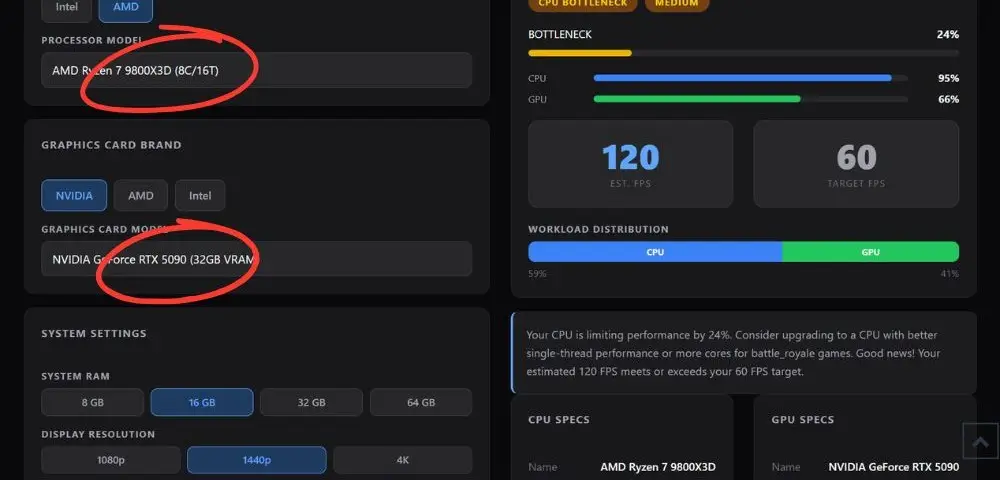
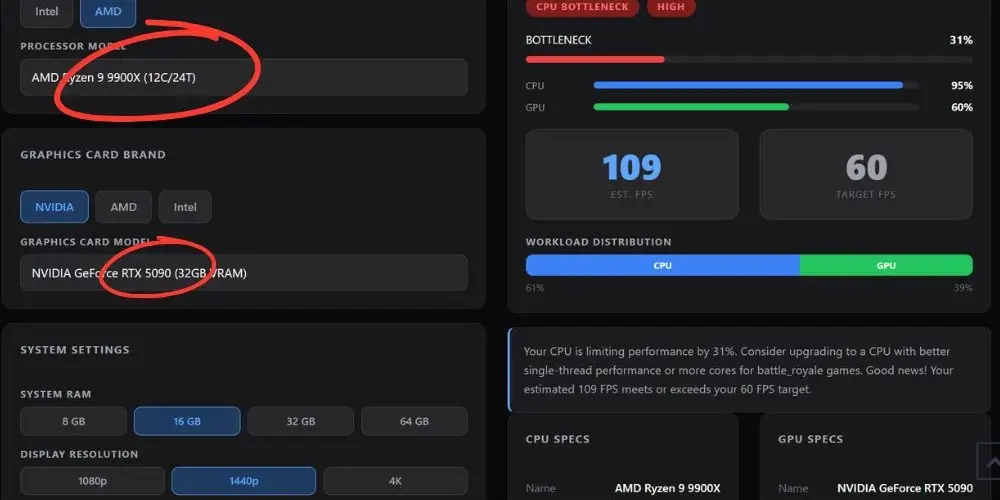
4K Bottleneck % Compared (Lower is Better)
The Truth Nobody Says Out Loud: Every CPU Bottlenecks the RTX 5090 at 1080p
This is the most important thing to understand before spending money on a best CPU for RTX 5090 build. Every CPU we checked shows a HIGH bottleneck at 1080p. Even the Ryzen 7 9800X3D, which is the best gaming CPU available right now, still shows a 34% CPU bottleneck at 1080p when paired with the RTX 5090. That number does not mean you lose 34% of your frames.
To understand exactly how a CPU bottleneck affects your frame rate and what the percentage actually means in real gaming, read our full CPU bottleneck guide.
What a High Bottleneck Actually Means
A 34% bottleneck means the CPU is the weakest link in this pairing at this resolution. The 9800X3D still produces 159 FPS at 1080p which beats most monitors. But the GPU has more power left over that the CPU cannot unlock. This is why the RTX 5090 is built for 4K gaming. At 4K that same CPU drops to just 2% bottleneck because the GPU is now fully loaded rendering all those pixels and the CPU has time to keep up.
This is the part that most articles skip. They say “get the 9800X3D and you are fine” without explaining that no CPU on the market fully eliminates bottleneck with this GPU at 1080p or 1440p. The RTX 5090 is simply faster than what current processors can fully feed at lower resolutions. That is not a flaw in your build. It is just how far ahead this GPU is.
Pick Your CPU Based on What Resolution You Actually Play At
The Ryzen 7 9800X3D is the only real answer here. Its 3D V-Cache keeps the bottleneck as low as it can possibly go at these resolutions. The next best option is 10+ percentage points worse.
Both AMD X3D chips work extremely well at 4K. The 7800X3D hits just 4% bottleneck and 77 FPS. You are not losing much by staying on AM4 if you are already there.
The Ryzen 9 9900X or Core Ultra 9 285K make more sense. More cores handle encoding and rendering better. Both hit the same gaming numbers at 4K so pick based on platform preference.
Stay on AM4 with the 7800X3D. Only 3 FPS difference at 4K versus the 9800X3D on AM5. A new motherboard and DDR5 RAM cost more than that gap is worth.
Best CPU for RTX 5090: Full Breakdown of Each Pick
1-AMD Ryzen 7 9800X3D- Best Overall CPU for RTX 5090
We may earn a commission from purchases made through these links, at no extra cost to you.
The 9800X3D is the clear winner at every resolution in our calculator. At 4K it drops to just 2% bottleneck, which means the RTX 5090 is running almost completely unrestricted. At 1440p it is the only CPU we checked that gets down to a MEDIUM rating instead of HIGH. That single step from HIGH to MEDIUM at 1440p is a meaningful real world difference in how smooth the experience feels, especially in competitive games where you want high frame rate consistency.
The 3D V-Cache is what sets this CPU apart from every non-X3D chip. It gives the processor a massive pool of fast cache memory that games can pull instructions from without waiting on main RAM. That is what keeps frame times consistent and bottleneck numbers low even when the GPU is pushing hundreds of frames per second. 8 cores, 96MB of cache, 5.2GHz boost speed. For pure gaming paired with the best GPU on the market, nothing tested beats it.
One thing to be aware of: this CPU still shows 34% HIGH at 1080p. That is not a defect or a sign to avoid it. It simply reflects how fast the RTX 5090 is. The 9800X3D is still the best CPU for RTX 5090 gaming at any resolution. It just cannot fully eliminate bottleneck at 1080p because no consumer CPU can right now.
We break down exactly how much the cache advantage matters in real gaming in our Ryzen 7 9800X3D vs 9700X comparison.
2- AMD Ryzen 7 7800X3D- Best AM4 Pick and Most Underrated Option
This is the most overlooked pairing in any best CPU for RTX 5090 guide. The 7800X3D runs on the older AM4 platform, which means if you already have an AM4 motherboard you do not need to buy anything new. Just drop the CPU in after a BIOS update.
At 4K it produces 77 FPS with a 4% LOW bottleneck. Compare that to the 9800X3D at 80 FPS and 2%. You are giving up 3 FPS and 2 percentage points to stay on a platform you already own. That trade is worth it for most people. The gap only becomes more noticeable at 1440p where the 7800X3D shows 26% HIGH versus the 9800X3D at 24% MEDIUM. If 1440p is your main resolution and you want the best possible experience, upgrading to AM5 with the 9800X3D makes sense. If you mainly game at 4K and already own an AM4 board, keep your platform and save the money.
If you are building your whole system around the 7800X3D, check out our best GPU for Ryzen 7 7800X3D guide to find the right card for that platform without bottleneck.
3-Intel Core Ultra 9 285K- Best Intel Option for Mixed Workloads
The 285K has 24 cores total made up of 8 performance cores and 16 efficiency cores. In pure gaming scenarios it falls noticeably behind both AMD X3D options in our data. A 39% HIGH at 1080p and 31% HIGH at 1440p puts it at the bottom of the gaming rankings in this test. It stays at MEDIUM at 4K rather than LOW like the X3D chips.
Where it earns its place is in workloads that go beyond gaming. Video editing, 3D rendering, compiling, and heavy multitasking all benefit from those extra cores in ways that gaming cannot. If you spend serious time doing productivity work on your PC alongside gaming, the 285K gives you a better overall machine even though it gives up some gaming performance. If your use case is 100% gaming, the 9800X3D is the better call based on these numbers.
4-AMD Ryzen 9 9900X- Best AMD Option for Creators on AM5
Something interesting shows up in our data here. The Ryzen 9 9900X and the Core Ultra 9 285K produce exactly the same bottleneck percentages and FPS estimates across all three resolutions. Same numbers, different chips. That tells you something important: in gaming workloads, both CPUs are hitting the same ceiling when paired with the RTX 5090, even though the 285K has twice as many cores.
Games simply cannot use 24 cores efficiently. Beyond a certain core count, adding more does not move the needle in gaming. Both CPUs have strong single thread speed which is what gaming cares about, and both run into the same limit with the 5090. The 9900X gives you 12 cores on AM5, which is a solid upgrade path going forward. If you want to stay in the AMD ecosystem and need more cores than the 9800X3D for creative work, the 9900X is a reasonable pick. Just know your gaming performance at 4K will be 7 FPS behind the 9800X3D based on our data.
Why the RTX 5090 Bottlenecks More Than the 4090 Ever Did
Most best CPU for RTX 5090 articles just say “pair it with the 9800X3D” and move on. Here is the actual reason why the CPU choice matters more with this GPU than it ever did before.
The RTX 5090 pushes roughly 30 to 50% more frames per second than the 4090 at every resolution. That sounds great, but it also means the CPU needs to prepare more frame data in the same window of time. A CPU that was balanced with the 4090 can easily become the bottleneck with the 5090, especially at 1080p and 1440p where the GPU is not being fully loaded by the resolution itself.
At 4K, the GPU is working so hard to render millions of pixels that it naturally slows down to a pace most modern CPUs can keep up with. At 1080p, the GPU renders each frame very quickly and immediately waits for the next instruction from the CPU. If the CPU is even slightly slow, the GPU sits idle for a fraction of a second between every single frame. Multiply that across hundreds of frames per second and you are leaving real performance on the table.
If the RTX 5090 is outside your budget right now, our best CPU for RTX 5080 guide covers the next tier down with the same real bottleneck data.
The Simple Rule
If you are buying the RTX 5090 to game at 4K, your CPU choice matters less. Both X3D chips get bottleneck under 5% at 4K. If you are buying the 5090 for 1440p gaming or 1080p at high refresh rate, only the 9800X3D gives you the lowest bottleneck of any CPU we checked. Everything else shows HIGH bottleneck at those resolutions.
Do Not Forget About RAM Speed
This is something almost no best CPU for RTX 5090 guide covers properly. CPU choice is only half of the equation. RAM speed matters significantly in this pairing. Our calculator results above used 16GB as the baseline. Both the 9800X3D on AM5 and the 285K on LGA1851 respond well to fast DDR5.
For AM5 builds the sweet spot is DDR5 6000MHz CL30, which keeps the AMD memory controller running at its optimal speed. Slower DDR5 at the standard 4800MHz setting leaves real FPS on the table in CPU limited scenarios. With a card this expensive you do not want slow RAM creating a hidden secondary bottleneck in your system.
AMD officially recommends DDR5 6000MHz as the optimal speed for AM5 platforms, which you can verify in the AMD Ryzen 9000 series memory compatibility documentation.
Our best RAM for gaming guide covers the exact DDR5 kits worth pairing with an AM5 build including speed and timing recommendations for Ryzen systems.
Not Sure About Your Specific Build?
Run your exact CPU and GPU combination through our free bottleneck calculator. Get real bottleneck percentages and estimated FPS at 1080p, 1440p, and 4K for your setup. Check Your Build Free
Still deciding between the 5080 and 5090? Read our RTX 5080 vs RTX 5090 comparison to see whether the price jump is actually worth it for your resolution and use case.
People Also Ask About the Best CPU for 5090
Will the RTX 5090 bottleneck on a 7800X3D?
Yes, at 1080p and 1440p. Our calculator shows the 7800X3D produces a 35% HIGH bottleneck at 1080p and 26% HIGH at 1440p with the RTX 5090. At 4K it drops to just 4% LOW, which is excellent. If you are gaming mainly at 4K the 7800X3D is a great pairing and there is no reason to switch platforms. If you are gaming at 1440p or lower, the 9800X3D reduces that bottleneck further and is worth the upgrade on AM5. This question came up frequently in Tom’s Hardware forum threads from users comparing these two CPUs for 5090 builds.
Is the Intel Core Ultra 9 285K a good CPU for the RTX 5090?
For gaming alone it is not the best choice based on our data. It shows 39% HIGH at 1080p and 31% HIGH at 1440p, which are the worst gaming numbers of any CPU we checked. At 4K it lands at 10% MEDIUM, behind the X3D chips which get under 5%. Where the 285K makes sense is if you do heavy work alongside gaming such as video editing, streaming at high quality, or 3D rendering.u003cbru003eMultiple forum users reported the 285K runs hot under sustained load which is worth factoring into your cooling budget. For a gaming only machine, the 9800X3D is a better fit based on what our calculator shows.
Does it make sense to pair an older CPU like an i9-10900K or Ryzen 5 5600 with the RTX 5090?
Not at 1080p or 1440p. Older CPUs with weaker single thread performance will show even higher bottleneck numbers than what we checked here. At 4K the GPU takes over most of the load and an older CPU can get away with it in some games, but you will still see the CPU capping your frame rate in fast competitive titles.u003cbru003eu003cbru003eUsers on Tom’s Hardware forums asking this question generally got the same answer: if you are spending money on an RTX 5090, pair it with a CPU that can at least keep up at 4K. The 7800X3D is the most affordable entry point for a proper pairing.
Why does the Ryzen 9 9900X get the same FPS as the Core Ultra 9 285K when paired with the RTX 5090?
Because gaming workloads do not scale with high core counts beyond a certain point. Both the 9900X and the 285K have strong single thread performance, and that is what gaming cares about. Adding more cores past 8 to 12 does not improve gaming FPS in most titles because the game engine cannot split work across that many threads efficiently.u003cbru003eBoth CPUs hit the same performance ceiling when paired with the 5090. Our calculator confirms this with identical bottleneck percentages and FPS numbers across all three resolutions for both chips.
Should I upgrade my CPU before buying the RTX 5090?
It depends on what you currently have. If you are on AM4 with a 7800X3D or a strong Ryzen 5000 series chip, you can pair the RTX 5090, and the bottleneck at 4K will still be manageable. If you are on something older, like an i7 or Ryzen 5 from 3 or more generations back, the CPU will be a significant limiter at every resolution.u003cbru003eu003cbru003eA forum thread on hard-reset.com with RTX 5090 build discussions pointed out that the 285K ran hotter than expected for some users, and the 9800X3D was consistently the recommendation for anyone wanting a stable long-term build without thermal issues. Buy your GPU first, check the numbers, then decide if the CPU needs to come next.u003cbru003eAccording to u003ca href=u0022https://www.tomshardware.comu0022u003eTom’s Hardware RTX 5090 reviewu003c/au003e, the card performs best when paired with a CPU that maintains consistent clock speeds under sustained gaming load, which is where the 9800X3D has a clear edge over hotter-running chips.
How much RAM do I need with the RTX 5090?
32GB DDR5 is the recommended amount for a 5090 build in 2026. The results in this article use 16GB as the calculator baseline. Modern open world games are regularly hitting 16GB of system RAM usage, and with a card this fast you want system memory to never be the thing slowing you down. Speed matters as much as capacity. DDR5 6000MHz CL30 is the sweet spot for AM5 builds.u003cbru003eAnything slower than that at the JEDEC default of 4800MHz leaves performance on the table, particularly in CPU heavy scenarios where the memory speed directly feeds into how fast the processor can work.
Final Words
The RTX 5090 is the most demanding GPU on the market and your CPU choice actually matters with this card. The Ryzen 7 9800X3D is the right pick for pure gaming. If you are on AM4, the 7800X3D holds up better than most people expect. Run your exact build through our bottleneck calculator before you buy anything so you know exactly what you are working with.


