Best GPU for Ryzen 5 5600 in 2026- 5 Best Picks Ranked
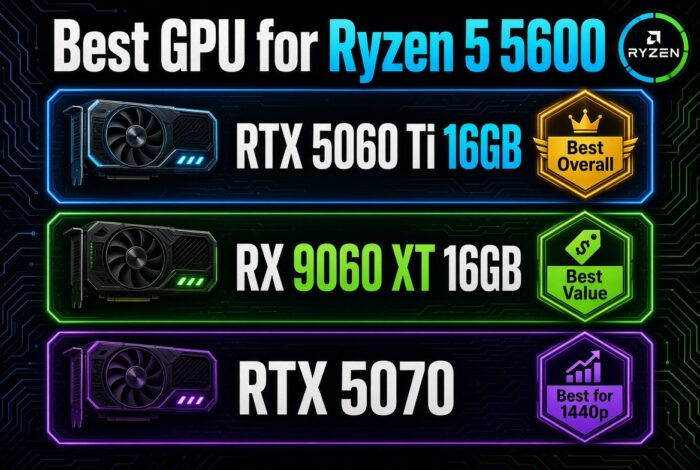
The best GPU for Ryzen 5 5600 is the RTX 5060 Ti 16GB. It is the top pick for most 1080p and 1440p builds. Want the best value? Get the RX 9060 XT 16GB. Gaming at 1440p? The RTX 5070 is the strongest card the 5600 can feed.
From a gaming perspective, the Ryzen 5 5600 is a great budget CPU. It has 6 cores. It runs most games well at 1080p and 1440p. But it is not the fastest chip. So there is a smart limit. A very expensive GPU will just wait for the 5600 to catch up. That wastes money. The picks below are the best ryzen 5 5600 gpu pairing without overspending.
We may earn a commission from purchases made through these links, at no extra cost to you.
What Is The Best GPU For Ryzen 5 5600?
The RTX 5060 Ti 16GB is the best GPU for Ryzen 5 5600. It gives strong 1080p and 1440p speed with very little CPU bottleneck. It also has 16GB of VRAM, DLSS support, and good ray tracing for the money. For best value, get the RX 9060 XT 16GB. For 1440p, get the RTX 5070.
How We Chose the Best GPUs for Ryzen 5 5600
We picked every card with the same checklist:
- Bottleneck level with the 5600, checked with our Bottleneck Calculator
- Price-to-performance
- 1080p and 1440p results from public reviews
- VRAM size and the PSU it needs
- How easy it is to find in stock
We did not test these cards ourselves on a 5600. The FPS numbers here are estimates from public benchmark data and our calculator. See bottleneck calculator vs real benchmarks to learn where the calculator is strong and where it is not. Real results change with your settings, drivers, and game.
This guide is based on desk research, not hands-on lab testing. We compare published manufacturer specifications, weigh real-world compatibility and value for each use case, track current prices and availability on Amazon, and reference publicly available benchmark data from established review outlets. We do not run our own hardware tests — any performance figures are estimates drawn from public sources and will vary with your system, drivers, and settings.
Best GPU for Ryzen 5 5600: Full Comparison
Every card here is a good match for the 5600. The question is your screen and your budget. Our full graphics card rankings cover every card if you want the wider view.
| GPU | Best Resolution | VRAM | Ideal Buyer | Verdict | Price Check |
|---|---|---|---|---|---|
| NVIDIA RTX 5070 | 1440p | 12GB GDDR7 | Gamers prioritizing higher 1440p performance | Best for 1440p | Check RTX 5070 Price |
| NVIDIA RTX 5060 Ti 16GB | 1080p and 1440p | 16GB GDDR7 | Most Ryzen 5 5600 owners wanting a balanced upgrade | Best Overall | Check RTX 5060 Ti Price |
| AMD RX 9060 XT 16GB | 1080p and 1440p | 16GB GDDR6 | Buyers prioritizing value and 16GB VRAM | Best Value | Check RX 9060 XT Price |
| NVIDIA RTX 5060 | 1080p | 8GB GDDR7 | 1080p gamers looking for a lower-cost NVIDIA option | Best Budget NVIDIA | Check RTX 5060 Price |
| Intel Arc B580 | 1080p | 12GB GDDR6 | Budget-focused gamers looking to minimize GPU cost | Cheapest | Check Arc B580 Price |
Quick Spec and Power Chart
The Picks in Detail
RTX 5060 Ti 16GB: Best Overall
The RTX 5060 Ti 16GB is my top pick as the best gpu for 5600. It is the best graphics card for Ryzen 5 5600 that never bottlenecks the CPU at 1080p. It also plays 1440p well. The 16GB of memory helps in new games. It has DLSS and good ray tracing for the price.
Tom’s Hardware reported that in one outside test, the 8GB version stayed close to the 16GB card in most games but fell behind when DLSS 4 features were on. That is why we only recommend the 16GB mode
Recommended build pairing:
CPU: Ryzen 5 5600
Motherboard: MSI MAG B550 Tomahawk
RAM: 32GB DDR4-3600
PSU: Corsair RM750e (650W is the minimum I would use)
RX 9060 XT 16GB: Best Value
The RX 9060 XT 16GB gives the most frames for your money. It has 16GB of memory, like the 5060 Ti. It is a strong 1080p and 1440p card. You give up some ray tracing power, but you get more raw speed per dollar.
If you are stuck between these two, read our RX 9060 XT vs RTX 5060 Ti comparison.
Recommended build pairing:
Motherboard: MSI MAG B550 Tomahawk
RAM: 32GB DDR4-3600
PSU: 650W or higher (Corsair RM750e is a safe pick)
RTX 5070: Best for 1440p
The RTX 5070 is the strongest card the 5600 can feed well. It shines at 1440p, where the GPU does more work per frame. That gives the 5600 room to breathe. For users targeting a smooth 1440p build, this is the ceiling before the CPU starts to cap frames.
Recommended build pairing:
Motherboard: MSI MAG B550 Tomahawk
RAM: 32GB DDR4-3600
PSU: Corsair RM750e (750W)
RTX 5060: Budget Pick
The RTX 5060 is a clean 1080p match for the 5600. It runs fast in esports games. It uses DLSS for the hard ones. It has 8GB of memory, which is fine for 1080p today. It is a great low-cost start.
Recommended build pairing:
Motherboard: MSI MAG B550 Tomahawk
RAM: 16GB DDR4-3600 is enough here, but 32GB is safer
PSU: 650W
Intel Arc B580: Cheapest
The Intel Arc B580 is the lowest-cost pick here. It still has 12GB of memory, which is a lot for the price. It plays 1080p games well. Intel drivers have improved a lot, so it is a smart bargain card for the 5600.
Recommended build pairing:
Motherboard: MSI MAG B550 Tomahawk
RAM: 32GB DDR4-3600
PSU: 650W
Build the Full Ryzen 5 5600 PC Around Your GPU
The 5600 sits on the AM4 platform, so the parts around it are easy to pick. This is the setup I would match with any card above:
- CPU: Ryzen 5 5600
- Motherboard: MSI MAG B550 Tomahawk
- RAM: 32GB DDR4-3600. Not sure about speed? Read our DDR4 RAM speed guide and our best RAM for gaming list.
- PSU: Corsair RM750e
- Cooler: See our best CPU coolers guide
- Monitor: See our best gaming monitors guide
Once your RAM is in, turn on XMP or the 3600 speed will not apply. Here is how to enable XMP in BIOS.
Which PSU do you need?
| GPU | Recommended PSU |
|---|---|
| RTX 5060 | 650W |
| RTX 5060 Ti 16GB | 650W |
| RX 9060 XT 16GB | 650W |
| Arc B580 | 650W |
| RTX 5070 | 750W |
Match the GPU to Your Monitor
Your screen is the best guide. Here is how the picks match up.
1080p gaming
This is the 5600’s home turf. An RTX 5060, RX 9060 XT, or Arc B580 is a clean match. A pricier card mostly buys headroom for a future screen, not frames you can see today, unless you chase very high refresh rates.
1080p high refresh (240Hz)
Here the 5600 is the limit, not the GPU. In fast esports games, the CPU prepares frames as quickly as it can. A super-fast GPU just waits. So a mid-range card like the RTX 5060 Ti is plenty. Spend the savings on a better monitor.
1440p gaming
1440p actually suits the 5600 well. The GPU does far more work per frame, so the CPU has more time. Pair it with an RTX 5060 Ti, RX 9060 XT, or RTX 5070 for a smooth 1440p build.
Gaming Benchmarks (1080p)
Because the 5600 is a budget CPU, these numbers show a 1080p match. Esports games run very fast. Heavy games lean on the GPU.
| Game (1080p, high) | RTX 5060 Ti | RTX 5070 | Arc B580 |
|---|---|---|---|
| Counter-Strike 2 | 300+ FPS | 350+ FPS | 280+ FPS |
| Fortnite (Performance) | 200+ FPS | 230+ FPS | 180+ FPS |
| Call of Duty: Warzone | 120-150 FPS | 140-165 FPS | 110-140 FPS |
| Cyberpunk 2077 (High) | 90-110 FPS | 105-125 FPS | 70-85 FPS |
| Starfield | 80-95 FPS | 90-105 FPS | 65-80 FPS |
| Black Myth: Wukong (FSR/DLSS) | 65-80 FPS | 70-85 FPS | 55-70 FPS |
Bottleneck Analysis
A bottleneck is the slow part. It is the part that runs out of power first. With the 5600, the CPU can be the slow part if you pair a very fast GPU at 1080p. In fast games, the GPU finishes a frame and waits for the 5600 to prepare the next one.
Here is the key point. A faster GPU is not always better for a 5600. At 1080p high refresh, cards above the RTX 5070 just wait on the CPU. At 1440p, the GPU does more work, so the balance improves and you can pair a stronger card. Want your exact numbers? Try our bottleneck calculator.
GPUs to Avoid with Ryzen 5 5600
Knowing what to skip saves you money. These cards are not bad. They are just a poor match for this CPU.
- RTX 5090 and RTX 5080: Big overkill. The 5600 cannot feed them, so you pay for power that sits unused, especially at 1080p. These cards belong with a faster CPU. See our best CPU for RTX 5080 guide.
- RTX 5070 Ti: A strong card, but poor value here. The 5070 is the better ceiling for the 5600, and the 5070 Ti gives you extra speed the CPU will hold back. Compare them in our RTX 5070 vs RTX 5070 Ti guide.
- RX 9070 XT: Great GPU, wrong CPU. It is a better fit for a faster chip, ideally on AM5. If you want it later, see best CPU for 9070 XT.
- RTX 5060 Ti 8GB: The 16GB model is the one to buy. Skip the 8GB version for a card you want to keep for years.
If you want one of these cards anyway, plan to upgrade the CPU too. Our best AM4 CPU for gaming and AM4 vs AM5 guides show your options
Upgrade Paths: What Should You Buy Next?
Start from the card you own now:
Upgrading from an RTX 3060
Buy the RTX 5060 Ti 16GB. It is a clear jump at 1080p and gives you much more VRAM. Want to compare first? See RTX 3060 vs RTX 5060.
Upgrading from an RX 6600
Buy the RX 9060 XT 16GB. You get a big speed jump and double the VRAM.
Upgrading from an RTX 3070
Buy the RTX 5070 if you game at 1440p. It gives you a real jump without going past what the 5600 can feed.
Upgrading from an RTX 4060 Ti
Already have an RTX 4060? Skip the RTX 5060 Ti. The upgrade is small, so your money is better spent on a future CPU or GPU upgrade.
The 5600 sits on AM4, so a GPU upgrade is easy. If you want more than an RTX 5070 can give, the real fix is a faster CPU or a move to AM5, not a bigger GPU.
Value for Money
Here is the best value with a 5600. The RX 9060 XT 16GB gives the most frames per dollar. The RTX 5060 Ti 16GB is the best all-round pick. The RTX 5070 is worth it only if you game at 1440p. The RTX 5060 and Arc B580 are the budget floor for clean 1080p.
Frequently Asked Questions
What is the best GPU for a Ryzen 5 5600?
The RTX 5060 Ti 16GB for most people. It never bottlenecks the 5600 at 1080p and still handles 1440p. For value, get the RX 9060 XT 16GB. For 1440p, the RTX 5070 is the top card the 5600 can feed well.
Does the Ryzen 5 5600 bottleneck the RTX 5070?
A little at 1080p high refresh, where the CPU has to prepare frames fast. At 1440p the GPU does more work, so the 5070 is a good match. Above the 5070, the 5600 starts to hold back a fast card, so it is not worth going higher for gaming.
Is the Ryzen 5 5600 good enough for gaming in 2026?
Yes, for 1080p and 1440p it is still a great budget CPU. It has 6 cores and runs most games well. It only struggles with the very fastest GPUs and heavy CPU games at high frame rates.
How much VRAM do I need with a Ryzen 5 5600?
8GB works for 1080p today, but 16GB is safer for new games with big textures. The RTX 5060 Ti 16GB and RX 9060 XT 16GB give you that headroom for a small extra cost.
RTX 5060 Ti or RX 9060 XT for the 5600?
The RTX 5060 Ti is better at ray tracing and has DLSS. The RX 9060 XT gives more raw frames for the money. Pick NVIDIA for ray tracing, AMD for the most FPS per dollar. Both have 16GB.
What power supply do I need for a Ryzen 5 5600 build?
A good 550W to 650W 80+ unit covers the 5600 with any of these cards. Step up to 650W-750W if you pick the RTX 5070.
Can the Ryzen 5 5600 run 1440p?
Yes. 1440p actually suits the 5600 well. The GPU does more work per frame, so the CPU has more time between frames. Pair it with an RTX 5060 Ti, RX 9060 XT, or RTX 5070 for a smooth 1440p build.
Should I upgrade my CPU or GPU first on a Ryzen 5 5600?
For 1080p and 1440p gaming, spend on the GPU first up to about an RTX 5070. If you play CPU-heavy games or want 200+ FPS at 1080p, then a CPU upgrade (or a move to AM5) helps more.
Final Verdict
Our pick for the best GPU for Ryzen 5 5600 is the RTX 5060 Ti 16GB. It fits most builds. The 5600 is a great budget CPU, but it has a smart GPU ceiling. Buy the RTX 5060 Ti for the best all-round 1080p and 1440p build. Buy the RX 9060 XT 16GB for value. Buy the RTX 5070 if you game at 1440p. Pick the RTX 5060 or Arc B580 on a tight budget. Whatever you pick, run it through our bottleneck calculator first to see your exact numbers.
Run the Ryzen 5 5600 with any of these GPUs through our free Bottleneck Calculator. See your estimated FPS and bottleneck percent at your resolution.
Open the Bottleneck Calculator →