

Best CPU Cooler for Ryzen 7 9800X3D (2026 Top Picks)
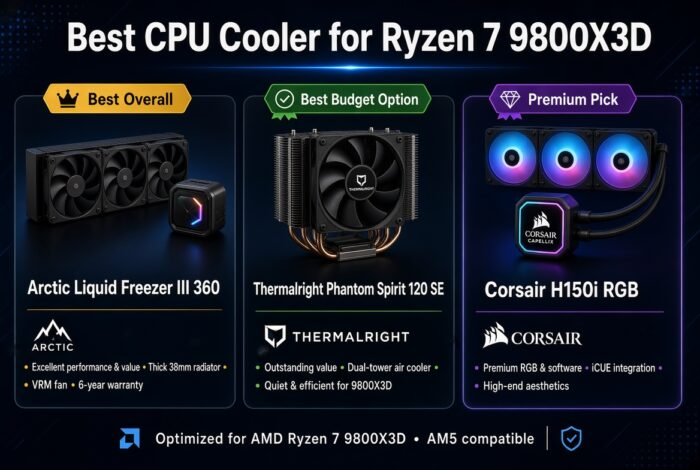
Best CPU Cooler for Ryzen 7 9800X3D buyers will find the Arctic Liquid Freezer III 360 to be the top overall recommendation because of its outstanding cooling performance, low noise levels, and excellent value. We compared the best air and liquid coolers to help you find the right option for your gaming PC.
Whether you’re pairing the Ryzen 7 9800X3D with an RTX 5070, RTX 5080, or RTX 5090, choosing the right cooler is important for maintaining low temperatures and consistent gaming performance.
🏆 Top Picks at a Glance
We may earn a commission from purchases made through these links, at no extra cost to you.
Quick Answer
For a Ryzen 7 9800X3D, get the Arctic Liquid Freezer III 360. It offers the best mix of cooling performance, quiet operation, and value for most gamers. Want to save money? Get the Thermalright Phantom Spirit 120 SE, one of the best air coolers available for this CPU without sacrificing much performance.
BEST CPU COOLER FOR RYZEN 7 9800X3D- FULL COMPARISON
Every cooler here can handle the 9800X3D. The real question is how much cooling headroom you want and how much noise you’re okay with. Our best CPU coolers 2026 guide covers more options if none of these fit your build.
Best CPU Cooler for Ryzen 7 9800X3D- Top Picks in Detail
Arctic Liquid Freezer III 360: Best Overall
If you’re looking for the best CPU liquid cooler for Ryzen 7 9800X3D, the Arctic Liquid Freezer III 360 is a great choice. It provides excellent cooling, runs quietly, and usually costs less than many high-end liquid coolers. It can easily handle long gaming sessions and demanding games while keeping the CPU cool and stable. The extra VRM fan is also a useful feature that many other liquid coolers don’t have.
✅ Buy This If
- You want the best overall cooler for the Ryzen 7 9800X3D.
- You’re building a gaming PC with an RTX 5080 or RTX 5090.
- You want lower temperatures during long gaming sessions.
- You prefer a quieter PC.
- You want strong performance without paying premium prices.
❌ Avoid This If
- You’re on a tight budget.
- Your PC case doesn’t support a 360mm radiator.
- You prefer a simpler air cooler.
- You don’t need high-end cooling for your build.
Thermalright Phantom Spirit 120 SE: Best Value
The Thermalright Phantom Spirit 120 SE is the best choice if you want great cooling without spending a lot of money. It keeps the Ryzen 7 9800X3D cool during gaming and performs surprisingly close to many more expensive coolers.
✅ Buy This If
- You want the best value for money.
- You’re building an RTX 5070 or RTX 5070 Ti gaming PC.
- You prefer a simple and reliable air cooler.
- You want to save money for a better GPU.
❌ Avoid This If
- You want RGB lighting.
- You prefer liquid cooling.
- You have a premium showcase build.
Corsair iCUE LINK Titan 360 RGB: Premium Choice
The Corsair iCUE LINK Titan 360 RGB is a premium liquid cooler designed for high-end gaming PCs. It offers excellent cooling performance, beautiful RGB lighting, and a cleaner cable setup than most AIO coolers.
✅ Buy This If
- You’re building a premium gaming PC.
- You have an RTX 5090 or similar high-end GPU.
- You want RGB lighting throughout your build.
- You care about appearance as much as performance.
❌ Avoid This If
- You’re looking for the best value.
- You don’t care about RGB.
- You’re trying to keep costs down.
be quiet! Dark Rock Pro 5: Quietest Option
The Dark Rock Pro 5 is a great choice for anyone who wants a quiet gaming PC. It delivers strong cooling performance while producing very little noise, making it ideal for gamers who prefer a silent setup.
✅ Buy This If
- You want the quietest cooler possible.
- You prefer air cooling.
- You don’t care about RGB lighting.
- You want a clean and professional-looking build.
❌ Avoid This If
- You want RGB effects.
- You have limited space around your RAM slots.
- You prefer the look of a liquid cooler.
Lian Li Galahad II Trinity: Best RGB
The Lian Li Galahad II Trinity combines strong cooling performance with excellent RGB lighting. We chose it as our Best RGB pick because it delivers premium visuals without sacrificing cooling performance.
✅ Buy This If
- You want the best RGB cooler.
- You’re building a showcase gaming PC.
- You want both looks and performance.
- You enjoy customizing RGB lighting.
❌ Avoid This If
- RGB is not important to you.
- You want the cheapest cooling option.
- You’re focused only on performance per dollar.
Which Cooler Should You Buy?
- 🏆 I want the best overall cooler for the 9800X3D → Arctic Liquid Freezer III 360
- 💰 I want the best value for money → Thermalright Phantom Spirit 120 SE
- ⭐ I want a premium RGB build → Corsair iCUE LINK Titan 360 RGB
- 🔇 I want the quietest PC possible → Dark Rock Pro 5
- 🌈 I want the best-looking PC → Lian Li Galahad II Trinity
Why Cooling Matters So Much on the 9800X3D
The 9800X3D runs hot under sustained load because of its 3D V-Cache stacking, which limits how much heat can move through the die. A weak cooler can trigger thermal throttling, which quietly drops your clock speeds and costs you frames even though nothing looks wrong on the surface. Pairing this CPU with a proper 240mm or 360mm AIO, or a strong air cooler like the Phantom Spirit, keeps boost clocks stable during long gaming sessions. If you’re also deciding between platforms, our AM4 vs AM5 guide covers how cooler mounting compatibility differs between the two sockets.
According to Tom’s Hardware, X3D chips are especially sensitive to sustained thermal load compared to non-3D-cache parts, which is part of why cooler choice matters more here than on a standard Ryzen chip. GamersNexus testing has also shown that AIO coolers in the 280mm to 360mm range tend to hold boost clocks more consistently than smaller air coolers under extended gaming loads.
Frequently Asked Questions
Does the Ryzen 7 9800X3D come with a stock cooler?
No. The 9800X3D ships without a bundled cooler, so budgeting for one of the options above is part of the build cost.
Is a 240mm AIO enough for the 9800X3D?
A 240mm AIO can handle the 9800X3D for 1080p and most 1440p gaming, but a 360mm AIO or the Phantom Spirit 120 SE gives more thermal headroom for longer sessions and hotter ambient rooms.
Do I need liquid cooling, or is air cooling enough?
Air cooling is enough for most gamers. The Phantom Spirit 120 SE and Dark Rock Pro 5 both keep the 9800X3D well within safe temps for gaming. Liquid cooling mainly helps if you’re also doing sustained multi-core workloads like rendering or streaming.
Will a bigger cooler improve my gaming FPS?
Not directly, but it prevents thermal throttling, which can quietly reduce sustained clock speeds and cost you frames in longer sessions. Check our Why Is My Game Lagging guide if you’re seeing drops that might be temperature related.
Does the 9800X3D need a specific socket cooler mount?
It uses the AM5 socket, so make sure whatever cooler you pick lists AM5 compatibility. Most modern coolers, including everything on this list, support AM5 out of the box or with an included bracket.
Is RGB worth paying extra for on a cooler?
Only if looks matter to you. RGB coolers like the Galahad II Trinity and Corsair iCUE LINK cost more mainly for the lighting and software ecosystem, not extra cooling performance.
Final Verdict
Our pick for the best CPU cooler for Ryzen 7 9800X3D is the Arctic Liquid Freezer III 360. It is the best water cpu cooler for ryzen 7 9800x3d and fits most builds and gives you the best mix of cooling, quiet operation, and value. Want to save money? Get the Thermalright Phantom Spirit 120 SE. Want the quietest build? Get the Dark Rock Pro 5. Want the best-looking rig? Get the Lian Li Galahad II Trinity. Whatever you pick, check it against your case size and GPU tier before you buy. Run your full build through our bottleneck calculator to make sure everything’s matched well.
