

Best CPU for RTX 5050: 4 Picks for Budget Builds and Upgrades
Logan’s gaming PC was a few years old: a Ryzen 5 5500 on a budget B450 motherboard, with a graphics card that could no longer keep up. When he saw the RTX 5050 at a budget price, it looked like the perfect upgrade. New Nvidia features, DLSS 4, and a big jump over his old card.
He installed it, and it was a clear improvement. But a friend with the same card was getting noticeably smoother frame rates in some games. Same graphics card, similar CPU, different results.
The difference was hiding in two places Logan had never thought about: his CPU and his motherboard were both stuck on an older version of PCIe, the connection between the graphics card and the rest of the PC. And the RTX 5050 is one of the cards that notices.
This guide shows you the best CPU for RTX 5050 at every budget, which older CPUs are still good enough to keep, and how to avoid the PCIe trap that quietly cost Logan frames.
How we picked: CPU specs were checked on AMD’s and Intel’s own product pages, and RTX 5050 specs come from Nvidia. Performance claims come from independent reviews and testing. We did not test these pairings hands-on, and we do not print FPS numbers we cannot back up.
Quick Answer: Best CPU for RTX 5050
| Award | CPU | Platform | Button |
|---|---|---|---|
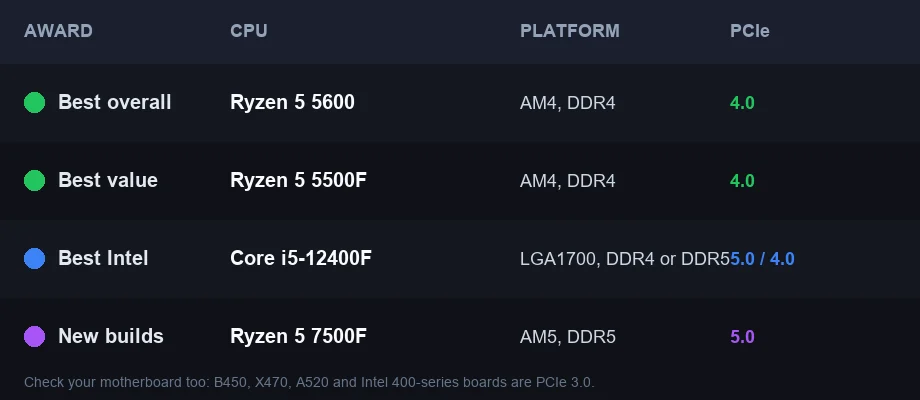
| Best overall | AMD Ryzen 5 5600 | AM4, DDR4 | Buy on Amazon |
| Best value | AMD Ryzen 5 5500F | AM4, DDR4 | Buy on Amazon |
| Best Intel | Intel Core i5-12400F | LGA1700, DDR4 or DDR5 | Buy on Amazon |
| Best for new builds | AMD Ryzen 5 7500F | AM5, DDR5 | Buy on Amazon |
Short on time? The Ryzen 5 5600 is the best CPU for RTX 5050 for most people. It keeps the card fully busy, uses cheap DDR4 memory, and supports PCIe 4.0 on a B550 board. On a tighter budget, the Ryzen 5 5500F is the smart pick, but do not confuse it with the older Ryzen 5 5500, which is limited to PCIe 3.0.
The RTX 5050 does not need a powerful CPU. It is a 1080p card, so a modern six-core chip is all it needs. Spend the rest of your budget elsewhere.
Best CPU for RTX 5050: Comparison Table
| CPU | Cores / Threads | Max boost | L3 cache | Memory | PCIe support |
|---|---|---|---|---|---|
| Ryzen 5 5600 | 6 / 12 | 4.4 GHz | 32MB | DDR4 | PCIe 4.0 |
| Ryzen 5 5500F | 6 / 12 | 4.4 GHz | 16MB | DDR4 | PCIe 4.0 |
| Core i5-12400F | 6 / 12 | 4.4 GHz | 18MB | DDR4 or DDR5 | PCIe 5.0 and 4.0 |
| Ryzen 5 7500F | 6 / 12 | 5.0 GHz | 32MB | DDR5 | PCIe 5.0 |
The PCIe column matters for this card. The RTX 5050 uses only eight PCIe lanes, so the PCIe version your CPU and motherboard support makes a real difference, as we explain below. Your motherboard must also support that version, so check it too.
Table of Contents
Table of Contents
How Much CPU Does the RTX 5050 Need?
The RTX 5050 is an entry-level 1080p card. Nvidia’s specs give it 2,560 CUDA cores and 8GB of GDDR6 memory, and reviewers found it performs a little below the RTX 4060. That means it does not need much CPU power to run at full speed.
Should you keep your current CPU?
Many RTX 5050 buyers are upgrading an older PC, so here is a quick check before you spend money on a new CPU.
| Your current CPU | Keep it? |
|---|---|
| Ryzen 5 3600, 5600 or newer, Core i5-10400 or newer | Keep it. It already keeps the RTX 5050 busy |
| Ryzen 5 1600 or 2600, Core i5-8400 or 9400F | Usable, but some CPU-heavy games will hold the card back |
| Four-thread chips like the Core i5-7400, older dual cores | Upgrade first. Expect stutters in busy games |
One extra check even if your CPU is fine: look at your PCIe version in the next section. For this card, it matters almost as much as the CPU itself.
Not sure where your CPU lands? Run your exact pairing through our free PC bottleneck calculator.
The Double PCIe 3.0 Trap
This is what happened to Logan, and it is the most important thing to understand before choosing a CPU for this card.
Why the RTX 5050 is sensitive
The RTX 5050 uses only eight PCIe lanes instead of sixteen. On a PCIe 5.0 or 4.0 system, that is plenty. On a PCIe 3.0 system, those eight lanes carry only a quarter of the bandwidth of a full PCIe 5.0 x16 link.
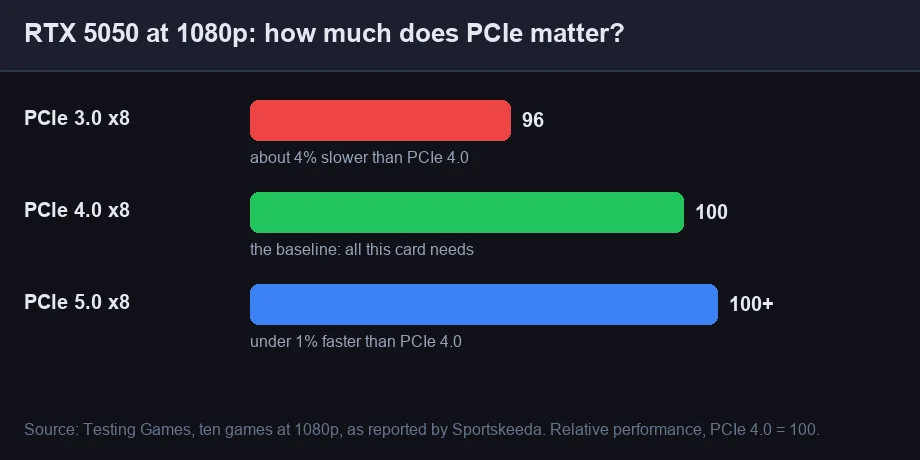
What testing found: in a ten-game test at 1080p by the YouTube channel Testing Games, the RTX 5050 averaged about 4 percent more performance on PCIe 4.0 than on PCIe 3.0, while PCIe 5.0 added less than 1 percent on top of PCIe 4.0. The gap can grow much larger in games that overflow the card’s 8GB of memory, because the card then leans on the PCIe link to borrow system memory.
Trap 1: some CPUs only support PCIe 3.0
- Ryzen 5 5500, and Ryzen 5000G chips like the 5600G and 5700G, run at PCIe 3.0 even on a PCIe 4.0 board. AMD lists the Ryzen 5 5500 as a PCIe 3.0 chip.
- Intel 10th Gen and older also top out at PCIe 3.0.
Trap 2: some motherboards only support PCIe 3.0
- AMD B450, X470 and A520 boards run the graphics slot at PCIe 3.0, even with a PCIe 4.0 CPU.
- Intel 400-series boards are also PCIe 3.0.
Logan had both traps at once: a PCIe 3.0 CPU on a PCIe 3.0 board. His friend had a Ryzen 5 5600 on a B550 board, which gave the same card a full PCIe 4.0 link.
The simple rule: for an RTX 5050, choose a CPU and a motherboard that both support PCIe 4.0 or newer. Want the full background? Our PCIe 4.0 vs 5.0 guide explains how PCIe versions and lanes work.
1. AMD Ryzen 5 5600: Best CPU for RTX 5050 Overall
Who it suits: most RTX 5050 owners, especially anyone already on AM4.
The Ryzen 5 5600 is the safest match for the RTX 5050. It keeps the card fully busy in almost every game, it uses cheap DDR4 memory, and the boxed version includes a cooler. Most importantly for this card, it supports PCIe 4.0, so on a B550 or X570 board the RTX 5050 gets its full connection.
Verified specs (AMD):
- 6 cores, 12 threads, Zen 3
- Up to 4.4 GHz boost
- 32MB L3 cache
- 65W default TDP
- Socket AM4, DDR4, PCIe 4.0
- Wraith Stealth cooler included in the box
One honest limitation: on a B450 or A520 board, it still runs at PCIe 3.0. If that is your board, consider a B550 upgrade at the same time, or accept a small loss.
Already own a 5600? See our best GPU for Ryzen 5 5600 guide for other card options.
2. AMD Ryzen 5 5500F: Best Value CPU for RTX 5050
Who it suits: the tightest budgets, and older AM4 PCs that need a cheap CPU refresh.
The Ryzen 5 5500F is newer than its name suggests, and it fixes the biggest problem with the older Ryzen 5 5500. AMD lists the 5500F with PCIe 4.0, while the original 5500 is PCIe 3.0 only. For an eight-lane card like the RTX 5050, that is exactly the difference you want. Tom’s Hardware’s review also measured it as noticeably faster than the old 5500.
Verified specs (AMD):
- 6 cores, 12 threads, Zen 3
- Up to 4.4 GHz boost
- 16MB L3 cache
- 65W default TDP
- Socket AM4, DDR4, PCIe 4.0
One honest limitation: it has half the L3 cache of the Ryzen 5 5600, so it falls a little behind in CPU-heavy games. If the price gap is small, the 5600 is worth the step up. Check the listing to see whether a cooler is included.
3. Intel Core i5-12400F: Best Intel CPU for RTX 5050
Who it suits: Intel fans and new budget builds that want a choice of DDR4 or DDR5.
The i5-12400F is Intel’s best match for the RTX 5050. Its six fast performance cores keep the card busy, and its platform avoids the PCIe trap: the CPU supports PCIe 5.0 and 4.0, and budget B660 and B760 boards run the graphics slot at PCIe 4.0 or better. It also works with DDR4, which keeps costs down during the memory shortage.
Verified specs (Intel):
- 6 performance cores, 12 threads
- Up to 4.4 GHz max turbo
- 18MB Intel Smart Cache
- 65W base power, 117W max turbo power
- Socket LGA1700, DDR4-3200 or DDR5-4800
- No integrated graphics (the F model)
One honest limitation: LGA1700 has no new CPUs coming, though you can still upgrade to a 13th or 14th Gen chip later with a BIOS update. If you later move to a 13th or 14th Gen K chip, update your BIOS for Intel’s stability fix first, as we explain in our best GPU for i5-13600K guide.
Own a 12400F already? See our best GPU for i5-12400F guide.
4. AMD Ryzen 5 7500F: Best CPU for RTX 5050 New Builds
Who it suits: anyone building a brand new PC who wants a platform with a future.
The Ryzen 5 7500F puts you on AMD’s AM5 platform, which is expected to get new Ryzen CPUs, so you can upgrade the CPU later without a new motherboard. It is far more CPU than the RTX 5050 needs today, which means it will still be a strong match when you move up to a faster graphics card. PCIe is never a worry here.
Verified specs (AMD):
- 6 cores, 12 threads, Zen 4
- Up to 5.0 GHz boost
- 32MB L3 cache
- 65W default TDP
- Socket AM5, DDR5, PCIe 5.0
- AMD lists the Wraith Stealth cooler for the boxed version
One honest limitation: AM5 needs DDR5 memory, which is expensive during the current memory shortage, so this is the priciest route overall. If you only plan to use the RTX 5050, an AM4 pick is better value. See when RAM prices will go down for the market outlook.
RTX 5050 or RTX 3060 12GB: Which Should You Buy?
With the RTX 3060 12GB back in stores, many budget buyers are choosing between these two cards. Here is the honest comparison.
| RTX 5050 | RTX 3060 12GB | |
|---|---|---|
| Video memory | 8GB GDDR6, 128-bit | 12GB GDDR6, 192-bit |
| PCIe link | PCIe 5.0 x8 | PCIe 4.0 x16 |
| Power | 130W | 170W |
| Nvidia recommended PSU | 550W | 550W |
| Newest DLSS features | Yes, including Multi Frame Generation | Upscaling only, no frame generation |
Choose the RTX 5050 if you have a PCIe 4.0 or newer system and play mostly at 1080p. Reviews place it close to the RTX 4060, which makes it the faster card in most games, and it supports Nvidia’s newest DLSS features.
Choose the RTX 3060 12GB if you are stuck on a PCIe 3.0 board or play games that need lots of video memory. Its full x16 link and 12GB of memory make it less sensitive to both problems.
See our best CPU for RTX 3060 guide and our RTX 3060 vs RTX 5060 comparison for more.
Best CPU for RTX 5050: FAQs
Will a Ryzen 5 3600 bottleneck the RTX 5050?
No, not in most games. It has six cores and twelve threads and supports PCIe 4.0 on a B550 or X570 board. On a B450 board, it runs the card at PCIe 3.0, which costs a little performance.
Is the Ryzen 5 5500 good for the RTX 5050?
It is fast enough, but it only supports PCIe 3.0, which costs the RTX 5050 some performance. The newer Ryzen 5 5500F supports PCIe 4.0 and is the better choice.
Does the RTX 5050 work on a PCIe 3.0 motherboard?
Yes. In testing at 1080p, it averaged about 4 percent lower performance on PCIe 3.0 than on PCIe 4.0, with larger drops possible in games that exceed 8GB of video memory.
Do I need a PCIe 5.0 motherboard for the RTX 5050?
No. In the same testing, PCIe 5.0 added less than 1 percent over PCIe 4.0. A PCIe 4.0 board is all this card needs.
Is the Ryzen 7 9800X3D overkill for the RTX 5050?
Yes. The RTX 5050 will be the limit long before the CPU. Spend that money on a faster graphics card instead.
What power supply does an RTX 5050 PC need?
Nvidia recommends a 550W power supply for a system with the RTX 5050. Our PSU calculator can size it for your build.
Final Verdict: The Best CPU for RTX 5050
Logan swapped his Ryzen 5 5500 for a Ryzen 5 5600 and moved to a cheap B550 board, keeping his DDR4 memory. His RTX 5050 finally ran on a full PCIe 4.0 link, and the gap with his friend’s PC disappeared.
That is the key to choosing the best CPU for RTX 5050: you do not need a fast CPU, but you do need the right platform. The Ryzen 5 5600 is the best choice for most people, the Ryzen 5 5500F is the value pick, the Core i5-12400F is the best Intel option, and the Ryzen 5 7500F suits new builds. Whatever you choose, make sure both your CPU and motherboard support PCIe 4.0.
Before you buy, check your pairing in our free PC bottleneck calculator, and watch our today’s deals page for CPU deals.
