

Can My PC Run Cyberpunk 2077?- Find Out Instantly
The short answer to Can my PC run Cyberpunk 2077? is that if your PC has at least a GeForce GTX 1060 or Radeon RX 580, an Intel Core i7-6700 or Ryzen 5 1600, and 12GB of RAM, it can run Cyberpunk 2077 on low settings at 1080p. Whether it runs well depends heavily on your exact CPU and GPU pairing, and that’s where most spec-checker tools stop short. Below are the full requirement tiers, real FPS numbers by GPU class, and how to tell if your CPU is holding your graphics card back.
Quick Answer: Can My PC Run Cyberpunk 2077?
Quick Answer
| Tier | CPU | GPU | RAM | Target |
|---|---|---|---|---|
| Minimum | Core i7-6700 / Ryzen 5 1600 | GTX 1060 6GB / RX 580 8GB | 12GB | 1080p, Low, 30 FPS |
| Recommended | Core i7-12700 | RTX 2060 / RTX 3060 | 12GB | 1080p, High, 60 FPS |
| Ultra / RT | Core i9-12900 / Ryzen 9 7900X | RTX 3080 Ti / RX 7900 XTX | 20GB | 4K, Ultra + RT |
Table of Contents
What Are the Cyberpunk 2077 Minimum System Requirements?
The minimum tier gets you a playable 30 FPS at 1080p on low settings, with ray tracing off. This is the floor CD Projekt RED tests against, not a comfortable target.
The following are the Cyberpunk 2077 system requirements minimum:
| Component | Minimum Spec |
|---|---|
| OS | 64-bit Windows 10 |
| CPU | Core i7-6700 or Ryzen 5 1600 |
| GPU | GeForce GTX 1060 6GB or Radeon RX 580 8GB |
| RAM | 12GB |
| Storage | 70GB SSD space |
What Are the Recommended Requirements for Cyberpunk 2077?
Recommended specs target 1080p at 60 FPS with high settings and no ray tracing. This is the realistic baseline for a smooth experience on a mid-range rig.
| Component | Recommended Spec |
|---|---|
| OS | 64-bit Windows 10/11 |
| CPU | Core i7-12700 |
| GPU | GeForce RTX 2060 or RTX 3060 |
| RAM | 12GB |
| Storage | 70GB SSD space |
What Do You Need for Ultra Settings and Ray Tracing?
Maxing out Night City with path tracing and ultra settings at 4K is a different tier entirely. CD Projekt RED’s official ultra tier calls for a genuinely high-end rig, and even then most players lean on upscaling to hit a stable frame rate. For a deeper breakdown of how ray tracing scales across GPU generations, Tom’s Hardware has ongoing benchmark coverage worth checking before you buy.
| Component | Ultra / Ray Tracing Spec |
|---|---|
| CPU | Core i9-12900 or Ryzen 9 7900X |
| GPU | GeForce RTX 3080 Ti or Radeon RX 7900 XTX |
| RAM | 20GB |
| Notes | Path tracing + DLSS/FSR upscaling recommended even at this tier |
How Many FPS Will I Get in Cyberpunk 2077 on My GPU?
Spec sheets only tell you pass/fail. What actually matters is the frame rate you’ll see at your resolution. Here’s what real testing and benchmark data show across current GPU tiers:
| GPU | Resolution | Est. FPS (Raster) | Notes |
|---|---|---|---|
| RTX 5060 | 1080p | ~76 FPS | Solid 1080p performer, see our Best GPU for Ryzen 5 9600X breakdown |
| RTX 5060 Ti | 1440p (RT) | ~40-45 FPS pre-DLSS | Needs DLSS 4 Quality for a smooth ray-traced experience |
| RTX 5070 | 1440p | ~107 FPS | Strong 1440p option with DLSS 4 headroom |
| RTX 5070 | 4K (native) | ~48 FPS | Needs DLSS 4 Quality to feel smooth at 4K |
| RX 9060 XT (8GB) | 1440p | 50+ FPS early, drops later | VRAM-limited — stutters and texture pop-in once the 8GB buffer fills, see our RX 9060 XT vs RTX 5060 Ti comparison |
| RTX 5080 | 4K (path tracing + DLSS 4) | 120+ FPS | Paired with a 7800X3D, see our Best GPU for Ryzen 7 7800X3D guide |
| RTX 5080 | 4K | 150+ FPS | Paired with a 9800X3D, see our Best CPU for RTX 5080 guide |
Cyberpunk 2077 is also a title where CPU choice matters more than most. In CPU-heavy scenes, the gap between a 9800X3D-class chip and an older or lower-tier CPU can stretch to 40-75%, so pick your CPU with the same care as your GPU. Our CPU pairing guides break this down per GPU tier.
Will My CPU Bottleneck Cyberpunk 2077?
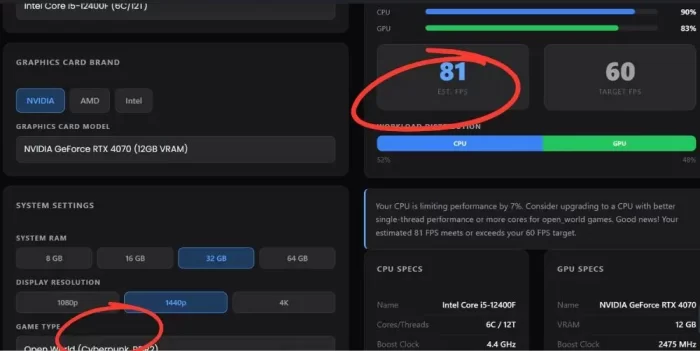
Even a great GPU can be held back by a weaker CPU, especially in the busier, NPC-heavy areas of Night City. We ran a few common CPU/GPU pairings through our bottleneck calculator at 1440p using its open-world game preset (the same category Cyberpunk 2077 and Red Dead Redemption 2 fall under) to show what a bottleneck result actually looks like for this kind of game.
Core i5-12400F + RTX 4070 — 1440p
7% bottleneck (CPU-limited)
The CPU is the limiting side here, not the GPU. Open-world titles like Cyberpunk lean harder on CPU threads than most genres, and the 12400F starts to show its limits at this resolution even paired with a solidly mid-range RTX 4070. Estimated FPS still clears the 60 FPS target comfortably at 81.
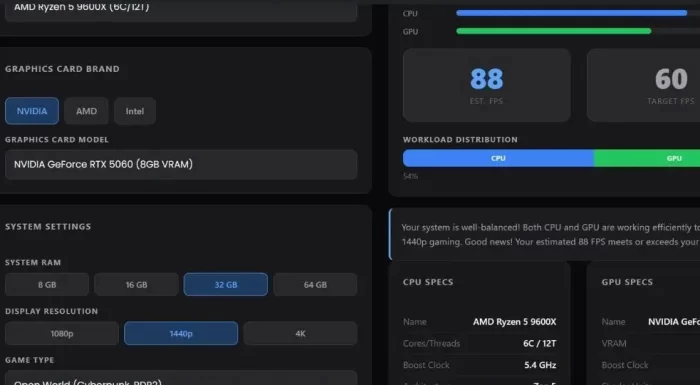
Ryzen 5 9600X + RTX 5060 — 1440p
Well-balanced
This pairing comes back balanced, with CPU usage higher than GPU usage but neither flagged as a clear bottleneck. Estimated FPS lands at 88, well past the 60 FPS target.
Ryzen 7 9800X3D + RTX 5080 — 1440p
28% bottleneck (CPU-limited)
Our calculator flags the CPU as the limiting factor here by a wide margin, even though estimated FPS still comes in well above target at 109. Worth reading with caution. see the note below.
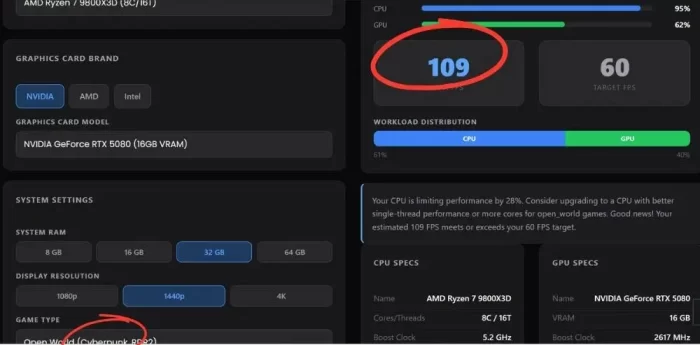
A note on this data: these results come directly from our own calculator’s open-world preset, not from in-game Cyberpunk 2077 benchmarks, so treat the FPS and bottleneck percentages as directional rather than exact. This is especially true for the 9800X3D result above: our tool models CPU load using general open-world workload assumptions, and it doesn’t fully account for how much a 3D V-Cache chip like the 9800X3D benefits from its larger cache in CPU-heavy scenes.
Independent benchmark testing consistently shows the 9800X3D as one of the strongest gaming CPUs available and a poor real-world bottleneck for an RTX 5080 in Cyberpunk 2077. If you’re deciding between CPUs, weigh outlets like GamersNexus or Tom’s Hardware more heavily than our calculator’s raw percentage for X3D chips specifically.
How Do I Check My PC’s Specs?
If you’re not sure what hardware you’re running, open the Start menu, type dxdiag, and hit Enter. The System tab shows your processor and installed RAM, and the Display tab shows your graphics card name. Compare those against the tables above to see where you land.
FAQ- Can My PC Run Cyberpunk 2077?
Is 8GB of RAM enough to run Cyberpunk 2077?
Technically the game will launch with 8GB, but it’s below the stated 12GB minimum and players consistently report better stability and fewer stutters once they’re at 12GB or more, especially in Night City’s denser districts.
Will a GTX 1050 or older card run Cyberpunk 2077?
It’s below the official minimum of a GTX 1060, and players with cards in that older tier have reported needing to weigh a GPU upgrade before buying, since performance at that level tends to be inconsistent even on the lowest settings.
Can a GTX 1660 Ti or similar mid-range card handle 1080p?
Yes, players running a GTX 1660 Ti-class card alongside a mid-range CPU have reported a smooth experience at 1080p on high settings, generally landing in the 60-80 FPS range without ray tracing enabled.
Is an older CPU like the i7-2600K still viable?
It’s aging well past what the game was designed around, and even players still running it acknowledge it’s more of a “it technically works” situation than something you’d want to build around today. If you’re on hardware from that era, a CPU upgrade will likely help more than a GPU one.
Does Cyberpunk 2077 need ray tracing to look good?
No. The game looks strong on high settings without ray tracing, and it runs on far more hardware that way. Ray tracing and path tracing are there for players with the GPU headroom to spare, not a requirement to enjoy the game.
Can I run Cyberpunk 2077 without graphics card?
No. Cyberpunk 2077 requires a dedicated GPU to meet even the minimum spec; integrated graphics fall well short of a GTX 1060 or RX 580 in real-world performance, and you won’t get a playable frame rate without a discrete card installed.
Can my laptop run Cyberpunk 2077?
Yes, as long as it has a discrete mobile GPU that matches the desktop tiers above, a laptop RTX 3060 or better handles it comfortably at 1080p. Thin-and-light laptops with integrated graphics only, or older laptop GPUs below the GTX 1060 tier, will struggle even on low settings.
What are the Cyberpunk 2077 system requirements minimum?
The Cyberpunk 2077 system requirements minimum are a Core i7-6700 or Ryzen 5 1600 CPU, a GeForce GTX 1060 6GB or Radeon RX 580 8GB GPU, 12GB of RAM, and 70GB of free storage — full breakdown in the table near the top of this article.
What is the Cyberpunk 2077 size PC?
Cyberpunk 2077 needs about 70GB of free SSD space on PC. Make sure you’ve got some extra headroom beyond that for updates and DLC like Phantom Liberty.
Final Thoughts-Can My PC Run Cyberpunk 2077?
So, can my PC run Cyberpunk 2077? For most rigs built in the last five years, the answer is yes; the real question is which settings and frame rate you’ll land on. Match your CPU and GPU against the tables above, and if you want a result tailored to your exact hardware pairing rather than a generic spec check, run it through our bottleneck calculator.
