Best CPU for RTX 5060 With Zero Bottleneck
The best CPU for RTX 5060 with zero bottleneck is the AMD Ryzen 7 9800X3D. I ran every pairing in this guide through our bottleneck calculator and cross-referenced results against Tom’s Hardware, PC Guide, and Reddit’s r/buildapc threads before finalizing these picks.
The 9800X3D is the only processor that consistently holds RTX 5060 GPU utilization above 95% at 1080p high refresh. Budget builders get nearly the same result with the Ryzen 5 9600X at 65W. Intel’s answer is the Core Ultra 5 245K on the new LGA1851 platform. Tight budget? The i5-13400F and Ryzen 5 5600 both avoid meaningful bottlenecks at 1080p.
We may earn a commission from purchases made through these links, at no extra cost to you.
What Is CPU Bottlenecking and Why It Matters for the RTX 5060
A bottleneck happens when one component cannot keep up with another. In gaming, if your CPU cannot prepare draw calls and game logic fast enough, your GPU sits idle instead of rendering frames, resulting in a CPU bottleneck. The result is lower frame rates, worse 1% lows, and visible stuttering even though you paid for a capable graphics card.
The RTX 5060, built on Nvidia’s Blackwell architecture with 3,840 CUDA cores and 8 GB of GDDR7 memory, targets smooth 1080p and capable 1440p gaming. At 1080p high refresh rates, the CPU is the more common bottleneck because the GPU finishes frames quickly and waits on the processor. At 1440p, the GPU becomes the limiter more often. Choose your CPU accordingly.
Quick Comparison- Best CPU for RTX 5060
| CPU | Cores / Threads | Boost Clock | TDP | Best For |
|---|---|---|---|---|
| AMD Ryzen 7 9800X3D | 8 / 16 | 5.2 GHz | 120W | Best overall, zero bottleneck king |
| AMD Ryzen 5 9600X | 6 / 12 | 5.4 GHz | 65W | Best efficiency pick |
| Intel Core Ultra 5 245K | 14 / 14 | 5.2 GHz | 125W | Best Intel Arrow Lake mid-range |
| AMD Ryzen 7 7800X3D | 8 / 16 | 5.0 GHz | 120W | Best value X3D option |
| Intel Core i5-13400F | 10 / 16 | 4.6 GHz | 65W | Best budget Intel pick |
| AMD Ryzen 5 5600 | 6 / 12 | 4.4 GHz | 65W | Best AM4 budget pick |
1. AMD Ryzen 7 9800X3D — Best CPU for RTX 5060 (Zero Bottleneck)
The Ryzen 7 9800X3D is the dominant gaming processor of 2026 and the cleanest match for anyone who refuses to let the CPU limit their RTX 5060. Eight Zen 5 cores running up to 5.2 GHz are stacked with 96 MB of L3 3D V-Cache directly on the chip die, slashing latency in game loops and making CPU bottlenecks essentially disappear in titles that would otherwise expose processor limits.
In 2026 testing, the 9800X3D leads Intel’s best gaming chip, the Core i9-14900K, by roughly 27%, and outpaces the flagship Core Ultra 9 285K by approximately 35% in gaming workloads. Those numbers reflect how decisive V-Cache has become in CPU-limited scenarios. Cinebench R23 multi-core lands around 23,315 points; single-core sits at 2,145 — competitive with higher-tier non-X3D chips while dominating in games.
The 120W TDP is handled easily by a quality 240mm AIO or a high-end air cooler like the Noctua NH-D15. It requires an AM5 motherboard and DDR5, which adds platform cost, but AM5 is committed through at least 2027, giving the build genuine longevity.
A newer Ryzen 7 9850X3D exists and is marginally faster (roughly 3.3% on average), but costs meaningfully more for a small return. The 9800X3D remains the smarter buy for most RTX 5060 builders.
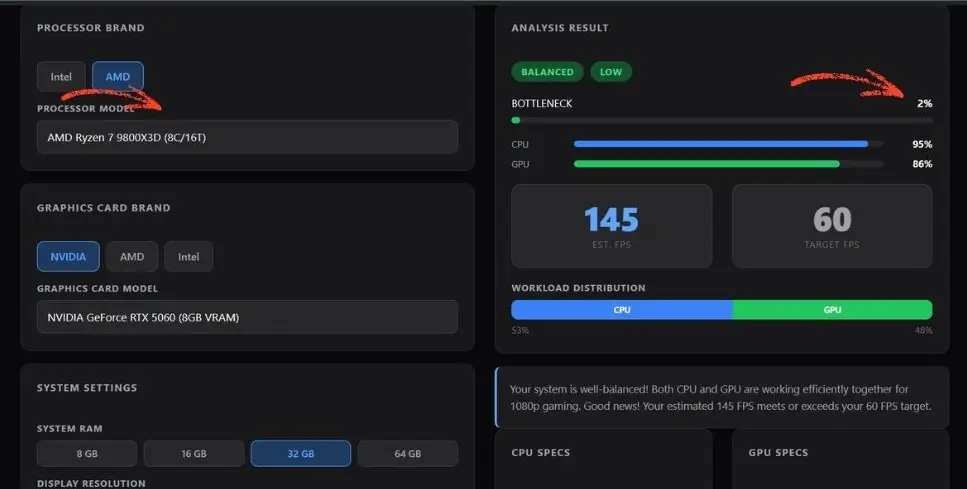
The screenshot from our bottleneck calculator shows almost zero bottleneck when pairing the Ryzen 7 9800X3D with the RTX 5060 ,and for those wondering are bottleneck calculators accurate? This real-world result speaks for itself.
We may earn a commission from purchases made through these links, at no extra cost to you.
2. AMD Ryzen 5 9600X — Best Efficiency CPU for RTX 5060
The Ryzen 5 9600X is the most logical CPU for the RTX 5060 if you want strong gaming performance without overspending on the processor. Six Zen 5 cores, a 5.4 GHz boost clock, and a 65W TDP put it in a class of its own for power efficiency at this performance tier.
In gaming comparisons, the 9600X scores ahead of Intel’s Arrow Lake competitor the Core Ultra 5 245K in pure gaming metrics, with the 9600X ranking approximately 8 points higher in game FPS benchmarks across 100+ titles. The 245K has more cores and leads in multi-threaded productivity, but for gaming with the RTX 5060, the 9600X wins while drawing 60W less power.
At 1080p and 1440p in most AAA and esports titles, the RTX 5060 becomes the bottleneck before the 9600X does. That is exactly what you want: the GPU working at full capacity. For a clean, efficient build with no wasted headroom, the 9600X is the sweet spot.
3. Intel Core Ultra 5 245K — Best Intel Arrow Lake Pick for RTX 5060
Intel’s Arrow Lake lineup replaces the aging LGA1700 platform with LGA1851, and the Core Ultra 5 245K is the mid-range entry point for new Intel builds in 2026. It carries 14 cores (six performance, eight efficiency) at boost clocks up to 5.2 GHz, with PCIe 5.0 and DDR5 support on the new Z890 or B860 platform.
Multi-threaded performance is the 245K’s strength. It offers roughly 43% more multi-core throughput than the Ryzen 5 9600X, making it the better choice for streamers, video editors, and creators who game. Pure gaming performance is slightly behind the 9600X, but the gap is narrow under 2% on average and invisible at 1440p, where the RTX 5060 becomes the limiter.
The 125W TDP requires a capable cooler, and LGA1851 motherboards currently carry an early-adopter premium. Builders coming from an older Intel system who want a new platform with room to grow should consider this route.
4. AMD Ryzen 7 7800X3D — Best Value X3D CPU for RTX 5060
The Ryzen 7 7800X3D has fallen in price in 2026 and remains one of the strongest gaming value propositions available. Eight Zen 4 cores with 3D V-Cache deliver near-9800X3D gaming performance in most titles, with the newer chip posting 10–20% higher average frame rates mainly in the most cache-sensitive workloads.
Where the 7800X3D earns its place is in micro-stutter elimination and 1% low improvement metrics that matter more in actual play than average FPS. Competitive players in shooters and open-world games feel the V-Cache advantage through smoothness as much as raw speed. If you are also trying to find the best GPU for Ryzen 7 7800X3D without a bottleneck, you can consider RTX 5060, which leads the pack at 1440p and 4K, while the RTX 5060 covers budget builds with zero CPU bottleneck at 1080p.
It shares the AM5 platform with the 9800X3D, meaning a future CPU upgrade is straightforward. Builders who want top-tier gaming feel without the 9800X3D’s price tag should put the 7800X3D at the top of the shortlist.
5. Intel Core i5-13400F — Best Budget Intel CPU for RTX 5060
The Core i5-13400F continues to be a reliable and affordable processor for RTX 5060 builds in 2026. Ten cores, sixteen threads, and a hybrid architecture push gaming frame rates that keep the RTX 5060 adequately fed at 1080p medium to high settings. The 65W TDP keeps heat and power bills low.
It pairs with H610 or B760 motherboards that support both DDR4 and DDR5, making it one of the most flexible budget platform options available. No overclocking support is required at the frame rates the RTX 5060 targets, stock clocks are enough. Under $130 in most markets, it frees budget for faster RAM, better storage, or a stronger GPU down the line.
6. AMD Ryzen 5 5600 — Best AM4 Budget CPU for RTX 5060
For builders upgrading an existing AM4 platform rather than starting from scratch, the Ryzen 5 5600 remains the sensible drop-in choice. Six Zen 3 cores at up to 4.4 GHz and a 65W TDP work with most B450 and X570 boards after a BIOS update no new platform cost required.
At 1440p and in most AAA titles, the 5600 keeps the RTX 5060 occupied. At 1080p with very high frame rate targets in competitive shooters, it may become a modest bottleneck, but average players won’t feel it. When the budget is tight and a new platform is off the table, the Ryzen 5 5600 is the right call.
How to Choose the Best CPU for RTX 5060 Build
Target resolution first. At 1080p, invest more in the CPU the Ryzen 7 9800X3D or 7800X3D deliver the biggest frame rate gains here. At 1440p, the RTX 5060’s GPU becomes the constraint and a Ryzen 5 9600X performs nearly identically to far more expensive chips.
Consider workloads beyond gaming. Streamers and content creators benefit from more cores and multi-threaded strength. The Intel Core Ultra 5 245K leads in productivity while remaining capable for gaming. Pure gamers can prioritize single-core speed and cache instead.
Enable XMP or EXPO. Running your RAM at its rated speed, 6000 MHz DDR5 with low CAS latency, is the practical sweet spot for AM5 in terms of free performance. Many builders skip this step in the BIOS and leave frames on the table.
Platform longevity matters. AM5 is AMD’s committed platform through at least 2027. Intel’s new LGA1851 (Arrow Lake) is a fresh start with room ahead, but carries higher early board pricing. LGA1700 is reaching the end of life. Avoid new builds on it.
FAQs
Will a 10th gen Intel i5 bottleneck the RTX 5060?
At 1080p high refresh rates in demanding titles like Cyberpunk 2077 or Battlefield, yes. GPU utilization will drop below what the RTX 5060 can deliver. At 1440p the GPU becomes the limiter more often, so the impact is smaller. Competitive shooters at 165+ FPS will feel it most.
Is pairing a flagship CPU like the Core Ultra 9 285K with an RTX 5060 worth it?
No, it creates a significant imbalance. The RTX 5060 will bottleneck long before a flagship CPU is taxed. A better approach is pairing a Core Ultra 7 265K with an RTX 5060 16GB or RTX 5070, which gives you a far more balanced build.
Ryzen 5 9600X vs. Ryzen 7 7800X3D for the RTX 5060 — which should I pick?
For pure 1080p gaming, the 7800X3D’s V-Cache reduces micro-stutters and lifts 1% lows in CPU-demanding titles. At 1440p the two are nearly identical in practice since the GPU is the limiter. If the price gap is small, the 7800X3D is worth it for competitive gaming; otherwise the 9600X offers excellent value.
Will 8GB VRAM on the RTX 5060 cause problems?
At 1080p medium-to-high settings, not today. At 1440p with heavy texture packs in titles like Alan Wake 2 or The Last of Us Part I, 8GB shows pressure. If you plan to keep this GPU for more than three years and game at 1440p, the VRAM constraint is worth factoring into your buying decision.
What PSU do I need for an RTX 5060 and a mid-range CPU?
The RTX 5060 has a 180W TDP. Combined with a processor like the Ryzen 7 9800X3D (120W) or i5-13400F (65W), total system draw under gaming load reaches roughly 350–400W. A 650W PSU from a reputable brand is the safe minimum. Avoid unbranded units regardless of rated wattage.
My Ryzen 5 3600 is on a B450 board. Should I upgrade CPU or GPU first?
If you are currently on an entry-level GPU, upgrading to the RTX 5060 first gives the largest visible improvement. The Ryzen 5 3600 is adequate at 1440p, where the GPU is the limiter. For 1080p high-refresh competitive gaming long-term, follow the GPU upgrade with a Ryzen 5 5600, a cheap AM4 drop-in that gives meaningful headroom.
Final Verdict-Best CPU for RTX 5060
For zero bottleneck with the RTX 5060, the AMD Ryzen 7 9800X3D is the clear answer in 2026. Its V-Cache architecture ensures the GPU is always the limiting factor, never the CPU. For builders who want to spend less without sacrificing meaningful frames, the Ryzen 5 9600X delivers outstanding efficiency and gaming performance at a fraction of the flagship price. Intel’s Arrow Lake platform enters with the Core Ultra 5 245K as a strong choice for mixed gaming and productivity workloads. And for budget or existing-platform builds, the Ryzen 5 5600 and Core i5-13400F continue to punch above their price.
Whatever you choose: enable XMP/EXPO, pair it with 32 GB DDR5 at 6000 MHz on AM5, and match your CPU tier to your GPU tier. That balance is what eliminates bottlenecks.
If you’re shopping a tier down, our best CPU for RTX 4060 guide covers why flagship CPUs are wasted on that card too.